Lab 06 — Azure DNS, Private Access, and Bastion
azure administrator series

Tutorial companion v0.9.0 • CLI + PowerShell + Portal • 150–210 minutes
ZIP SHA-256: bc075cc9f45bfa5feec3d923786802f3382d76dc698429e0ed89e373aa6f3ba4
This 150–210 minute workshop distinguishes management access, DNS resolution, storage network access, and OAuth authorization. Build an isolated environment, demonstrate service-endpoint access, switch the same synthetic blob to Private Link, introduce one controlled DNS fault, and prove recovery without weakening storage security.
Follow the steps below as a hands-on tutorial. Commands describe the procedure and expected results; screenshots show the configuration captured during preparation. They are not a claim that every exercise has been completed. The download includes scripts, a challenge, progressive hints, a separate solution, eight knowledge checks with answers, and the detailed preparation record.
The topic selection follows the networking objectives of Microsoft Certified: Azure Administrator Associate and AZ-104. This is an independent practice workshop, not an official Microsoft course or a promise of exam coverage.
Scope and safety
Use a disposable environment only. The lab uses the existing Visual Studio Enterprise subscription and West Europe. It does not modify a registrar, an existing DNS zone, an existing VNet, Conditional Access, or subscription-wide roles. It retrieves no storage keys and generates no SAS tokens.
The operational ceiling is EUR20: EUR15 for active consumption and EUR5 reserved for cleanup. A public-retail estimate is not a spending cap or a guarantee of the subscription's billed rate. Start no new exercises after five hours and finish cleanup before six. Stop on missing quota, incompatible policy, unexpected associations, changed ownership, or unavailable Bastion Developer connectivity. Do not substitute a paid Bastion tier.
The foundation includes an Ubuntu 24.04 LTS Standard_B2s VM, a 32 GB Standard SSD, NIC, NSG, and Standard static public IPv4 address. The public IP supplies the selected explicit outbound method; public inbound SSH remains blocked. Disabling default outbound access does not disable explicit outbound connectivity. See Microsoft's outbound-access guidance.
Component | Lab configuration |
VNet | 10.106.0.0/24 with Azure-provided DNS |
Workload subnet | 10.106.0.0/26; VM private address 10.106.0.4 |
Private-endpoint subnet | 10.106.0.64/27; no workload associations |
Inbound access | TCP 22 from VirtualNetwork to the VM private address; deny other inbound |
Bastion | Developer, same VNet, no dedicated Bastion subnet or public IP |
Storage | Standard_LRS, private container, OAuth only, anonymous and shared-key access disabled |
Private zone | privatelink.blob.core.windows.net, registration disabled |
Public zone | Unique az104-06-<run>.example.com, undelegated |
Bastion Developer supports browser connections in the same VNet and is available in West Europe. It is a shared dev/test service with one VM connection at a time, not a production design. Confirm the current Bastion SKU comparison before your run.
Preparation and command conventions
Use Windows PowerShell 7.5 or newer, Azure CLI, Bicep, Az.Accounts, Az.Network, Az.Resources, PSScriptAnalyzer, and nslookup. The guest probe uses Ubuntu's Python 3 standard library. Scripts do not install or upgrade tools, register providers, grant operator permissions, or create policy exemptions.
Sign in to CLI and PowerShell yourself and select the approved tenant and subscription in both. Preflight requires matching enabled AzureCloud contexts. The operator needs the management actions to deploy and remove the lab, invoke guest commands, inspect effective NSG rules, connect through Bastion, and assign/remove the VM identity's data role at the container scope. A storage data role is different from a management-plane Contributor role.
Extract the package and run from its root. Create a fresh ACL-protected state directory outside the package:
./Initialize-Lab06StateDirectory.ps1 -Path C:/lab-private/az104-06 -Execute
$state = 'C:/lab-private/az104-06/state-private.json'
./Start-Az104Lab06.ps1 -StatePath $state -Stage Preflight
Preflight is read-only in Azure. Review its private policy, quota, region, provider, address-space, VM/image, permissions, Defender automation, and pricing results. Stop if the VNet range conflicts with existing networks. The private files contain real identifiers and must never enter the ZIP, blog, screenshots, or source-control history.
Mutations require -Execute. Validation also requires -Execute because Run Command invokes code in the guest. Previewing a command without that switch does not establish that the live operation passed.
Deploy the isolated foundation
Allocate about 25 minutes, including prerequisite review.
./Start-Az104Lab06.ps1 -StatePath $state -Stage Foundation -PrepareOnly -Execute -AcknowledgeCostPreparation creates only the fresh owned group and disposable local SSH key, then validates the Bicep template and captures what-if. Review template-validation-private.json, whatif-private.json, and the inherited policies locally. Every proposed resource must belong to the recorded lab; no unrelated modification or deletion is acceptable.
./Start-Az104Lab06.ps1 -StatePath $state -Stage Foundation -Execute -AcknowledgeCost -ReviewedWhatIfAll deployments are Incremental. Never replay the empty foundation after later subnet or endpoint changes. In Portal, open the recorded resource group and verify the expected resources, VM image/size, private address, outbound public-IP association, and NSG rules. Capture genuine evidence without exposing tenant/subscription IDs, full resource names, or public IPs.
Connect through Bastion and prove public SSH is blocked
Allocate about 20 minutes. Open the VM in Portal, then Connect → Bastion. Confirm Developer and Succeeded; do not click upgrade or configure Entra login. Choose Private Key from Local File, username labadmin, and the private bastion-key-private.pem from the manifest directory. Leave the passphrase blank for this disposable generated key.

Portal checkpoint: the Developer configuration and connection form. Complete the browser connection to obtain your own terminal checkpoint; this image is not a connected terminal.
In the successful browser SSH terminal, run:
hostname
ip -br address
resolvectl status
Observe hostname lab06, workload address 10.106.0.4, and the guest's DNS configuration. Capture a genuine screenshot after the commands succeed. The presence of the Bastion login form is not a successful-login checkpoint.
./Register-Lab06BastionCheckpoint.ps1 -StatePath $state -ScreenshotPath C:/lab-private/az104-06/bastion.jpg -ObservedBastionLogin -ExecuteThe script records the operator's observed login and screenshot hash, reads effective NSG rules, and makes three bounded external TCP 22 probes. All public probes must fail and the effective explicit inbound deny must be present. The probes alone cannot prove that Bastion works; both observations are mandatory for the completed workshop.
If a browser interaction is pending, ./Test-Lab06PublicSsh.ps1 -StatePath $state -Execute can independently verify the public-access boundary before the storage and DNS exercises. Complete the Bastion checkpoint while the same VM is still active. A failed Bastion service connection requires diagnosis; browser automation trouble does not count as a successful connection.
Demonstrate service-endpoint access
Allocate about 25 minutes.
./Start-Az104Lab06.ps1 -StatePath $state -Stage ServiceEndpoint -ExecuteThe CLI enables Microsoft.Storage on the workload subnet. Storage permits selected networks with default deny, only the recorded workload subnet allowed, and no trusted-service bypass or IP exceptions. A private container holds one small synthetic marker. The VM's system-assigned identity receives Storage Blob Data Contributor at that exact container scope, not the account or subscription.
The guest obtains an OAuth token from managed identity in memory, uploads the marker, then reads and hashes it. Tokens never appear in command arguments or output. Bounded retries allow for role propagation; exhaustion is a failed gate, not permission to broaden the role.
Inspect Portal's subnet Service endpoints, storage Networking, container access level, and container IAM assignment. Record the successful upload/read, SHA-256, ETag, and public DNS destination. Service endpoints keep the service's public DNS destination; they do not assign a private IP to the account. See Microsoft's service-endpoint explanation.
Switch the same blob to Private Link
Allocate about 30 minutes.
./Start-Az104Lab06.ps1 -StatePath $state -Stage PrivateLink -Execute
./Test-Az104Lab06.ps1 -StatePath $state -Phase Baseline -Execute
The stage creates a Blob private endpoint, its private NIC, a DNS zone group, the isolated private zone, and one VNet link with registration disabled. It proves private resolution and blob access before disabling storage public network access. It then removes only the recorded workload-subnet allowance from the storage firewall and retires Microsoft.Storage from that isolated subnet. Effective routes are retained privately before and after retirement. Default deny, no bypass, no IP rules, and no resource-instance exceptions remain in force. The NIC public IP remains the chosen explicit outbound method; NSG rules and default-outbound-disabled settings are unchanged.
Use the normal <account>.blob.core.windows.net hostname. The private endpoint is an address in the lab VNet; DNS supplies that address to the linked workload. Creating an endpoint does not automatically disable the public path. See Microsoft's Storage Private Link guidance.
Baseline acceptance requires an approved endpoint, private DNS answer, HTTP 200, original SHA-256 and ETag, disabled storage public access, and an empty storage network allowlist. The same guest OAuth token is then used for a separate HTTPS request pinned to the previously recorded public destination, preserving the normal hostname, Host header, TLS SNI, and certificate verification. Both tests record the actual TCP peer privately. Capture the public request's actual rejection. Do not substitute an unauthenticated workstation request for this comparison, and do not treat a Portal setting as proof of data-plane denial.
Portal checkpoints: storage Public network access Disabled; endpoint Approved and correct Blob target; private DNS A record; DNS zone group; VNet link Completed with registration disabled. Record which checks are API/guest evidence and which are visual evidence.

Storage configuration: public network access is Disabled. Validate the actual request separately from this setting.

Private endpoint connection: Approved. Approval, name resolution, and authenticated data access are separate checkpoints.

Private DNS record: the account's A record points to the endpoint's private address.
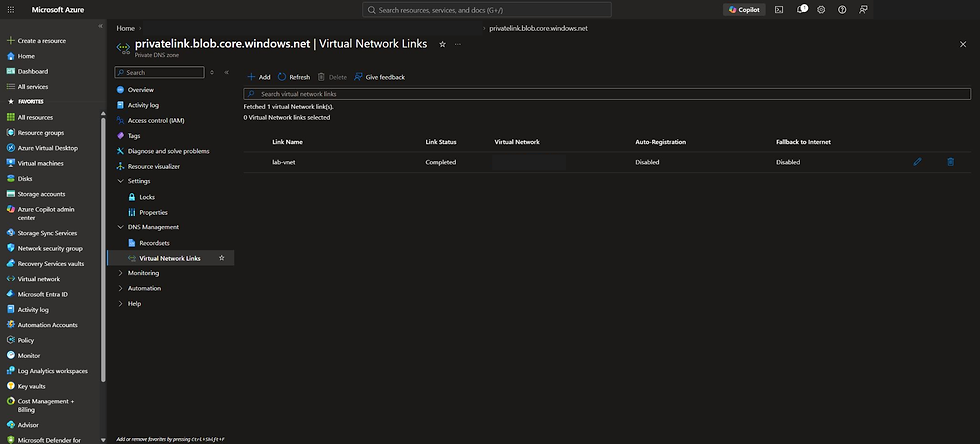
VNet link: Completed, with auto-registration disabled. This is the relationship used by the later DNS exercise.
Technical note: validate the path, not just the setting
During preparation, service-endpoint upload/read and private-endpoint reads returned the original synthetic data. However, authenticated requests pinned to a public storage address from the lab VM also returned HTTP 200 despite the disabled-public-access setting. That observation remains unexplained and does not establish access from the public Internet. If your public-path check also succeeds, stop before the fault exercise, retain the actual response, and investigate; do not mark the baseline complete. The later DNS fault and recovery are presented here as reader exercises with expected outcomes, not a reproduced incident. The preparation resources were cleaned up.
Test an undelegated public DNS zone
Allocate about 15 minutes.
This authoritative-DNS exercise is independent of blob access. It can be completed after Private Link setup while a separate Bastion or storage validation issue is being diagnosed. It does not establish that those other checks passed.
./Start-Az104Lab06.ps1 -StatePath $state -Stage PublicDns -ExecuteThis creates a unique zone under example.com with host A = 192.0.2.10, alias CNAME to that host, and proof TXT containing a synthetic run marker. Query the assigned Azure authoritative server directly for all three types. No registrar change occurs. Direct authoritative results establish what that server hosts, not public recursive resolution through delegated ownership. This follows Microsoft's DNS testing procedure.
Inspect the zone's assigned servers and record sets in Portal. Keep the unique run marker private in raw evidence; publish only sanitized observations.

Public DNS checkpoint: an undelegated training zone with A, CNAME, and TXT records. Direct authoritative queries returned the intended records during preparation.
Diagnose the controlled fault
Allocate about 25 minutes. Continue only after your complete baseline passes. Before running this stage, set aside the separate challenge and do not read its solution.
./Set-Lab06DnsFault.ps1 -StatePath $state -Execute
./Test-Az104Lab06.ps1 -StatePath $state -Phase Fault -Execute
The fault deletes only the exact recorded private DNS VNet link after preserving its recovery configuration. Fresh guest queries and bounded cache handling must show a resolution change and a failed blob read. Capture the actual DNS answers and response; do not assume an error code from a generic failure.
Prove the endpoint remains approved, public access stays disabled, and the VM identity, container role, blob baseline, NSG, NIC, storage settings, and endpoint configuration remain unchanged. Inspect Portal's missing VNet link and unchanged private zone/endpoint. A failure caused by another layer is not this lab's intended fault and must be diagnosed before continuing.
Recover without reopening storage
Allocate about 20 minutes.
./Restore-Lab06Dns.ps1 -StatePath $state -Execute
./Test-Az104Lab06.ps1 -StatePath $state -Phase Recovery -Execute
./Restore-Lab06Dns.ps1 -StatePath $state -Execute
./Test-Az104Lab06.ps1 -StatePath $state -Phase Recovery -Execute
PowerShell restores the exact saved link. Wait for Completed/Succeeded and then test fresh private resolution, HTTP 200, unchanged blob hash/ETag, and the protected configuration fingerprint. The repeated recovery must keep a single link and preserve its configuration. No hosts-file override, DNS-server substitution, public-network reopening, or broader data role is permitted.
A resolution-only private DNS VNet link allows linked workloads to query the zone without auto-registering VM records. The endpoint's zone group and the VNet link are distinct relationships; inspect each separately.
Safety tests and interrupted operations
./Test-Lab06Safety.ps1 -StatePath $stateThese are simulated wrong-context, mismatched-ID, and interrupted-operation fixtures plus real file-lock contention and read-only context checks. They make no Azure writes. Do not describe the fixtures as live cross-tenant deployments or forced Azure outages.
Every mutating operation saves its pending target before execution. A pending record can mean the response was lost even though Azure completed the operation. Inspect the exact recorded deployment or object, then use Reconcile-Lab06Operation.ps1 -StatePath $state -Execute. Unknown or incomplete results remain blocked. Never edit the manifest IDs, delete a held lock, or clear a pending record to force progress.
Cleanup and evidence
Allow about 15 minutes; do this sooner if the time or cost boundary is approaching.
./Remove-Az104Lab06.ps1 -StatePath $state -Execute
./Remove-Az104Lab06.ps1 -StatePath $state -Execute
./Test-Lab06ReleaseGates.ps1 -StatePath $state
./Export-Lab06Evidence.ps1 -StatePath $state -OutputPath C:/lab-public/lab06-evidence.json -Execute
Cleanup removes the exact recorded container role and resources, checks associations before deletion, removes the exact deployment record, then deletes the empty owned group. It refuses an unexpected object rather than deleting by prefix or broad group membership. Both invocations must verify no active recorded resources remain.

Cleanup checkpoint: the exact lab group no longer appeared in the resource-group view. The recorded cleanup and repeated cleanup also confirmed no active lab resources.
The local private manifest and disposable key remain outside the public package. Delete them separately only after your private evidence-retention needs are met. The sanitized export omits tokens, key material, ARM identifiers, public IPs, raw DNS results, and private run names. Genuine screenshots may be cropped or masked with opaque privacy rectangles; no AI generation or enhancement is allowed for evidence.
Verify extracted files against SHA256SUMS.txt with Verify-Lab06Package.ps1. File integrity does not certify a successful Azure run. Test-Lab06ReleaseGates.ps1 retains the full acceptance criteria and will reject incomplete evidence; do not bypass it or edit its flags to force success.
Series navigation
Previous workshop: Lab 05 — Network Core.
Next workshop: coming soon.
Browse all Azure Workshopz.
Challenge — A healthy endpoint and a failed blob read
Use this challenge only after the instructor has established the healthy baseline, applied the packaged fault, and observed Fault validation. Do not read the solution first.
The disposable Ubuntu VM can no longer read a synthetic blob that it read successfully earlier. The private endpoint still reports an approved connection. Storage public network access remains disabled, the VM identity still exists, and the intended container-scoped data role remains assigned.
Determine what changed in the request path. Recover only the recorded lab configuration responsible for the failure. Preserve the VM, endpoint, role assignment, NSG, storage security settings, and original blob. Do not reopen public storage access, add firewall exceptions, edit a hosts file, change DNS servers, replace the VM, or grant broader roles.
Deliver a short diagnosis supported by fresh name-resolution and HTTP evidence, a successful read with the original SHA-256 and ETag after recovery, unchanged security and identity checks, a safe repeat recovery, and verified cleanup twice. An approved private endpoint or a Running VM alone is insufficient evidence.
Eight knowledge checks for Lab 06
Does a storage service endpoint give the storage account a private IP address?
Why should the client continue using the normal blob hostname after creating a private endpoint?
What does a private DNS VNet link establish, and does a DNS zone group replace it?
Can a valid Storage Blob Data Contributor role overcome disabled storage public network access?
Does an approved endpoint connection prove that a particular VM resolves the storage hostname correctly?
Why can this VM use outbound Internet connectivity when default outbound access is disabled, and does that require allowing public inbound SSH?
How can an undelegated training zone be tested without modifying a domain registrar?
What proves recovery here, and what should cleanup do if an unrelated resource appears?
The download includes progressive hints, a separate solution, knowledge-check answers, the preparation record, sanitized evidence, and file checksums. Try the challenge before opening the solution.
Comments