Lab 08 — Storage Resiliency and Data Protection
azure administrator series

Lab 08 — Storage Resiliency and Data Protection. Neon cover illustration, not validation evidence.
Azure CLI + PowerShell 7 + Portal • 150–210 minutes
ZIP SHA-256: 6183f1c76e8427da16ed4069cf2aacfc21f979e7e62beb2be1e6ec55075197ea
A document has the wrong contents, but both storage accounts and the replication policy are healthy. Recover the original document from the correct version, prove its SHA-256 hash, and observe the recovered copy at the destination. Then distinguish four different recovery mechanisms through isolated deletion and Azure Files exercises.
Allow 150–210 minutes. Use Azure CLI, PowerShell 7, and Azure Portal in a disposable subscription environment. This independent community workshop follows the storage objectives of the Microsoft Azure Administrator AZ-104 study guide; it is not an official Microsoft course or an exam-question collection.
What you will build
Two GPv2 accounts share one temporary resource group in West Europe. The source uses Standard_ZRS; the destination uses Standard_LRS. Three source containers separate replication, recovery fixtures, and container deletion. One destination container receives only the replication/ prefix. A 1 GiB Transaction Optimized Azure Files share supplies a small HTTPS REST exercise.
There are no VMs, virtual networks, private endpoints, backup vaults, or regional failovers. Both accounts require HTTPS and TLS 1.2, deny anonymous blob access, and admit only the operator's verified public IPv4. No trusted-service bypass is enabled. Blob requests use Microsoft Entra OAuth. Only the source allows Shared Key, for the Files REST requests; keys stay in PowerShell memory.
The source and destination use Microsoft-managed encryption at rest. Customer-managed keys and infrastructure encryption are guided alternatives, not additional deployments. Inspect the service encryption settings under Security and networking → Encryption. Encryption options.
Redundancy and recovery solve different problems
Mechanism | What this workshop demonstrates | What it does not establish |
LRS and ZRS | The configured account SKUs | Survival of an actual zone or regional failure |
Object replication | An asynchronous copy with matching contents and reported completion | An independent backup that preserves good contents after an overwrite |
Blob versioning | Selection and copying of a recorded historical version | A soft-delete recovery by itself |
Blob and container soft delete | Restoration of the particular deleted version or container | Protection against storage-account deletion |
Share snapshot | Copying one file from a read-only checkpoint | Promotion of an entire snapshot to the active share |
File-share soft delete | Restoration of the exact deleted share instance | Recovery of an individual deleted file |
GRS, GZRS, and their read-access variants add geographic considerations. This same-region setup does not exercise those modes. Storage redundancy.
Tools and safety before starting
Use Windows and PowerShell 7.5 or later for the private-state ACL checks. The release was exercised with Azure CLI 2.88.0, Bicep 0.46.1, PowerShell 7.6.6, Az.Accounts 2.12.1, Az.Resources 6.5.3, and Az.Storage 5.4.1. Preflight checks installed capabilities; it does not upgrade tools or register providers.
Sign in to Azure CLI and PowerShell separately, select the same disposable subscription and tenant, and review your effective permissions. New data roles are scoped to the recorded containers, but they do not remove existing broader rights. Account and role provisioning, policy inspection, key retrieval, and final account deletion also require management-plane permissions.
Deleting a previous blob version additionally requires Microsoft.Storage/storageAccounts/blobServices/containers/blobs/deleteBlobVersion/action, included in Storage Blob Data Owner rather than Data Contributor. Obtain explicit approval for any additional container-scoped grant before that exercise; the scripts do not silently grant it. Version deletion permissions.
The EUR20 operational ceiling reserves EUR15 for exercises and EUR5 for cleanup. Refresh pricing before your run. The implementation's conservative retail estimate was EUR2.79, not an actual bill or a Visual Studio offer quote. Capacity, versions, soft-deleted objects, change feed, snapshots, transactions, replication, tier changes, retrieval, and Cool early-deletion charges all matter. A 1 GiB share quota is not a spending limit. Stop new exercises at five hours and finish cleanup before six.
Extract the download to a new directory. Keep private state outside the extracted package. In the examples, $state is a path chosen by you, not a supplied subscription identifier.
$private = Join-Path $env:LOCALAPPDATA ('AzureWorkshopz-Lab08-' + [guid]::NewGuid().ToString('N'))
./Initialize-Lab08StateDirectory.ps1 -Path $private -Execute
$state = Join-Path $private 'state-private.json'
./Start-Az104Lab08.ps1 -StatePath $state -Stage Preflight
Review the private preflight report. An unstable outbound IPv4 is a stop condition; do not expand the firewall to make a test pass. Unexpected locks, policy, objects, roles, versions, snapshots, or ownership changes also stop the run. Neither tokens nor storage keys belong in screenshots, transcripts, CLI arguments, or shared evidence.
Deploy and inspect the foundation
Prepare the empty owned group, validate the template, and save a what-if preview. Inspect its exact targets before authorizing deployment. The foundation cannot be replayed over a later stage.
./Start-Az104Lab08.ps1 -StatePath $state -Stage Foundation -PrepareOnly -Execute
# Review template-validation-private.json and whatif-private.json in $private.
./Start-Az104Lab08.ps1 -StatePath $state -Stage Foundation -ReviewedWhatIf -Execute
# Only after approval for the temporary recovery-container Data Owner grant:
./Add-Lab08VersionDeletePermission.ps1 -StatePath $state -ApprovedRecoveryContainerRole -Execute
./Start-Az104Lab08.ps1 -StatePath $state -Stage Protection -Execute
In Portal, inspect both accounts' Overview and Networking pages. Confirm the SKUs, selected-network rule, HTTPS/TLS settings, and source-only Shared Key configuration. Data protection must show versioning on both accounts, seven-day blob and container soft delete, and a seven-day source change feed. The Files service has seven-day share soft delete. Permanent deletion, point-in-time restore, immutability, and legal holds are not enabled.
The scripts record exact resource IDs, creation times, run tags, role assignment IDs, and deployment identity. An exclusive lock prevents concurrent scripts using the same manifest. Pending-operation records make an interrupted request a reconciliation task rather than permission to repeat it blindly.

Portal checkpoint: seven-day protection, versioning and change feed. Initial configuration run; recovery evidence below is from the independent release run.
Establish the replicated baseline
./Start-Az104Lab08.ps1 -StatePath $state -Stage Replication -Execute
./Start-Az104Lab08.ps1 -StatePath $state -Stage RecoveryPoints -Execute
./Start-Az104Lab08.ps1 -StatePath $state -Stage TiersLifecycle -Execute
./Test-Az104Lab08.ps1 -StatePath $state -Phase Baseline -Execute
The destination policy is created first. Its returned policy and rule IDs are applied to the source, using full account resource IDs and disallowing cross-tenant replication. The initial rule ID request is null so Azure creates it. The main document is uploaded only after both policies exist.
Open Data management → Object replication in each account. Check the direction, container pair, and prefix filter. Open the document under replica-source/replication/ and the copied document at the destination. Baseline acceptance requires matching contents plus the source's completed replication status; a policy row alone is insufficient.
Standard replication is asynchronous. Source and destination version IDs need not be equal. The script polls for an observed result within a bounded window; a timeout is not a pass. Replication may copy unwanted overwrites too. Object replication behavior.
The recovery-point stage creates separate synthetic fixtures and records their hashes, ETags, version IDs, and the share snapshot timestamp. No historical recovery point is chosen simply because it sorts first.

Source policy: replica-source → replica-destination with a narrow filter. Metrics and priority replication were not enabled.

Destination policy: the corresponding incoming container pair. Account identifiers are masked.
Investigate the overwrite
Have the instructor introduce the fault, then attempt the separate symptom-only challenge before opening the solution.
./Set-Az104Lab08Fault.ps1 -StatePath $state -Exercise BlobVersion -Execute
./Test-Az104Lab08.ps1 -StatePath $state -Phase Fault -Exercise BlobVersion -Execute
The current hash differs from the recorded original hash. In Portal, open the main blob → Versions and compare the current document with its preserved historical version. Inspect timestamps and lengths, but use the known-good hash to prove the recovery candidate. Keep the firewall and replication policy unchanged.
./Restore-Az104Lab08.ps1 -StatePath $state -Exercise BlobVersion -Execute
./Test-Az104Lab08.ps1 -StatePath $state -Phase Recovery -Exercise BlobVersion -Execute
./Restore-Az104Lab08.ps1 -StatePath $state -Exercise BlobVersion -Execute
PowerShell reads the exact recorded good version, checks its hash, and writes those bytes as a new current version only if the faulted object's ETag still matches. It then waits for the destination's original contents and completed source status. Repeated recovery verifies the healthy state and performs no new write.

The original historical version remains available during the overwrite. A version list alone does not prove its hash.

Recovered current blob: 67 bytes. Sanitized request evidence, not this properties image, proves the original hash and replication completion.

Recovered document at the replication destination. Its hash was verified separately.
Run the separate protection exercises
Run each exercise fully before starting the next. Substitute one exercise name in all four commands below, in this order: CurrentBlobDelete, BlobSoftDelete, ContainerDelete, FileSnapshot, ShareDelete.
$exercise = 'CurrentBlobDelete'
./Set-Az104Lab08Fault.ps1 -StatePath $state -Exercise $exercise -Execute
./Test-Az104Lab08.ps1 -StatePath $state -Phase Fault -Exercise $exercise -Execute
./Restore-Az104Lab08.ps1 -StatePath $state -Exercise $exercise -Execute
./Test-Az104Lab08.ps1 -StatePath $state -Phase Recovery -Exercise $exercise -Execute
./Restore-Az104Lab08.ps1 -StatePath $state -Exercise $exercise -Execute
CurrentBlobDelete removes a current blob while versioning retains its previous version. Recovery copies the recorded version into a new current blob. This exercise does not independently prove blob soft delete. Versioning and deletion.
BlobSoftDelete deletes a particular previous version of another blob. Enable Show deleted versions in Portal and verify that instance is marked deleted. Undelete restores the soft-deleted versions for the blob, so the script checks that every affected version belongs to this fixture. Read the restored original version and verify its hash; it is not promoted to current. Soft delete with versioning.
ContainerDelete captures the deleted-container instance and restores it rather than creating a namesake replacement. In Containers, include deleted containers during the fault; after recovery, inspect the original marker. Do not delete either replication container. Container recovery.
FileSnapshot overwrites the active file, reads the exact share snapshot, and copies only that file's original bytes back through HTTPS REST. File writes use a recorded lease and a pre-write ETag check. The script releases only its own lease; it never breaks an unexpected lease. In Portal, inspect the snapshot and active file. There is no SMB mount or identity-based SMB acceptance claim. Share snapshots.
ShareDelete runs only after snapshot recovery. It deletes the share including its snapshots, records the deleted-share version, and restores that exact instance using Restore-AzRmStorageShare. Both the active file and retained snapshot must reproduce the original hash. In Classic file shares, include deleted shares during the fault and inspect the recovered share afterward. Share soft delete.

The recorded previous version is marked Deleted.

Undelete restores it as a Previous version, without promoting it to current.
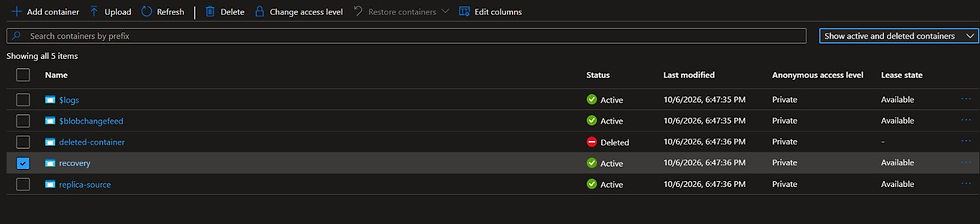
Container fault: the recorded disposable container is Deleted.

Container recovery: the exact deleted instance is Active again.

Files fault: active document is 43 bytes.

The recorded share snapshot remains available.

Snapshot recovery: active document is 55 bytes again, with its original SHA-256 verified through REST.

Share fault: the disposable share is Deleted.

Share recovery: the exact instance is Active again; file and snapshot hashes both matched.
Inspect tiers and lifecycle
The separate tier marker performs Hot → Cool → Hot with an unchanged hash. Cool has a 30-day minimum-storage charging period, so a rapid move back can incur early-deletion charges. Cold and Archive are guided comparisons; Archive is not supported on the selected ZRS source. Tier support and charges.
The enabled lifecycle rule targets only recovery/lifecycle/ and tiers qualifying base blobs to Cool after seven days. It has no deletion action. Open Lifecycle management → List view or Code view and verify the prefix, condition, and action. Configuration is the short-run acceptance gate; scheduled evaluation is not. Lifecycle changes can take up to 24 hours to begin execution, so do not leave lab accounts running beyond the cleanup window to wait for it. Lifecycle scheduling.

Enabled lifecycle configuration. Scheduled execution was not claimed during this short run.
Safety tests and evidence
./Test-Lab08Safety.ps1 -StatePath $state -Execute
./Export-Lab08Evidence.ps1 -StatePath $state -OutputPath ./evidence-before-cleanup.json
The conflicting-ETag test makes a real conditional write attempt and requires HTTP 412 ConditionNotMet with unchanged contents, ETag, and current version. Wrong-context, mismatched-ID, concurrent-run, interrupted-operation, and five-hour guards are offline simulations, not deliberate production-context mutations.
If a script stops with a pending operation, do not edit the manifest to suppress it. Use Reconcile-Lab08Operation.ps1 only for its supported exact-object cases. Unsupported outcomes stop for inspection; there is no universal resume command. Preserve the private manifest until cleanup has been verified.
An interrupted Files write is deliberately not auto-cleared: matching contents do not establish that its recorded lease was released or the stage completed. Inspect the exact file, ETag, request outcome, and recorded lease before further action; never break an unrelated lease.
Cleanup and verify absence
Cleanup removes the recorded replication policies and exact lab-created role assignment IDs, then the two disposable accounts and their isolated resource group. It first inventories retained objects and stops on unexpected contents or changed ownership. Final account deletion destroys versions, soft-deleted objects, snapshots, and change feed; their retention does not protect the containing account.
./Remove-Az104Lab08.ps1 -StatePath $state -Execute
./Remove-Az104Lab08.ps1 -StatePath $state -Execute
./Export-Lab08Evidence.ps1 -StatePath $state -OutputPath ./evidence-after-cleanup.json
Confirm absence in Portal as well as the exact-ID checks. A second cleanup must report the recorded objects absent without changing unrelated resources. If an inherited control blocks deletion, record continuing resources and costs; do not remove the control.
The download contains the separate challenge, progressive hints, solution, eight knowledge checks with answers, validation report, sanitized evidence, genuine Portal captures, and file checksums.

Cleanup checkpoint: the deleted account returns Resource not found. Exact-ID checks separately verified all lab resources and assignments absent.
Challenge
The main synthetic document can still be read, and both storage accounts are available. Its SHA-256 hash no longer matches the expected original hash recorded in your baseline evidence. The destination may contain the same unwanted contents. The firewall, authorization, and replication configuration have not intentionally changed.
Identify a recovery candidate, prove its contents, and restore the original current document without recreating accounts, weakening the firewall, or changing the replication rule. Demonstrate the original hash at both accounts, completed source replication status, unchanged unrelated fixtures, and a safe repeated recovery.
Use the baseline's expected length and hash as acceptance criteria. Do not use an instructor-provided version ID as the diagnosis. Keep identifiers and credentials private. Inspect hints only if needed; the solution is separate.
Knowledge checks
Why can ZRS still contain the wrong document after an overwrite?
Why is same-region object replication not an independent backup or a regional failover test?
What evidence should determine the version selected for recovery?
How do current-blob deletion with versioning and deletion of a previous version differ?
How does restoring one file from a share snapshot differ from restoring a soft-deleted share?
Why can an immediate Cool-to-Hot transition incur charges?
What does an enabled lifecycle rule prove during a short lab, and what does it not prove?
What happens to retained recovery points when the containing disposable storage account is deleted?
The download includes progressive hints, a separate solution, eight answers, all 25 genuine Portal captures, sanitized evidence, the validation report and individual checksums. Try the challenge before opening the solution.
Live validation
The 6 October 2026 release run passed all six recoveries, repeated no-op recovery, source/destination hash checks, HTTP 412 conditional-write protection, cleanup and repeated cleanup. Five safety guards were tested as offline simulations. The verified 60-file ZIP was freshly downloaded, extracted and hash-checked. Lifecycle execution, regional failover, SMB access and actual-phone testing are outside the tested scope.
Comments