Lab 14 — Azure Backup, Restore, and Site Recovery
azure administrator series
Lab 14 cover illustration — generated artwork, not validation evidence.
A required file is gone, but the VM is healthy. Recover the original bytes, owner and permissions from a verified pre-deletion point without replacing the VM. Compare Recovery Services VM Backup with independent operational Disk Backup.
Duration: 180–240 minutes, with additional service waits possible. Use a disposable environment only. Live backup, restore, integrity, security-alert and cleanup checks passed; Site Recovery and delayed Backup Reports remain guided.
This workshop supports the AZ-104 backup and recovery objectives. It is independent training, not a Microsoft exam endorsement.
ZIP SHA-256: 5194fffb4a936d0e3d125495398819cfd433806daf49c91a6c3d128916a7db64. A fresh public download, extraction and all 55 individual file hashes were verified before publication.
Tools, private state and operational limits
Tools and permissions
Windows, PowerShell 7.5 or newer, Azure CLI with Bicep, and compatible installed Az.Accounts, Az.Resources, Az.Compute, Az.RecoveryServices and Az.DataProtection modules are required. Do not upgrade automatically. Both Azure contexts must identify the same tenant, subscription and operator. The workshop uses the Visual Studio Enterprise subscription and West Europe selected for this series.
Required permissions include deployment, VM Run Command, backup/restore management and narrowly scoped role-assignment creation/deletion. Preflight is read-only in Azure. It saves a private manifest only when explicitly executed. Review applicable policy and cost evidence before acknowledging the corresponding gates.
Interfaces
Every Azure stage requires -StatePath. Without -Execute, those scripts only describe the intended action; they do not deploy, format, generate traffic, back up, restore or delete anything. Live validation invokes guest commands and therefore also requires -Execute. Local static, evidence-export, safety and package-verification scripts have their own read-only or local-artifact interfaces.
Use a new private state directory outside this package. The manifest is Windows-ACL protected and exclusively locked. Never copy private state, key material, restore artifacts or raw evidence into the download.
$state = 'C:\LabPrivate\Lab14\state.json'
.\Start-Lab14.ps1 -StatePath $state -Stage Preflight -Execute
# Review the private governance inventory before acknowledging applicable policy.
.\Start-Lab14.ps1 -StatePath $state -Stage Preflight -Execute -ReviewedGovernance
.\Start-Lab14.ps1 -StatePath $state -Stage Foundation -Execute
# This stops after saving validation and what-if; review both templates.
.\Start-Lab14.ps1 -StatePath $state -Stage Foundation -Execute -ReviewedWhatIf
If the manifest already exists, do not run Preflight again or replace it. Resume its recorded stage. An uncertain operation requires Reconcile-Lab14.ps1; an ambiguous submission is deliberately not retried automatically.
After a guarded guest recovery stops, inspect the private transcript and the exact attachment. Azure guest metadata can briefly lag an ARM attachment update. Reconcile-Lab14.ps1 -StatePath $state -ResumeGuestRecovery -Execute explicitly rechecks the recorded VM, LUN 1, disk, filesystem UUID and any existing read-only mount. It unmounts only that verified restored copy, submits no new restore, and performs no copying or formatting. Rerun the recovery stage only after reconciliation succeeds. An identity mismatch still stops the workflow.
Cost and cleanup
Require a refreshed conservative estimate of at most EUR15, retaining EUR5 for cleanup. Stop new exercises at five hours after chargeable creation and target cleanup before six. Stopping the VM does not remove disk, IP, snapshot or backup charges.
Cleanup deletes only recorded lab resources and assignments after protection deletion reaches a terminal state. Soft delete remains enabled. Removing operational snapshots ends their recovery capability; soft-deleted metadata is not a preserved disk copy. Run cleanup twice and inspect the retained-record report separately from active-resource absence.
Source alignment
The lab supports the monitoring and maintenance portion of the AZ-104 study guide. It is independent training material, not a Microsoft exam endorsement.
1 — Prepare the isolated environment
Run the preflight described in README. Inspect both contexts, quota, registered providers, existing automation, policy, locks, address overlap and current prices. Existing vaults are outside the exercise. Never use a name prefix as authority to adopt or delete resources.
Read templates/foundation.bicep before deployment. It creates an Ubuntu 24.04 Standard-security B2s VM, a 32 GiB Standard SSD OS disk and a separate 4 GiB data disk at LUN 0. The VNet is 10.114.0.0/24, and the workload subnet is 10.114.0.0/26. A static public IPv4 supplies explicit outbound connectivity; the NSG denies all inbound traffic, including SSH. Administration uses Run Command.
The Recovery Services vault protects both VM disks. A separate Backup vault manages independent snapshots of the data disk. Workload, operational snapshots and restore targets have separate recorded groups. The VM backup service may create its own snapshot group; record it from the protected VM/restore-point relationship rather than its name alone.
Review the incremental what-if for the foundation and staging account. Only intended new resources should appear. A failed deployment is not a baseline: reconcile its exact record, inspect the actual Azure error, and clean up or explicitly review a retry.
Portal checkpoint: capture the resource inventory, VM size/security type, OS/data disks, LUN 0, subnet configuration and inbound NSG rule. Hide subscription, tenant, account names, public/private addresses and resource IDs in published copies.
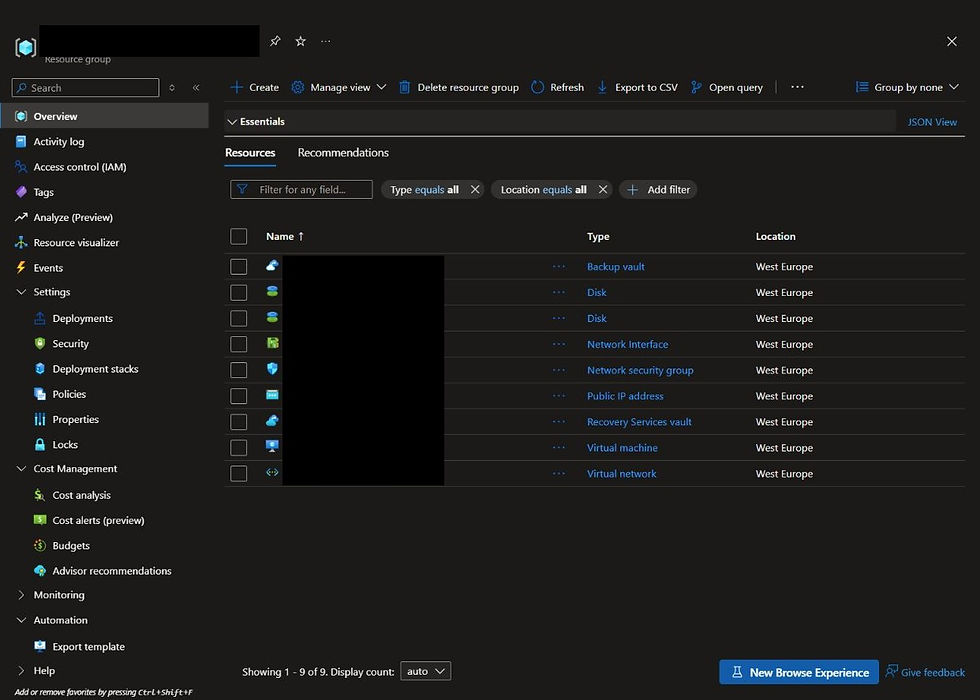
Genuine Portal inventory of the isolated foundation.
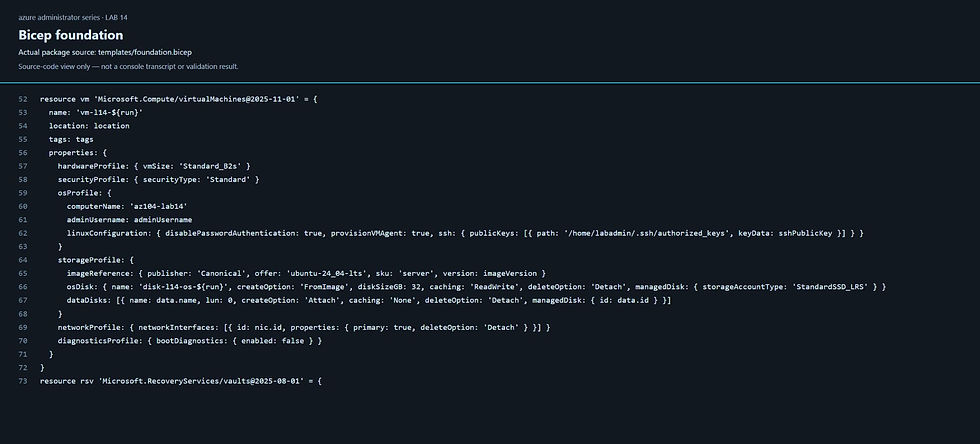
Actual Bicep source-code capture; not an execution transcript.
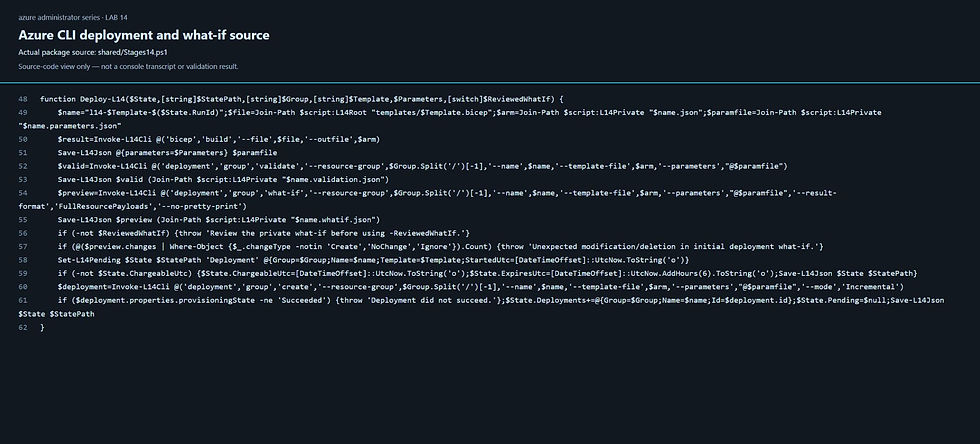
Actual Azure CLI deployment/validation/what-if source.
2 — Establish the dataset
.\Start-Lab14.ps1 -StatePath $state -Stage Data -ExecuteThe guest helper checks the Azure attachment, IMDS VM identity, LUN relationship, physical device, blank signatures and separation from root/temporary volumes before formatting. It creates ext4 and persists the mount by filesystem UUID at /srv/az104-lab14.
Synthetic files total less than 5 MiB. Record each path, byte count, SHA-256, UID, GID and mode. Use the dedicated unprivileged owner, not root-owned application data. Keep a private baseline tied to the exact original disk. Reboot and validate mount persistence before backup.
Portal/coding checkpoint: show the actual guest command and returned hashes alongside the disk inventory. A coding screenshot documents source code; it is not proof of successful execution.

Genuine original disk inventory: 32 GiB OS and 4 GiB data at LUN 0.
3 — Configure protection
.\Start-Lab14.ps1 -StatePath $state -Stage Protection -ExecuteConfigure a Standard daily VM policy with seven-day retention and two-day Instant Restore retention. Confirm both OS and data disks are included. Configure the independent disk policy for daily snapshots with seven-day operational retention.
The Backup vault identity receives Disk Backup Reader on the exact source disk, Disk Snapshot Contributor on the recorded snapshot group and temporary Disk Restore Operator on the restore group. The Recovery Services vault identity receives VM Restore Operator only on the restore-staging account and restore group. Inspect exact recorded assignment IDs and scopes.
The staging account requires HTTPS/TLS 1.2, disables anonymous access and Shared Key, and uses default-deny networking with the Backup-required trusted-service bypass. No storage keys or signed URLs are needed in public evidence.
Portal checkpoint: both vault types, policy schedules/retention, soft-delete state and identity assignment scopes. Disk Backup uses operational snapshots in the subscription; it does not create vaulted disk copies. See Disk Backup configuration.

Genuine Standard daily VM policy: seven-day retention and two-day Instant Restore.
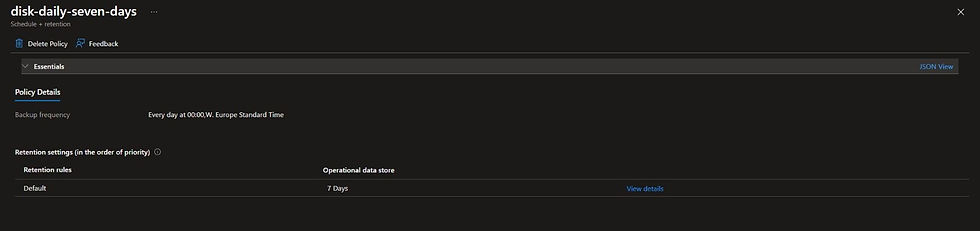
Genuine daily policy with seven-day operational snapshot retention.
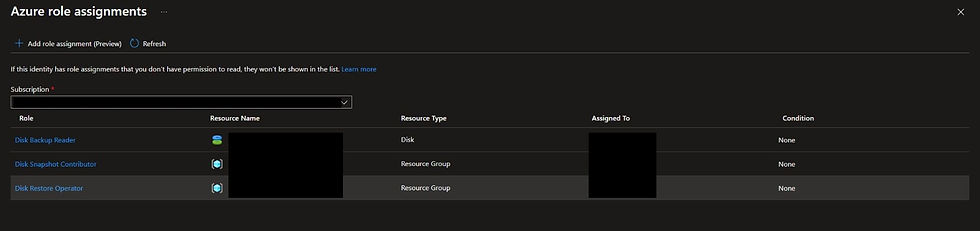
Genuine Backup vault identity roles; identifying values are masked.
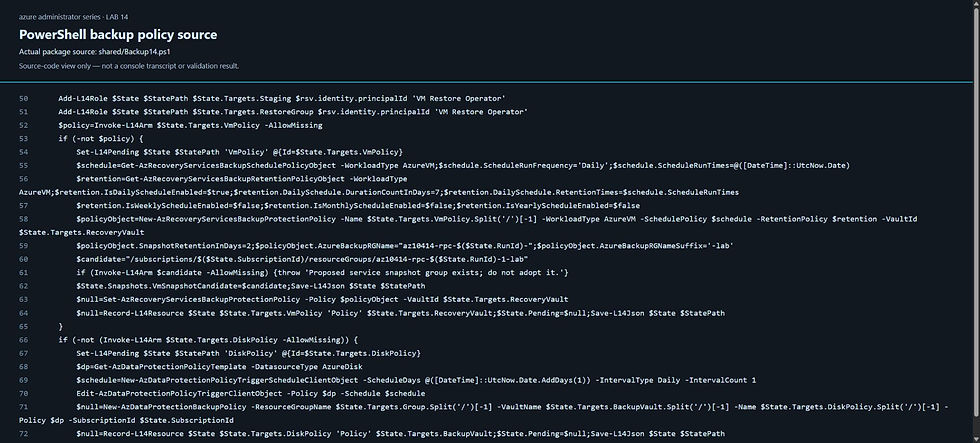
Actual PowerShell protection-policy source-code capture.
4 — Capture usable recovery points
.\Start-Lab14.ps1 -StatePath $state -Stage Backup -ExecuteStop dataset writes, synchronize and unmount its filesystem. Trigger one on-demand backup through each service. Wait for the entire returned job to complete, not merely the snapshot subtask. Allow at most 90 minutes, bounded by the overall deadline. Record job IDs privately and verify exact recovery-point IDs, UTC times, consistency types and tiers.
Remount and compare every baseline hash. Both points must predate the file-loss fault. If either backup is failed or incomplete, do not introduce the fault or claim a recoverable baseline.
Portal checkpoint: complete job details, recovery-point selection, timestamps/tier and independent disk snapshot relationships.

Genuine entire completed VM backup, including transfer and validation.

Genuine completed independent backup to Operational storage.
5 — Investigate the missing file
.\Test-Lab14.ps1 -StatePath $state -Phase Baseline -Execute
.\Invoke-Lab14Fault.ps1 -StatePath $state -Execute
.\Test-Lab14.ps1 -StatePath $state -Phase Fault -Execute
Fault injection deletes only /srv/az104-lab14/restore-me.txt. Capture the real unprivileged missing-file response. Check the remaining file hashes, source disk identity, mount UUID, guest agent, NSG and network configuration. This is data loss, not an infrastructure outage.
Use the symptom-only challenge before opening hints. A green VM status does not prove the dataset is intact.

Observed missing-file error while control hashes and the OS filesystem remain healthy.
6 — Recover through VM Backup
.\Restore-Lab14.ps1 -StatePath $state -Source VmBackup -ExecuteSelect the exact recorded pre-deletion VM recovery point. Restore disks into the separate target group using PowerShell and the vault identity. Never select Replace existing or boot the restored OS disk. Retain the OS disk only for inventory.
Identify the restored data disk from completed job metadata and its original LUN/source relationship. A matching name or size alone is insufficient. Attach it temporarily at LUN 1 on the original VM. Mount the restored ext4 filesystem read-only with noload to avoid journal replay. Verify all restored hashes before copying anything.
Copy only the missing file to the original mounted source filesystem, preserving recorded UID, GID and mode. Verify the complete dataset and original VM/disk identities. Unmount and detach the temporary restored disk. Microsoft restore options include disk restoration for attachment to an existing VM.
Portal checkpoint: completed restore job, new OS/data disks, temporary LUN 1 relationship, recovered file hash and original VM identity.

Genuine completed Recover disks job; its Create VM Template action was not used.
7 — Verify independent Disk Backup recovery
.\Restore-Lab14.ps1 -StatePath $state -Source DiskBackup -Execute
.\Test-Lab14.ps1 -StatePath $state -Phase Recovery -Execute
.\Restore-Lab14.ps1 -StatePath $state -Source VmBackup -Execute
.\Restore-Lab14.ps1 -StatePath $state -Source DiskBackup -Execute
Restore the exact Backup vault recovery point into another new disk. Verify its original dataset using the same guarded read-only attachment procedure. Do not create a second VM or modify original files that are already correct.
Repeated recovery must submit no additional restore job, create no disk, leave no temporary attachment and change no file. Confirm recorded successful results, source hashes and the restore-target inventory.

Genuine independent alternate-location disk restore.
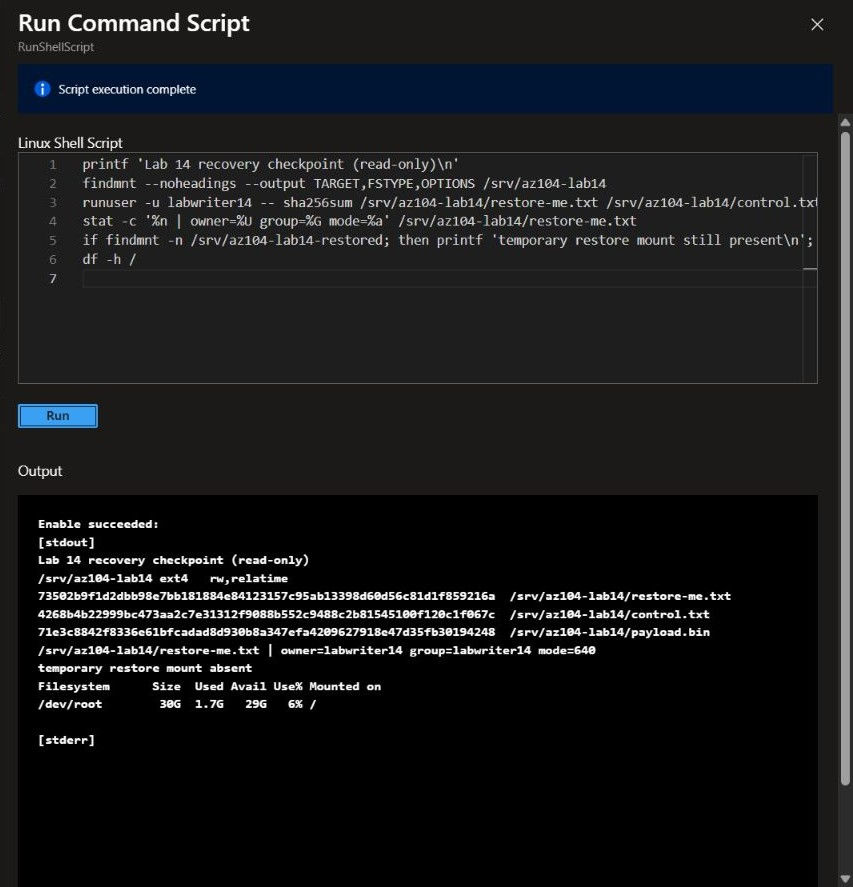
Genuine final guest checkpoint: restored hash, owner/group, mode 640 and no temporary mount.
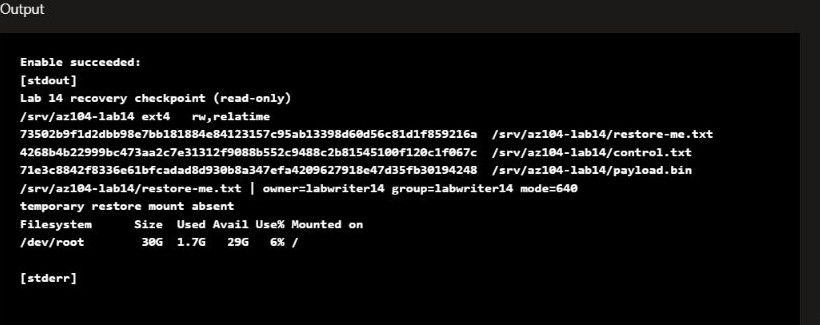
Legible crop of that same final checkpoint; not a separate test.
8 — Monitor protection and plan disaster recovery
.\Start-Lab14.ps1 -StatePath $state -Stage Monitoring -ExecuteInspect actual protection status, backup/restore jobs, recovery points and built-in Azure Monitor settings. During cleanup, observe the genuine Delete Backup Data security alert in the bounded window. No receiver or notification route is configured, so an alert record does not prove notification delivery.
Read GUIDED-TOPICS for Backup Reports and a West Europe-to-North Europe Site Recovery walkthrough. Neither creates replication resources or a reporting workspace in this lab.
9 — Clean up without weakening protection
.\Remove-Lab14.ps1 -StatePath $state -Execute -ObserveAlert
.\Remove-Lab14.ps1 -StatePath $state -Execute
Stop protection and request normal backup-data deletion first. Wait for confirmed terminal states before removing permissions or dependencies. Keep soft delete enabled; never downgrade APIs or purge vaulted data to force an empty view.
Delete only recorded operational snapshots, VM restore-point collections, restored disks, staging storage, source resources, assignments and deployment records. Delete an owned group only after it is empty. Unexpected resources or unfinished jobs stop cleanup and block publication.
Report active-resource absence separately from retained tombstones and their server-reported expiry. Deleting operational snapshots destroys their recovery capability even if metadata remains soft-deleted. Default vaulted retention is 14 days; operational snapshot charges have separate behavior. See secure-by-default Backup deletion.
Portal checkpoint: terminal protection deletion, security alert, removed operational snapshots, empty owned groups and retained-record status. Run two absence checks and verify the public package only after all release gates pass.
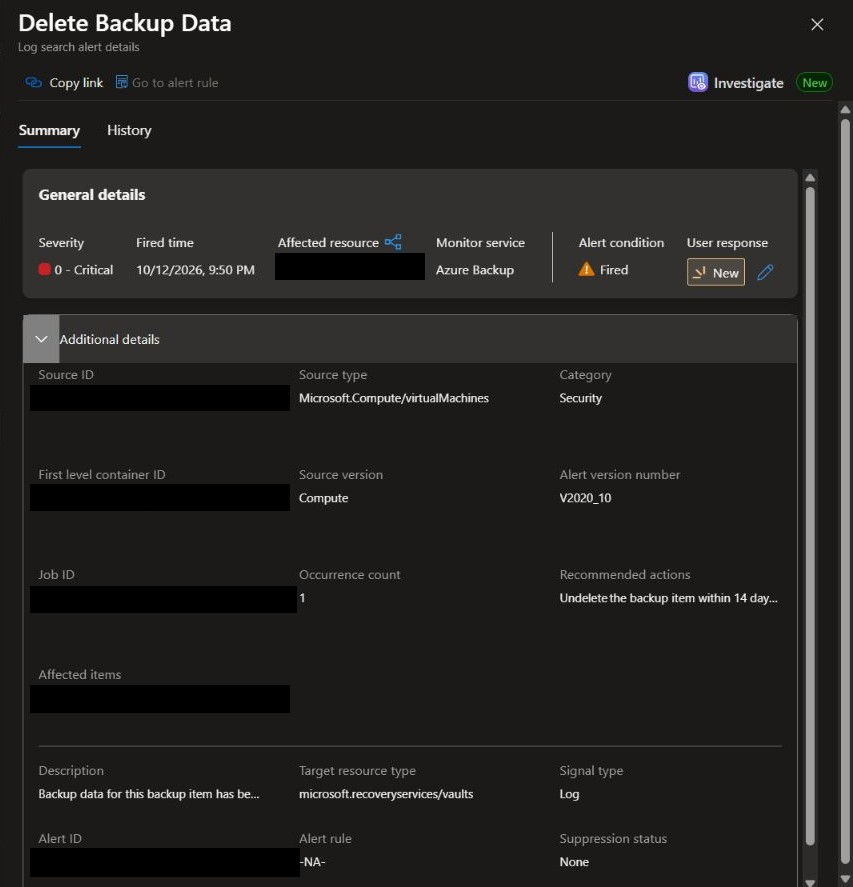
Genuine Azure Backup Delete Backup Data security alert; notification delivery is not claimed.

Genuine Portal absence view, supported by three exact-ID checks including repeated cleanup.
Challenge — start from the symptoms
The synthetic workload reports that restore-me.txt cannot be read. The VM remains Running and Run Command is available. Other files are still present. Two protection services were configured before the incident.
Recover the original file with its original bytes, owner and permissions. Preserve the original VM, source disks, mount and network configuration. Use an appropriate pre-incident recovery point. Prove that independent disk recovery can reproduce the same dataset.
Do not recreate the VM, replace its disks, boot a restored OS disk, guess a restored disk by name, weaken access controls or overwrite unrelated files. Submit evidence of the symptom, independent health, point selection, completed restore jobs, hashes and safe repetition. Then perform scoped cleanup.
Progressive hints
Open the hints one at a time
Hint 1 Narrow the failure
Compare the failing path with the baseline manifest. Check the mount, remaining files and guest-agent response before changing infrastructure.
Hint 2 Select the right time
A policy is not a completed backup. Compare complete job status and recovery-point time against the deletion time in UTC.
Hint 3 Preserve the original workload
Disk restoration can produce a separate copy without replacing the running VM. Investigate the target group, restore job details and source-disk/LUN relationships.
Hint 4 Protect the recovered copy
Attach only the proven restored data disk at the temporary LUN. Use read-only ext4 mounting without journal replay, then compare the entire dataset before copying one file.
Hint 5 Prove completion
The missing file needs a matching SHA-256 and metadata. Check original VM/disk identities, detach the temporary copy, and repeat recovery without submitting another job.
Separate solution — open after attempting the challenge
Show the recovery solution
Measure the missing-file error and verify the original data mount and unaffected hashes. Confirm the VM/agent/network are healthy.
Select the recorded successful VM recovery point captured before deletion. Reject a later point, failed job or ambiguous disk relationship.
Restore into new disks in the restore group. Keep the OS disk unbooted. Prove which new disk corresponds to original LUN 0 using actual source/job metadata.
Attach that disk temporarily at LUN 1, mount read-only with noload, and compare every dataset hash. Copy only the missing file, preserving baseline UID/GID/mode.
Validate original dataset and identities; unmount and detach. Restore the independent Disk Backup point into a different new disk and verify its dataset the same way.
Repeat both recovery commands. They must reuse recorded completed results, not create additional jobs or disks.
Stop/delete protection normally with soft delete enabled. Observe the cleanup security alert without claiming notifications. Remove only recorded operational copies, resources and assignments, then verify absence twice.
Use the commands in WALKTHROUGH. If an operation is interrupted, reconcile its exact record before resuming; uncertainty is not permission to repeat a restore submission.
Eight knowledge checks with answers
Show the eight questions and answers
Does configured protection prove that a usable recovery point exists? No. Verify a completed entire backup job and the returned recovery point, time and tier.
Which point should recover a file deleted at 14:00 UTC? A verified point containing the file before 14:00, not merely the newest point.
Does Azure Disk Backup copy its managed disk snapshots into Backup vault storage? No. This exercise uses operational snapshots in the subscription.
Why restore into new disks rather than replace existing disks? It preserves the original VM/source volumes and lets you recover only the missing file after inspecting a separate copy.
Is a new disk's matching name or capacity enough to identify its source? No. Require completed job metadata and the original source/LUN relationship.
Why use read-only ext4 mounting with `noload`? Read-only alone can still allow journal replay; avoiding replay protects the restored copy during validation.
Does a Delete Backup Data alert prove email delivery? No. Alert creation and notification routing/delivery are separate; this lab configures no external receivers.
Are deleted operational snapshots recoverable because backup metadata is soft-deleted? No. Removing the snapshots ends their recovery capability. Retained vaulted data and metadata must be reported separately.
Guided Backup Reports and Site Recovery
These walkthroughs are not live tests in Lab 14. Do not enable replication, deploy a reporting workspace or modify existing protection resources while following this release.
Backup Reports
In a separately authorized environment, choose a Log Analytics workspace, configure supported vault diagnostic categories, and select Backup Reports. Check workspace access, vault coverage, UTC date filters, job status and retention/capacity trends. Initial ingestion and completed UTC reporting days can delay useful results. The immediate job/evidence report in this lab is not Backup Reports. Follow Microsoft report configuration.
Site Recovery from West Europe to North Europe
Establish target-region capacity, compatible VM/disk/network support, service permissions, a recovery vault, cache storage and replication cost controls in a separately authorized environment.
Plan target networks, IP/DNS dependencies, application consistency and recovery order. Define RPO as the acceptable data-loss interval and RTO as the acceptable time to restore service; measure both rather than promising them.
Enable replication and wait for initial synchronization and healthy protection. Inspect available recovery points and their consistency.
Run a test failover into an isolated test network. Avoid accidental production connectivity, duplicate identities or DNS changes. Validate guest, application and data state.
Clean up the test failover through Site Recovery before removing disposable test artifacts. Do not confuse a drill with a production regional outage.
For a real approved failover, select the intended point, complete validation and commit as appropriate. Reprotect, plan failback and verify the return path before moving service back.
Use Microsoft replication guidance and isolated test failover guidance. Backups recover data at retained points; replication and recovery orchestration address a different disaster-recovery workflow.
Actual validation report
Core release status: passed, measured on 12 October 2026. Timestamps in this report are UTC. These are results from the actual disposable Azure run, not assumptions from VM or protection status.
Baseline and recovery points
Ubuntu 24.04, Standard security, B2s, 32 GiB Standard SSD OS and 4 GiB data disk at LUN 0 were deployed in West Europe. The guarded blank-disk check, UUID-persistent ext4 mount and reboot persistence passed. The guest agent remained healthy. Effective NSG rules and an external connection probe verified blocked public SSH; inbound access was not opened for recovery.
restore-me.txt: 61 bytes; SHA-256 73502b9f1d2dbb98e7bb181884e84123157c95ab13398d60d56c81d1f859216a; mode 0640.
control.txt: 23 bytes; SHA-256 4268b4b22999bc473aa2c7e31312f9088b552c9488c2b81545100f120c1f067c; mode 0640.
payload.bin: 1048576 bytes; SHA-256 71e3c8842f8336e61bfcadad8d930b8a347efa4209627918e47d35fb30194248; mode 0640.
The dataset was synchronized and its filesystem unmounted for both backups. Both entire jobs completed, then the original filesystem was remounted and all hashes rechecked. VM Backup protected OS and data disks; the independent Backup vault used operational snapshots.
VmBackup: Completed; 2026-10-12T18:39:20.6074967+00:00 to 2026-10-12T19:05:35.5480376+00:00.
DiskBackup: Completed; 2026-10-12T18:39:23.9374705+00:00 to 2026-10-12T18:43:08.1930014+00:00.
VmBackupRestore: Completed; 2026-10-12T19:24:27.3324556+00:00 to 2026-10-12T19:25:38.6307254+00:00.
DiskBackupRestore: Completed; 2026-10-12T19:34:16.9477447+00:00 to 2026-10-12T19:37:52.3396734+00:00.
VmBackup: 2026-10-12T18:39:26.6682864+00:00; FileSystemConsistent. Exact private point identity was checked against the original source and the pre-fault window.
DiskBackup: 2026-10-12T18:42:14.9317366+00:00; Incremental. Exact private point identity was checked against the original source and the pre-fault window.
The VM recovery point reported FileSystemConsistent, with valid InstantRP and HardenedRP tiers. The disk point reported Incremental and COMMITTED OperationalStore. Configured protection or a completed snapshot subtask was not counted as a completed backup.
Observed loss and measured recovery
Only the recorded synthetic restore-me.txt was deleted at 2026-10-12T19:14:42.6111831+00:00. The unprivileged read produced an actual No such file or directory response and exit code 1. Other hashes, mount, original disk attachment, guest agent and network configuration remained healthy.
PowerShell restored the recorded VM point into two new disks. Completed job metadata and the Compute recovery point's original VM/source/LUN relationships identified the data disk. Its source reference matched the recorded original data LUN; identification did not rely on a disk name or capacity alone. The restored OS disk was inventoried only: never booted, swapped or used to create another VM.
The restored data disk was temporarily attached at LUN 1 and mounted read-only with journal replay disabled. Its original dataset hashes matched. Only the missing file was copied back, preserving the recorded owner, group and 0640 mode. The temporary copy was unmounted and detached.
The Backup vault independently restored its exact operational point into another new disk. Its completed job identified the original source, point and exact alternate destination; the separate restored dataset matched the same hashes. The original VM and disks were retained throughout both exercises.
Recovery validation and both repeated recovery calls passed. Repetition submitted no additional restore job, created no new disk, left no temporary attachment, and made no file change.
Corrections and interruption handling observed live
The first partial foundation attempt failed before VM creation because an older VM API required an unregistered Standard-security feature and a vault monitoring payload was incomplete. The supported modern VM API and complete payload corrected the templates without registering a feature. Exact partial resources were removed; repeated cleanup passed before the fresh successful run.
Installed module/JSON interfaces required explicit response-field corrections during implementation. The completed restore was reconciled from its recorded job instead of resubmitted. Guest metadata briefly lagged both ARM disk attachments. Identity guards stopped before mounting or copying. Read-only inspection verified the exact updated LUN, disk and absent restore mount; explicit reconciliation resumed the same successful restore. The final helper bounds metadata propagation waiting to 60 seconds and still rejects mismatches. No disk was reformatted, no additional restore was submitted, and unsuccessful checkpoints were not counted as passing results.
Cleanup and monitoring
Normal protection/backup-data deletion reached confirmed terminal states before dependencies and identity permissions were removed. Soft delete stayed enabled; no data purge or API downgrade was used. The real Delete Backup Data security alert fired at 2026-10-12T19:50:33.9087142+00:00 (Azure Backup, Sev0, Security category). No external receiver or notification route was configured, and notification delivery is not claimed.
Cleanup initially stopped on a service status shape and an omitted alertRule field. Read-only inspection showed scheduled soft deletion and the native alert name. The helpers were corrected to distinguish string/map status values and use the actual alert name. Cleanup reconciled the already-soft-deleted item without issuing another data-deletion request or removing dependencies early. The full exact-ID cleanup and repetition subsequently passed.
Recorded operational snapshots, restore-point collections, restored disks, staging storage, source resources, assignments, deployment records and empty owned groups were removed. 3 exact-ID absence checks, including repeated cleanup, found no active billable lab resources or recorded role assignments. Temporary SSH material was removed.
Retained data/metadata records are separate from active-resource absence:
VmBackup: recorded remaining duration 14 days; calculated expiry 2026-10-26T19:50:19.5623042+00:00; Derived from server scheduling timestamp and returned retention days.
DiskBackup: recorded remaining duration 14 days; server expiry 2026-10-26T19:56:11.4811684+00:00.
BackupVaultTombstone: recorded remaining duration 14.996 days; server expiry 2026-10-27T19:56:11.4811684+00:00.
RecoveryServicesVaultTombstone: recorded remaining duration 13.992 days; server expiry 2026-10-26T19:50:19.5623042+00:00.
Vaulted backup soft-delete retention and native vault-metadata tombstone retention are not the same promise. Only server-returned expiry dates are represented as verified. Deleting operational snapshots ends their recovery capability even if backup metadata remains soft-deleted.
Static checks and safety simulations
All Bicep builds, Azure template validation and reviewed incremental what-if passed before deployment. All 17 PowerShell files parsed; PSScriptAnalyzer error-severity rules returned zero errors. This is not a claim that every stylistic warning rule was clean. Eight offline Python guest guard tests and 20 offline PowerShell safety tests passed. Wrong-context, mismatched-disk/point, exclusive-lock concurrency and interrupted-operation checks were simulations, not intentional live wrong-tenant or root-volume mutations. Live metadata/interruption reconciliation is documented separately above.
The refreshed six-hour estimate was EUR 11.89, below EUR15 active allowance with EUR5 cleanup reserve. An estimate is not the final Azure bill. Cleanup completed within the operational deadline.
Evidence, package and publication scope
Portal and guest pictures are genuine, with deterministic privacy masks/crops. Coding captures show actual package source, not fabricated execution. The neon cover is generated marketing artwork only; see CAPTURE-PROVENANCE.md and ARTWORK-PROVENANCE.md.
Site Recovery and delayed Backup Reports remain guided. No replication, regional failover, reports ingestion, reporting workspace or external notification delivery was tested. No actual-phone testing is claimed; Wix mobile preview is a separate publication check.
ZIP extraction and per-file SHA-256 verification run after this report is finalized. A fresh public-download SHA-256 is a separate publication gate recorded in the article; a ZIP cannot contain its own final hash or a receipt generated after upload.
Core gate receipt
Backup: passed at 2026-10-12T19:10:40.3275916+00:00.
BaselineValidated: passed at 2026-10-12T19:13:02.7573394+00:00.
Cleanup: passed at 2026-10-12T20:04:29.1657291+00:00.
Data: passed at 2026-10-12T18:23:03.4877981+00:00.
DeleteBackupDataAlert: passed at 2026-10-12T19:57:59.8879001+00:00.
DiskBackupRecovery: passed at 2026-10-12T19:42:07.4780494+00:00.
DiskBackupRecoveryRepeat: passed at 2026-10-12T19:45:22.0287805+00:00.
Fault: passed at 2026-10-12T19:14:45.6795198+00:00.
FaultValidated: passed at 2026-10-12T19:15:51.1940948+00:00.
Foundation: passed at 2026-10-12T18:21:48.5379725+00:00.
Monitoring: passed at 2026-10-12T19:45:23.3142016+00:00.
Preflight: passed at 2026-10-12T18:12:22.2162355+00:00.
Protection: passed at 2026-10-12T18:37:05.2514288+00:00.
RebootPersistence: passed at 2026-10-12T18:24:21.3602970+00:00.
RecoveryValidated: passed at 2026-10-12T19:43:10.4453026+00:00.
VmBackupRecovery: passed at 2026-10-12T19:33:03.2172673+00:00.
VmBackupRecoveryRepeat: passed at 2026-10-12T19:44:17.6597265+00:00.
Comments