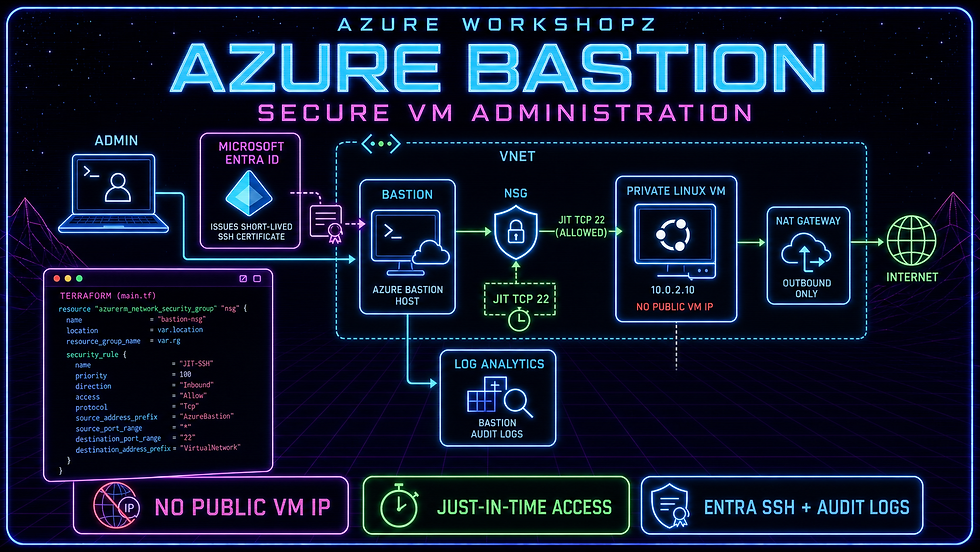
The entire lab is deployed as code with Terraform 1.15.8 and AzAPI 2.11.0. PowerShell 7 drives Terraform and Azure CLI. There are no stored VM passwords, no permanent SSH rule, and no inbound access from the internet.
Level: Intermediate to advancedTime: Approximately 30–35 minutes, plus Azure provisioning timeRegion: West EuropeCategory: Azure Infrastructure
What you will prove
By the end of the lab, you will have evidence that:
The Linux VM has a private address but no public IP resource.
The workload NSG starts with no custom inbound allow rule.
Azure Bastion is the only managed entry point into the VNet.
Defender JIT creates a narrow, temporary TCP 22 rule from AzureBastionSubnet.
Network reachability alone does not authorize a user to sign in.
A VM-scoped Azure RBAC role enables passwordless Entra SSH through Bastion.
Bastion audit records reach a dedicated Log Analytics table.
Terraform finishes with a no-change plan and cleanup restores the original Defender plan.
Architecture
The lab uses one VNet with two subnets:
Component | Address or scope | Purpose |
AzureBastionSubnet | 10.90.0.0/26 | Dedicated subnet for Bastion instances |
snet-private-vm | 10.90.1.0/24 | Private VM subnet with NSG and NAT Gateway |
Azure Bastion Standard | Managed service | Browser and native-client administrative path |
Ubuntu 24.04 B1s | Private IP only | Disposable administration target |
NAT Gateway | Workload subnet egress | Explicit outbound path for extensions and Entra endpoints |
Defender JIT policy | VM TCP 22 | Temporary inbound rule sourced only from Bastion subnet |
Log Analytics | 30-day retention | Resource-specific Bastion audit table |
The Bastion public IP belongs to the managed Bastion service—not to the VM. The NAT Gateway public IP is outbound-only and cannot accept unsolicited inbound VM sessions.

Four different security decisions
It is easy to treat Bastion, JIT, NSGs, and Entra authentication as one feature. They solve different parts of the problem:
Bastion supplies the managed network path into the VNet.
The NSG decides whether the Bastion data plane can reach the VM on TCP 22.
JIT changes that NSG decision for a limited source, port, and time window.
Microsoft Entra ID and Azure RBAC decide whether the human is allowed to sign in.
A successful route is not authentication, and a valid identity does not create a route. The workshop deliberately separates those failures so you can recognize them in production.
Prerequisites and cost guardrail
You need:
PowerShell 7.
Azure CLI 2.22.1 or later; this lab was verified with 2.88.0.
Terraform 1.15.8.
The Azure CLI bastion and ssh extensions.
Permissions to deploy network, compute, monitoring, role-assignment, and Defender resources.
An isolated subscription with no pre-existing VMs.
JIT VM access requires Microsoft Defender for Servers Plan 2. That plan is configured at subscription scope and can incur charges for every protected server. The supplied script refuses to enable it if it finds any VM before the lab begins, records the original pricing tier, and restores that tier after cleanup. Use a sandbox subscription rather than weakening this guardrail. See Microsoft’s current JIT prerequisites.
Sign in and check the exact active subscription without copying its immutable ID into screenshots:
az login
az account show --query "{Name:name, State:state}" --output table

$existingVms = az vm list --output json | ConvertFrom-Json
if (@($existingVms).Count -ne 0) {
    throw 'Use an isolated subscription with zero pre-existing VMs.'
}

az security pricing show `
  --name VirtualMachines `
  --query "{Tier:pricingTier, SubPlan:subPlan}" `
  --output table
Install the native-client extensions and verify versions:
az extension add --name bastion --upgrade
az extension add --name ssh --upgrade
az version --query "'azure-cli'" --output tsv
terraform version
Terraform interface
The downloadable root exposes only these inputs:
Variable | Purpose |
subscription_id | Sensitive exact active Azure CLI subscription ID |
location | Fixed to West Europe for the verified lab |
resource_group_name | Disposable lab resource group |
vm_admin_ssh_public_key | Ephemeral provisioning-only public key |
enable_jit_policy | Adds or removes the JIT policy |
grant_entra_login_role | Controls the VM-scoped login role assignment |
enable_bastion_diagnostics | Routes Bastion audit logs to Log Analytics |
workspace_retention_days | Defaults to 30 days |
common_tags | Non-sensitive workshop tags |
The private key, Terraform state, saved plans, subscription ID, tenant ID, principal ID, and tokens are local-only artifacts and are excluded from the source bundle.
Prepare Terraform and Defender
Run the safety wrapper from the workshop folder:
pwsh ./scripts/Invoke-BastionWorkshop.ps1 -Action Prepare
pwsh ./scripts/Invoke-BastionWorkshop.ps1 -Action EnableDefender
The script generates a disposable SSH key only because Azure Linux provisioning requires one. The workshop never uses that key to connect. It also exports the active subscription ID to the Terraform process without writing it to a tracked .tfvars file.
The provider enables AzAPI preflight validation:
provider "azapi" {
  enable_preflight = true
}
The root also checks that subscription_id matches the active Azure CLI context. Two subscriptions can share the same display name; automation should bind to the immutable ID, while screenshots and the distributable bundle should not reveal it.

Stage 1 — private VM and controlled egress
Apply the bootstrap stage:
pwsh ./scripts/Invoke-BastionWorkshop.ps1 -Action Bootstrap
This creates Bastion Standard, a private Ubuntu 24.04 VM, a system-assigned managed identity, AADSSHLoginForLinux, NAT Gateway egress, a workload NSG, Log Analytics, and Bastion diagnostics. It intentionally creates neither a JIT policy nor a VM login role.

The VM subnet sets defaultOutboundAccess = false and attaches an explicit NAT Gateway. This matters for new VNets: outbound internet reachability should be intentional, especially when VM extensions must reach Microsoft endpoints.
Inspect the Bastion configuration:

az network bastion show `
  --name bas-secure-admin-we `
  --resource-group rg-bastion-secure-admin-we `
  --query "{Sku:sku.name, NativeClient:enableTunneling, ShareableLink:enableShareableLink}" `
  --output table
The target NSG has no custom inbound allow rule. A deterministic DenySshInbound rule closes TCP 22 before Azure's broader default AllowVnetInBound can match traffic from the Bastion subnet:

az network nsg rule list `
  --resource-group rg-bastion-secure-admin-we `
  --nsg-name nsg-private-vm-we `
  --output table
Expected failure: no JIT path
Attempt the native-client connection before JIT is configured:
$vmId = terraform -chdir=./terraform output -raw virtual_machine_id

az network bastion ssh `
  --name bas-secure-admin-we `
  --resource-group rg-bastion-secure-admin-we `
  --target-resource-id $vmId `
  --auth-type AAD `
  -- -o ConnectTimeout=10
The request reaches Bastion but the workload NSG does not allow Bastion to reach TCP 22. A timeout or connection failure is the expected result.

Stage 2 — configure and request JIT
Add the JIT policy:
pwsh ./scripts/Invoke-BastionWorkshop.ps1 -Action ConfigureJit
The policy permits requests for TCP 22 for at most one hour, but only when the requested source is inside 10.90.0.0/26. The lab requests ten minutes. Defender rejects requests of five minutes or less, so the automation leaves enough margin for request processing.

Request the window through the REST API without printing IDs or tokens:
pwsh ./scripts/Invoke-BastionWorkshop.ps1 -Action ActivateJit
The request contains:
{
  "virtualMachines": [
    {
      "id": "<private-vm-resource-id>",
      "ports": [
        {
          "number": 22,
          "endTimeUtc": "<ten-minutes-from-now>",
          "allowedSourceAddressPrefix": "10.90.0.0/26"
        }
      ]
    }
  ]
}
Defender creates a temporary NSG rule. It is implementation state, not a permanent Terraform-owned rule.

Expected failure: network is open but RBAC is missing
Try the connection again during the ten-minute window. TCP 22 is reachable from Bastion, but the current user still lacks a VM login role. Microsoft Entra SSH should reject the sign-in with an authorization error.
This is an important troubleshooting boundary: JIT approval proves only temporary network authorization. It does not grant Microsoft.Compute/virtualMachines/login/action or administrator login rights.

Stage 3 — authorize the human at VM scope
Apply the operate stage:
pwsh ./scripts/Invoke-BastionWorkshop.ps1 -Action Operate
Terraform assigns the active Azure CLI user the immutable built-in role ID for Virtual Machine Administrator Login:
1c0163c0-47e6-4577-8991-ea5c82e286e4
The assignment is scoped to the single VM—not the resource group or subscription. Users who do not require sudo should receive Virtual Machine User Login instead.

RBAC can take several minutes to propagate. Request a fresh JIT window if necessary, then connect:
pwsh ./scripts/Invoke-BastionWorkshop.ps1 -Action ActivateJit
pwsh ./scripts/Invoke-BastionWorkshop.ps1 -Action Connect
The Azure CLI obtains a short-lived OpenSSH certificate from Microsoft Entra ID and asks Bastion to proxy the SSH transport. No VM password, permanent private key, or public VM address is used.
Expected sanitized output:

BASTION_AAD_CONNECTED
private-admin
<entra-user-alias>
Microsoft documents the same native-client flow with az network bastion ssh --auth-type AAD in Configure Microsoft Entra ID authentication for Azure Bastion.
Audit the session
The diagnostic setting uses resource-specific mode, so Bastion records arrive in MicrosoftAzureBastionAuditLogs rather than the shared AzureDiagnostics table.
Run a privacy-safe query that avoids email, client IP, VM IP, target resource ID, subscription ID, and tunnel ID:

MicrosoftAzureBastionAuditLogs
| where TimeGenerated > ago(30m)
| project TimeGenerated, OperationName, Protocol, Duration
| order by TimeGenerated desc
| take 10
The table can include the username, user email, client address, target address, target resource ID, protocol, session start, session end, and duration. Treat it as security data and apply appropriate workspace RBAC and retention.
JIT activity is separate. Defender records who requested access, for which VM and port, and the requested time window in the Azure Activity Log.

Audit logs are not session recording. Bastion audit data proves session metadata. If your requirement is video-style session recording and review, evaluate the appropriate Bastion Premium capabilities, storage controls, privacy requirements, and regional support.
Observe automatic closure
After the ten-minute window expires, Defender removes the temporary allow rule. Flush assumptions rather than trusting the countdown: inspect the effective NSG rules and repeat the connection test.
az network nsg rule list `
  --resource-group rg-bastion-secure-admin-we `
  --nsg-name nsg-private-vm-we `
  --query "[?destinationPortRange=='22'].{Name:name,Access:access,Source:sourceAddressPrefix}" `
  --output table
The result should contain no active JIT allow rule. The Entra role may still exist, but without the network window the session cannot be established. Identity authorization and network authorization remain independent.
Final Terraform drift check
Run the final plan only after the JIT-generated NSG rule has expired:
pwsh ./scripts/Invoke-BastionWorkshop.ps1 -Action NoChange
Expected result:

No changes. Your infrastructure matches the configuration.
If Terraform proposes deleting a temporary JIT rule, the access window is still active or Azure has not completed cleanup. Wait and poll rather than applying over Defender-owned runtime state.
Troubleshooting matrix
Symptom | Likely cause | Check |
Bastion provisioning remains pending | Bastion commonly takes several minutes | Resource provisioning state and regional capacity |
Native-client command is unavailable | bastion extension missing or old | az extension show --name bastion |
Connection times out before SSH | No JIT rule, wrong source prefix, or port expired | NSG effective rules and JIT request time |
Azure role not assigned | Login role absent or still propagating | VM IAM and immutable role ID |
Entra certificate cannot be obtained | ssh extension, tenant sign-in, or Conditional Access issue | az ssh cert, active tenant, sign-in policy |
AADSSHLoginForLinux is unhealthy | VM lacks outbound HTTPS/DNS or supported image | Extension status, NAT Gateway, Ubuntu support |
Audit table is empty | Diagnostic propagation or session still active | Diagnostic setting, wait several minutes, end session |
Terraform detects an NSG rule | JIT window is still active | Wait for Defender to remove the runtime rule |
JIT page says unsupported | Defender Plan 2 or NSG missing | Defender pricing and subnet/NIC NSG association |
Production hardening
Use a dedicated connectivity subscription and central Bastion design where organizational boundaries permit it.
Keep the VM without a public IP and block direct internet inbound paths.
Restrict JIT sources to the Bastion subnet or approved administrative ranges; never default to Any without a documented reason.
Grant Virtual Machine User Login by default and administrator login only when sudo is required.
Assign login roles through groups and privileged access workflows rather than directly to permanent individual accounts.
Enforce Conditional Access for the Azure Linux VM Sign-In enterprise application where licensing and client support allow it.
Treat NAT Gateway as explicit egress, then add Azure Firewall or another governed inspection layer when policy requires it.
Disable Bastion shareable links and unnecessary file copy. Review clipboard requirements separately.
Send Bastion diagnostics to a protected central workspace and alert on unusual source addresses, session hours, or repeated failures.
Use Azure Policy to require Entra SSH, diagnostics, approved SKUs, no VM public IPs, and compliant network placement.
Deploy Bastion and workload resources across availability zones where the selected region and SKU support the design.
Cleanup and restore the Defender plan
Bastion Standard, NAT Gateway, public IPs, Log Analytics, Defender Plan 2, and the VM can incur charges. Clean up immediately after validation:
pwsh ./scripts/Invoke-BastionWorkshop.ps1 -Action Cleanup
The wrapper:
Creates a saved destroy plan.
Applies that exact plan.
Verifies that the resource group is absent.
Restores the original Defender for Servers tier.
Deletes the ephemeral bootstrap SSH key.
Do not consider cleanup complete until both the resource group and the subscription-level Defender change have been verified.

Key takeaways
Azure Bastion removes the need for a public VM address, but it does not replace workload NSGs, identity authorization, temporary-access governance, or monitoring. JIT narrows the network window. Microsoft Entra ID replaces stored login credentials with short-lived SSH certificates. VM-scoped RBAC limits who can sign in. Bastion audit logs provide traceable session metadata.
The secure path is therefore a chain:
Authorized human
    -> short-lived Entra SSH certificate
    -> temporary JIT network window
    -> Azure Bastion managed transport
    -> private VM
    -> auditable session metadata
Break any link and administration fails—which is exactly what a layered design should do.
Comments