
Level: Advanced · Time: 90–120 minutes · Tooling: Bicep, Azure CLI, PowerShell 7, Azure portal
Deployment Stacks turn an Infrastructure-as-Code deployment into a managed lifecycle boundary. In this hands-on Azure Workshopz lab, you will build a subscription-scoped stack, progressively enable deny settings, prove that direct changes are blocked, make an approved change through the stack, detach one resource safely, and verify an ordered cleanup.
Cost note: The lab creates no compute, public IP, data-plane workload, or application. Its only billable resource is an empty Standard_LRS Storage account, which may incur minimal charges until cleanup.
What you will prove
Your Deployment Stack owns the workshop resource group at subscription scope.
A managed identity cannot be deleted directly after denyDelete is enabled.
A direct tag update is denied after denyWriteAndDelete, while a stack-driven update succeeds.
A resource removed from desired state can be retained with detachAll, then changed directly because it is no longer stack-managed.
Cleanup removes every lab artifact and the stack-owned deny assignment without modifying the captured starting baseline.
Architecture
Bicep → subscription-scoped Deployment Stack
          ├── managed resource group
          │    ├── hardened empty Storage account
          │    ├── delete-probe managed identity
          │    └── detachable managed identity
          └── deny assignment
               ├── blocks direct delete/write
               └── permits stack-authorized updates
The Bicep template declares the resource group at subscription scope, then deploys its child resources through a resource-group module. This intentionally avoids the documented resource-group deletion limitation for resource-group-scoped stacks. The lab keeps deny-settings-apply-to-child-scopes disabled, so the detached identity is editable after it leaves the stack’s explicit inventory.
Before you start
You need Azure CLI 2.88+, Bicep 0.46+, PowerShell 7.6+, and Owner or Azure Deployment Stack Owner capability at the selected subscription. Preflight checks that required providers are already registered; it never registers providers or changes Azure state.
$subscriptionId = '<your-subscription-guid>'
pwsh ./Start-AzureDeploymentStacksWorkshop.ps1 -SubscriptionId $subscriptionId -Stage Preflight
The safety gate refuses a pre-existing Workshopz resource group or stack, an unavailable storage name, missing permissions, and unregistered providers. It also captures resources, role assignments, and stacks into an ignored private baseline.
Stage 1 — Deploy the initial stack
pwsh ./Start-AzureDeploymentStacksWorkshop.ps1 -SubscriptionId $subscriptionId -Stage Deploy
The initial stack uses no deny setting. It creates an isolated West Europe resource group, a hardened Storage account with public network access and shared-key access disabled, a disposable delete-probe identity, and a later-detachable identity.
Stage 2 — Prove denyDelete
pwsh ./Start-AzureDeploymentStacksWorkshop.ps1 -SubscriptionId $subscriptionId -Stage Protect
The stack is updated with denyDelete, and the runner tries to delete only the disposable managed identity. Azure returns the expected deny-assignment authorization failure. No pre-existing identity or resource is touched.
Stage 3 — Prove denyWriteAndDelete
pwsh ./Start-AzureDeploymentStacksWorkshop.ps1 -SubscriptionId $subscriptionId -Stage Enforce
The direct Storage tag update must fail. The stack update sets Lifecycle=Enforced on the protected Storage account successfully. That distinction is the point: deny settings protect the desired-state boundary without preventing the stack from applying its own authorized update.
The runner deliberately updates the Storage account’s tags. Generic az tag update uses the separate Microsoft.Resources/tags/write operation, so it is not a valid equivalent test for a stack-managed resource-write deny boundary.
Stage 4 — Retain and detach one identity
pwsh ./Start-AzureDeploymentStacksWorkshop.ps1 -SubscriptionId $subscriptionId -Stage Detach
The template stops declaring one identity and updates with detachAll. The identity remains in Azure but disappears from the stack-managed inventory. The lab then updates its tag directly to prove it is no longer protected by this stack. This is a lifecycle handoff, not an automatic ownership transfer; record the new owner before using detach in production.
Stage 5 — Validate the control plane
pwsh ./Start-AzureDeploymentStacksWorkshop.ps1 -SubscriptionId $subscriptionId -Stage Validate
Validation builds Bicep, runs az stack sub validate, checks the managed-resource inventory and resource hardening, and emits a sanitized evidence file with booleans and counts only.
Troubleshooting and production guidance
If a direct operation succeeds, wait briefly for deny-assignment propagation and confirm the stack’s deny mode. If the stack cannot set deny settings, confirm Owner or Azure Deployment Stack Owner capability rather than ordinary Contributor. If the detached identity remains blocked, verify that it was removed from desired state and child-scope deny is not enabled.
Deployment Stacks are best for clearly bounded, IaC-owned resources. Use normal Azure RBAC, Policy, network controls, and application authorization alongside them. Start with denyDelete, create an exception procedure, and move to denyWriteAndDelete only after the stack update path is reliable. Decide deliberately between deleteAll, deleteResources, and detachAll whenever desired state changes.
Deny assignments are control-plane protection. They do not govern data-plane access, and Microsoft documents resource-group and resource-type limitations that should be evaluated before production adoption.
Cleanup
pwsh ./Remove-AzureDeploymentStacksWorkshop.ps1 -SubscriptionId $subscriptionId -ConfirmCleanup
Cleanup deletes the detached identity directly, deletes the stack with deleteAll, waits for the resource group to disappear, confirms the stack is gone, and compares the original protected baseline. A PASS result means no Workshopz resources, stack, or stack-owned deny assignment remain.
Download
Microsoft references
Live evidence gallery
CLI preflight and safety gate

Read-only preflight confirms tooling, permissions, provider readiness, name availability, and a collision-free starting baseline.
Deployment Stack overview

The subscription-scoped Deployment Stack is visible in the Azure portal before protection is enabled.
Initial Bicep stack deployment
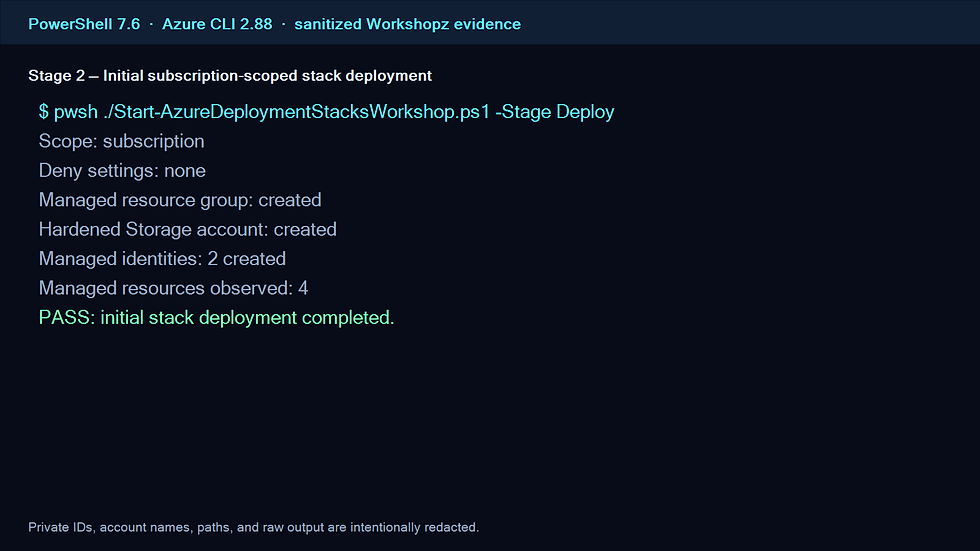
The initial Bicep deployment created the isolated resource group, hardened Storage account, and two managed identities.
Managed resource inventory

The stack inventory shows the resource group, Storage account, and delete-probe identity that remain under stack management.
Direct delete denied

A direct deletion of the disposable managed identity is rejected after denyDelete is applied.
Stack deny-assignment settings

The portal shows the stack-owned deny assignment that creates the direct-operation protection boundary.
Direct write denied; stack update succeeds

A direct Storage tag write is denied under denyWriteAndDelete, while the same desired-state change succeeds through the Deployment Stack.
Final denyWriteAndDelete settings

The final stack configuration uses denyWriteAndDelete and leaves child-scope deny disabled for the safe detach demonstration.
Detach proof and validation

detachAll retains the identity, removes it from stack inventory, and permits its direct tag update; Bicep and stack validation also pass.
Verified cleanup and protected baseline

Ordered cleanup deletes the lab artifacts and proves the protected subscription baseline remains unchanged.
Comments