
Traditional Windows infrastructure does not disappear when it moves to Azure. Domain controllers still replicate. DNS still determines whether a computer can find Kerberos, LDAP, and Group Policy. File permissions still depend on identities and tickets. Network segmentation still decides which systems can talk to one another.
In this workshop, you will build a complete but disposable Azure IaaS datacenter from PowerShell 7 and Azure CLI. A central hub contains Azure Firewall and Azure Bastion. Four spokes isolate identity, management, application, and data services. Two Windows Server 2025 domain controllers provide redundant Active Directory and DNS. Member servers demonstrate DHCP, Group Policy, IIS, SMB, Kerberos, monitoring, and domain-controller failover.
The lab deliberately fails before it succeeds. You will attempt to locate and join the domain while DNS is wrong, link a computer GPO to the wrong OU, and stop the first domain controller. Each failure creates evidence you can use to reason about production incidents.
Estimated reading time: 40–45 minutes
Estimated infrastructure time: 3–5 hours
Cost warning Azure Firewall Basic, Azure Bastion Basic, Log Analytics, public IP addresses, disks, and five Windows virtual machines are billable. Complete the cleanup section on the same day. No VM receives a public IP.
What you will build
The lab creates:
• a central hub VNet;
• identity, management, application, and data spokes;
• bidirectional hub-to-spoke peerings;
• Azure Firewall Basic with separate data and management IP configurations;
• Azure Bastion Basic for private RDP;
• four route tables that send cross-spoke and Internet traffic through the firewall;
• five private Windows Server VMs;
• a Windows Server 2025 Active Directory forest named corp.workshop.test;
• two domain controllers with AD-integrated DNS and separate directory data disks;
• Active Directory sites, subnets, OUs, groups, users, and delegated domain joining;
• an inactive Windows DHCP scope representing remote clients behind a DHCP relay;
• a domain-joined IIS server and secured SMB file server;
• three Group Policy Objects;
• Azure Monitor Agent, a data collection rule, and Log Analytics evidence.
Architecture
Internet
│
┌───────────▼───────────┐
│ Azure Firewall Basic │
│ 10.120.0.4 │
└───────────┬───────────┘
│
┌───────────────────┼───────────────────┐
│ │ │
Azure Bastion Hub peerings Route tables
│ │ │
┌──────────▼──────┐ ┌──────────▼──────┐ ┌──────────▼──────┐
│ Identity spoke │ │ Management spoke│ │ Application │
│ 10.121.0.0/16 │ │ 10.122.0.0/16 │ │ 10.123.0.0/16 │
│ DC01 + DC02 │ │ MGMT01 + DHCP │ │ APP01 + IIS │
└──────────┬──────┘ └──────────┬──────┘ └──────────┬──────┘
│ │ │
└───────────────────┼───────────────────┘
│
┌────────▼────────┐
│ Data spoke │
│ 10.124.0.0/16 │
│ FILE01 + SMB │
└─────────────────┘
VNet peering is not transitive. A management spoke peered with the hub does not automatically gain a route to the data spoke. The 0.0.0.0/0 user-defined route on each workload subnet points to Azure Firewall, and both directions of every peering allow forwarded traffic. The firewall becomes the deliberate transit boundary.
Address plan and names
| Role | Name | Address |
|---|---|---:|
| Hub VNet | vnet-hub-dc-we | 10.120.0.0/16 |
| Firewall subnet | AzureFirewallSubnet | 10.120.0.0/26 |
| Bastion subnet | AzureBastionSubnet | 10.120.0.64/26 |
| Firewall management subnet | AzureFirewallManagementSubnet | 10.120.0.128/26 |
| Identity spoke | vnet-identity-spoke-we | 10.121.0.0/16 |
| Management spoke | vnet-management-spoke-we | 10.122.0.0/16 |
| Application spoke | vnet-application-spoke-we | 10.123.0.0/16 |
| Data spoke | vnet-data-spoke-we | 10.124.0.0/16 |
| First domain controller | vm-dc01-we | 10.121.1.4 |
| Second domain controller | vm-dc02-we | 10.121.1.5 |
| Management server | vm-mgmt01-we | 10.122.1.4 |
| Application server | vm-app01-we | 10.123.1.4 |
| File server | vm-file01-we | 10.124.1.4 |
Azure Firewall Basic currently requires both AzureFirewallSubnet and AzureFirewallManagementSubnet. The second public IP belongs to the firewall management plane; it is not an inbound path to a workload. The workshop creates no DNAT rule.
Prerequisites and safety boundaries
You need:
• PowerShell 7.2 or later;
• Azure CLI;
• an enabled Azure subscription;
• Contributor permissions for the lab resource group;
• permission and quota for Firewall, Bastion, Log Analytics, and 12 B-series vCPUs;
• West Europe capacity for Windows Server 2022 and 2025 images.
Clone or extract the source bundle, then switch to its directory.
$Project = Resolve-Path .\azure-iaas-datacenter-deep-dive
Set-Location $Project
pwsh --version
az version
az login
Select the subscription by immutable ID. Do not select by display name when two subscriptions share a name.
$SubscriptionId = (
az account show --query id --output tsv
).Trim()
The distributable transcript never prints that value. Run the safety gate:
.\scripts\Start-AzureDatacenterWorkshop.ps1 `
-SubscriptionId $SubscriptionId `
-Stage Preflight
The preflight verifies provider registration, exact subscription selection, address-space collisions, Marketplace images, regional vCPU quota, and BS-family quota before it creates a billable resource.

Step 1 — Deploy the private hub-spoke foundation
Run the foundation stage:
.\scripts\Start-AzureDatacenterWorkshop.ps1 `
-SubscriptionId $SubscriptionId `
-Stage Foundation
The script generates the disposable local administrator credential with a cryptographically secure random number generator. It persists only a DPAPI-encrypted PSCredential in .private so later stages can join the domain. The directory is excluded from the ZIP and deleted during cleanup.

IMAGE 03 — Azure Portal resource-group topology

Every VM NIC is created first with a fixed Azure private allocation. There is no public IP resource on any VM. Bastion supplies RDP across peering, while the workload NSGs allow RDP only from 10.120.0.64/26.

The firewall stage intentionally omits TCP and UDP 53 from member spokes to the identity spoke. Kerberos, LDAP, SMB, RPC, Global Catalog, NTP, management WinRM, and permitted file-server SMB rules exist, but the domain still cannot be located without DNS.

IMAGE 06 — Azure Bastion Basic protecting private administration
Step 2 — Understand static IPs and Azure DHCP
An Azure NIC configured with privateIPAllocationMethod=Static does not make the guest operating system manually static. Inside Windows, the adapter normally remains DHCP-enabled. Azure platform DHCP supplies the private address, subnet mask, route, and DNS server list reserved on the NIC or VNet.
That distinction matters for domain controllers:
• reserve the address in Azure;
• leave the guest adapter DHCP-enabled;
• configure custom DNS on the NIC or VNet;
• renew the DHCP lease or restart the VM after changing DNS servers;
• never hard-code the guest default gateway.
Azure uses the virtual IP 168.63.129.16 for platform services including DHCP, filtered DNS, VM Agent communication, and load-balancer probes. User-defined routes do not redirect this platform address.

Step 3 — Create the Windows Server 2025 forest
Run the identity stage:
.\scripts\Start-AzureDatacenterWorkshop.ps1 `
-SubscriptionId $SubscriptionId `
-Stage Identity
DC01 initializes its attached 32-GB data disk with host caching disabled. AD DS database, logs, and SYSVOL are placed on that disk. A protected Custom Script Extension installs AD DS and DNS and creates corp.workshop.test without putting the recovery password in command output.
Because the forest contains only Windows Server 2025 domain controllers, the workshop uses the Windows Server 2025 forest and domain functional level. After the reboot, the automation waits for the Azure VM Agent and NTDS instead of relying on a fixed delay.

The second controller initially points only to 10.121.1.4, joins the forest, installs DNS and Global Catalog, and stores its directory files on a second cache-disabled disk. After replication is healthy:
• DC01 prefers DC02 and uses itself second;
• DC02 prefers DC01 and uses itself second;
• the identity VNet advertises both domain-controller addresses.
Validate:
.\scripts\Get-AzureDatacenterEvidence.ps1 `
-SubscriptionId $SubscriptionId `
-Stage Identity
The acceptance state is two advertised domain controllers, shared SYSVOL, DNS registration, and zero replication failures.

Step 4 — Model Azure networks in Active Directory
The identity stage creates four AD sites and maps each Azure workload subnet:
Identity-WestEurope 10.121.1.0/24
Management-WestEurope 10.122.1.0/24
Application-WestEurope 10.123.1.0/24
Data-WestEurope 10.124.1.0/24
AD Sites and Services influences DC location and replication topology. It does not create Azure routes. Azure networking determines whether packets reach a controller; AD topology determines how domain members identify an appropriate controller after they can communicate.

IMAGE 10 — Active Directory sites and subnet mappings
The DNS server hosts the AD-integrated domain zone and four reverse zones. Queries it cannot answer are forwarded to 168.63.129.16, allowing the domain controllers to resolve Azure and Internet names without using a public resolver directly.
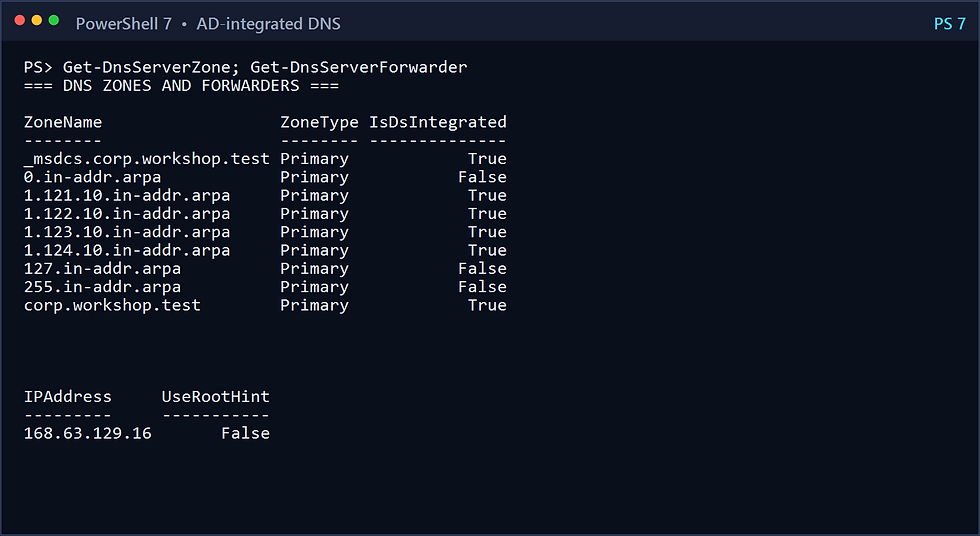
IMAGE 11 — AD-integrated DNS zones and Azure DNS forwarder
Step 5 — Prove the DNS and domain-join failure
The three member spokes still use Azure-provided DNS, and the firewall still lacks the AD DNS rule. Capture the failure:
.\scripts\Start-AzureDatacenterWorkshop.ps1 `
-SubscriptionId $SubscriptionId `
-Stage BrokenDns
The stage runs Resolve-DnsName and nltest /dsgetdc on every member, then attempts an actual protected domain-join extension on APP01. The expected outcome is an unresolved domain or DC locator failure. The failed extension is removed so it cannot contaminate the successful stage.

This failure teaches a useful diagnostic order:
1. Check the DNS servers received by the client.
2. Resolve the domain and _ldap._tcp.dc._msdcs records.
3. Test TCP and UDP 53 to both controllers.
4. Inspect the effective route and next hop.
5. Inspect Firewall and NSG rules.
6. Only then troubleshoot credentials or computer-account permissions.
Step 6 — Repair DNS and join the domain
Run the operate stage:
.\scripts\Start-AzureDatacenterWorkshop.ps1 `
-SubscriptionId $SubscriptionId `
-Stage Operate
The stage adds Allow-Ad-Dns, configures both domain-controller addresses on the management, application, and data VNets, restarts the members to acquire the new DHCP options, and joins each server into its delegated OU with the protected domain extension.
IMAGE 13 — Corrected DNS path and successful domain joins
The directory now contains dedicated server OUs, groups, users, service accounts, and member computer objects. svc-domainjoin is used for joining instead of placing the domain administrator credential in general member-server automation.
Step 7 — Build the hybrid DHCP lesson
MGMT01 installs DHCP and RSAT. The lab authorizes it in Active Directory and creates this inactive scope:
Scope: 10.250.10.0/24
Range: 10.250.10.100–10.250.10.200
Router: 10.250.10.1
DNS: 10.121.1.4, 10.121.1.5
DNS suffix: corp.workshop.test
State: Inactive
IMAGE 15 — Azure platform DHCP compared with Windows DHCP

This scope does not serve the Azure VMs. Azure intercepts the DHCP exchange for Azure NICs. A production design can host Windows DHCP in Azure for remote clients when an on-premises router or appliance acts as a DHCP relay. The scope is inactive to prevent the article from implying that it should answer local Azure VM broadcasts.

IMAGE 16 — Inactive Windows DHCP scope for a hybrid relay example
Step 8 — Create authenticated application and data workloads
APP01 installs IIS and publishes a non-sensitive proof page. FILE01 creates WorkshopData and grants access to domain security principals instead of local users. From APP01, the automation:
• reads the file through the server FQDN;
• requests a cifs/ service ticket;
• verifies the ticket exists in klist;
• retrieves the local IIS page.
The traffic crosses spokes through Azure Firewall. Only SMB is permitted from the application spoke to the data server; an unrelated application-to-data connection remains blocked.
Step 9 — Deliberately miss and repair Group Policy
Run the Group Policy stage:
.\scripts\Start-AzureDatacenterWorkshop.ps1 `
-SubscriptionId $SubscriptionId `
-Stage GroupPolicy
The stage creates:
• CORP-Server-Baseline;
• CORP-Application-Servers;
• CORP-File-Servers.
The baseline configures a legal notice, PowerShell module and transcription logging, command-line process auditing, Windows Firewall policy, an audit-friendly marker, and SMBv1 disabled. The GroupPolicy stage also makes CORP\GG-Server-Admins the controlled domain group added to each member's local Administrators group; no named domain user is granted directly. The role GPOs write an application or data marker.
First, the baseline is linked to the Users OU. A computer-side policy cannot apply to servers there. gpresult and the registry marker prove the miss. The link is then moved to the Servers OU, gpupdate /force runs on every member, and the same evidence proves the repair.

IMAGE 17 — Failed and corrected Group Policy evidence
Step 10 — Prove domain-controller failover
Run the failover stage:
.\scripts\Start-AzureDatacenterWorkshop.ps1 `
-SubscriptionId $SubscriptionId `
-Stage Failover
Before the outage, the script captures repadmin /replsummary and focused dcdiag tests. It then powers off DC01 without deallocating it and validates from each member:
• DNS through 10.121.1.5;
• domain-controller location through nltest;
• SMB access from APP01;
• IIS status;
• continued domain membership.
Finally, it starts DC01, waits for NTDS, forces replication, and repeats the health tests. A successful failover is not merely “the second VM is running.” Clients must resolve the domain, locate a controller, authenticate, and use the workload.

IMAGE 18 — Kerberos, IIS, SMB, and domain-controller failover evidence
Step 11 — Query monitoring evidence
Each VM uses a system-assigned managed identity so Azure Monitor Agent can authenticate without a stored secret. The agent sends selected System, Directory Service, DNS Server, and Group Policy Operational events to the workspace. The DCR intentionally avoids collecting every security event in this disposable lab.
Run:
.\scripts\Get-AzureDatacenterEvidence.ps1 `
-SubscriptionId $SubscriptionId `
-Stage Monitoring
Example KQL:
Event
| where TimeGenerated > ago(24h)
| summarize Events=count() by Computer, EventLog
| order by Computer asc

IMAGE 19 — Azure Monitor event evidence and exact-scope cleanup verification
Troubleshooting matrix
| Symptom | Likely layer | First checks |
|---|---|---|
| Domain cannot be found | DNS | Client DNS list, SRV records, Firewall 53 |
| DNS works but join fails | AD/RBAC | Time, join identity, OU path, existing computer object |
| Kerberos falls back to NTLM | Naming/time | Use FQDN, SPN, klist, clock skew |
| Share name resolves but SMB fails | Network/ACL | Firewall 445, NSG, share ACL, NTFS ACL |
| GPO does not appear | Directory | Computer OU, link, security filtering, gpresult |
| A computer probe stops before creation | PowerShell/AD | Prefer a non-throwing LDAP filter when absence is expected; Get-ADComputer -Identity can terminate |
| New GPO works through only one DC | AD/SYSVOL | Confirm both DCs share the intended site, run KCC, wait for SYSVOL, and verify gpt.ini on each SYSVOL share |
| DC2 is not selected during outage | DNS/DC locator | DNS order, SRV records, nltest, cache |
| Events are missing | Monitoring | System-assigned identity, AMA state, DCR association, event-log XPath, ingestion delay |
| Firewall has no private IP | Azure control plane | Required management subnet and IP, provisioning state |
Production recommendations
The workshop is intentionally compact. For production:
• place domain controllers across availability zones and, when required, regions;
• use a registered DNS suffix rather than a reserved test domain;
• delegate domain joining to the exact target OUs instead of a broad built-in operator group;
• use a managed privileged-access workstation rather than a general management server;
• use Azure Firewall Policy and infrastructure as code;
• use Azure Policy to deny public VM IPs and unrestricted management ports;
• protect domain controllers with tested system-state-aware recovery procedures;
• monitor replication, DNS, time, SYSVOL, privileged group changes, and authentication failures;
• use a real VPN or ExpressRoute path and redundant DHCP relays for hybrid clients;
• evaluate Microsoft Entra Domain Services only when managed-domain tradeoffs match the workload;
• treat AD CS, Entra Connect, backup, clustering, and configuration management as separate architecture decisions.
Cleanup
Collect the final safe evidence before deletion:
.\scripts\Get-AzureDatacenterEvidence.ps1 `
-SubscriptionId $SubscriptionId `
-Stage Final
Then review and remove the exact tagged resource group:
.\scripts\Remove-AzureDatacenterWorkshop.ps1 `
-SubscriptionId $SubscriptionId `
-Wait `
-Confirm:$false
The cleanup script refuses to delete a resource group unless its workshop tag is exactly iaas-datacenter-deep-dive. It does not search for or remove similarly named resources elsewhere.
What you proved
You built a private Windows datacenter with centralized transit, redundant AD DS and DNS, delegated domain joining, Active Directory topology, hybrid DHCP guidance, Group Policy, Kerberos-authenticated workloads, monitoring, and real domain-controller failover. More importantly, you used failures as evidence: DNS before credentials, OU scope before registry settings, and application behavior before declaring failover healthy.
Microsoft references• Hub-and-spoke network topology (https://learn.microsoft.com/en-us/azure/networking/design-guide/hub-spoke)
• Install Active Directory Domain Services on an Azure VM (https://learn.microsoft.com/en-us/windows-server/identity/ad-ds/deploy/virtual-dc/adds-on-azure-vm)
• Active Directory functional levels (https://learn.microsoft.com/en-us/windows-server/identity/ad-ds/active-directory-functional-levels)
• Azure Virtual Network FAQ (https://learn.microsoft.com/en-us/azure/virtual-network/virtual-networks-faq)
• Azure platform virtual IP 168.63.129.16 (https://learn.microsoft.com/en-us/azure/virtual-network/what-is-ip-address-168-63-129-16)
• Azure Bastion with VNet peering (https://learn.microsoft.com/en-us/azure/bastion/vnet-peering)
• Collect Windows events with Azure Monitor Agent (https://learn.microsoft.com/en-us/azure/azure-monitor/vm/data-collection-windows-events)
Comments