
Windows containers add a second operating system, a different image lifecycle, and extra scheduling constraints to Kubernetes. In this workshop you will operate Windows Server 2022 containers on a private Azure Kubernetes Service cluster, deliberately break scheduling and image pulls, scale pods and nodes under load, repair a Pod Disruption Budget, drain a Windows node, and perform a real Kubernetes patch upgrade while continuously checking the application.
The cluster has no public API endpoint. The application has no public endpoint. Administration travels through Azure Resource Manager Run Command, so there is no jump box, VPN, public SSH rule, or local kubeconfig in the distributable files.
Guided reading: 35–40 minutes Live execution: approximately 2–3 hours Level: intermediate to advanced Tools: PowerShell 7, Azure CLI, Kubernetes manifests, ACR Tasks, Azure Portal, Azure Monitor
This lab creates billable AKS nodes, a NAT Gateway, Azure Container Registry, a Standard Load Balancer, managed disks, and Log Analytics ingestion. Run the cleanup section when the evidence is complete.
What you will prove
By the end of the lab you will have evidence for each of these claims:
• AKS needs a Linux system node pool even when the application uses Windows containers.
• Labels select nodes; taints repel pods unless the pod supplies the matching toleration.
• A workload can schedule successfully but still fail independently at the registry authorization layer.
• The Horizontal Pod Autoscaler adds replicas, while the cluster autoscaler adds nodes for unschedulable pods.
• A strict Pod Disruption Budget can protect availability so aggressively that it blocks maintenance.
• A supported AKS patch upgrade can rotate Linux and Windows nodes while a private application stays healthy.
Microsoft recommends separating critical system pods from application workloads. System pools are Linux-based, while Windows is supported on user pools. The CriticalAddonsOnly=true:NoSchedule taint keeps normal application pods away from the system pool. See Manage system node pools in AKS (https://learn.microsoft.com/en-us/azure/aks/use-system-pools).
Architecture
Component — Configuration
Resource group — rg-aks-windows-operations-we
Private AKS cluster — aks-winops-we, Standard tier, Microsoft Entra integration, Azure RBAC, local accounts disabled
VNet — 10.170.0.0/16
AKS subnet — 10.170.0.0/22
Pod CIDR — 10.244.0.0/16
Service CIDR — 10.0.0.0/16
Outbound — User-assigned NAT Gateway; no node public IPs
syslinux — Two zonal Linux system nodes, Standard_D4s_v5, critical-addons taint
opslinux — One small untainted Linux user node for transient Run Command and probe pods
win22 — Windows Server 2022, Standard_D2s_v5, one-to-three-node autoscaler
Registry — Basic ACR, RBAC + ABAC repository permissions, admin and anonymous access disabled
Application — .NET 10 on Windows Server Core LTSC 2022, internal Load Balancer
Monitoring — Log Analytics and Container Insights
Azure CNI Overlay assigns pod addresses from the pod CIDR instead of consuming one VNet address per pod. That makes it a useful fit for mixed operating-system clusters where VNet address conservation matters. The nodes remain on the VNet; pod-to-pod traffic uses the overlay. Review Azure CNI Overlay concepts (https://learn.microsoft.com/en-us/azure/aks/concepts-network-azure-cni-overlay).
1. Preflight: do not guess versions or capacity
The orchestration script verifies the exact active subscription ID, registers providers, rejects an overlapping 10.170.0.0/16, checks regional vCPU headroom, validates preferred VM SKUs, and asks Azure for a supported GA upgrade path.
$subscriptionId = (az account show --query id -o tsv).Trim()
./Start-AksWindowsOperationsWorkshop.ps1 `  -SubscriptionId $subscriptionId `  -Stage Preflight
The live run selected Kubernetes 1.35.5 as the source and 1.35.6 as the target. Both were GA, and Azure explicitly reported the latter as a direct upgrade from the former. Never hard-code those values in a reusable production pipeline: available versions and upgrade edges are regional and time-dependent.
The preflight also required 20 free regional vCPUs. This is more than the steady-state cluster consumes because a three-node Windows pool plus an upgrade surge temporarily needs extra capacity.
2. Deploy the private foundation
Run the foundation stage:
./Start-AksWindowsOperationsWorkshop.ps1 ` -SubscriptionId $subscriptionId ` -Stage FoundationThe script creates only rg-aks-windows-operations-we and places the VNet, NAT Gateway, NSG, two user-assigned identities, Log Analytics workspace, and ACR inside it. The NSG has no custom inbound rules. The public IP belongs to the NAT Gateway and supplies explicit outbound connectivity; it is not attached to a node or application.

The registry uses rbac-abac mode. Its administrator account and anonymous pulls remain disabled:
az acr show -g rg-aks-windows-operations-we -n <generated-acr-name> ` --query '{admin:adminUserEnabled,anonymous:anonymousPullEnabled,mode:roleAssignmentMode}'3. Create a private AKS control plane
./Start-AksWindowsOperationsWorkshop.ps1 ` -SubscriptionId $subscriptionId ` -Stage ClusterThe Windows administrator password required at cluster creation is generated in memory, passed directly to Azure CLI, cleared in finally, and never written to the transcript or bundle. The cluster is created with:
--enable-private-cluster--disable-public-fqdn--disable-local-accounts--enable-aad--enable-azure-rbac--network-plugin azure--network-plugin-mode overlay--outbound-type userAssignedNATGateway
A naming failure worth keeping
The first planned name, aks-windows-operations-we, was rejected because the AKS resource-name validator does not accept that value. The corrected live name is aks-winops-we. A good automation script treats resource naming as a preflight concern and keeps the public workshop title separate from the shorter Azure resource name.
4. Add Windows and operations node pools
./Start-AksWindowsOperationsWorkshop.ps1 ` -SubscriptionId $subscriptionId ` -Stage WindowsPoolThe Windows pool uses both labels and a taint:
labels: workload=windows, workshop=aks-windowstaint: workload=windows:NoScheduleosSku: Windows2022scale: min=1, max=3zones: 1, 2, 3
Why is there an opslinux pool? Portal Run Command and az aks command invoke create a transient Linux command pod. The dedicated system pool rejects it because of CriticalAddonsOnly; the Windows pool rejects it because of the Windows taint and OS. A small untainted Linux user pool gives operational pods a valid home without weakening system-pool isolation. This was a genuine scheduling discovery during the live lab.
For production, Run Command is a useful break-glass and workshop mechanism, not a replacement for a properly governed private management path. Microsoft documents its transient pod, permission, timeout, and output limits in Access a private AKS cluster with Run Command (https://learn.microsoft.com/en-us/azure/aks/access-private-cluster).
5. Build a Windows image without local Docker
The sample application is a minimal .NET 10 API with these endpoints:
• / returns a safe workload summary.
• /healthz returns health, host, node, and OS details.
• /cpu?milliseconds=1200 performs bounded CPU work for autoscaling.
The Dockerfile uses Windows Server Core LTSC 2022:
FROM mcr.microsoft.com/dotnet/sdk:10.0-windowsservercore-ltsc2022 AS buildWORKDIR /srcCOPY Workshop.WindowsWeb.csproj .RUN dotnet restore .\Workshop.WindowsWeb.csprojCOPY Program.cs .RUN dotnet publish .\Workshop.WindowsWeb.csproj -c Release -o C:\out --no-restore
FROM mcr.microsoft.com/dotnet/aspnet:10.0-windowsservercore-ltsc2022WORKDIR /appCOPY --from=build C:\out .EXPOSE 8080ENTRYPOINT ["dotnet", "Workshop.WindowsWeb.dll"]
Run the cloud build:
./Start-AksWindowsOperationsWorkshop.ps1 ` -SubscriptionId $subscriptionId ` -Stage BuildImage
The first build exposed a modern ACR nuance: in RBAC + ABAC mode, control-plane permission to start a task does not automatically grant repository data-plane permission to push its output. The script temporarily grants the signed-in author Container Registry Repository Writer and Container Registry Repository Catalog Lister, uses [caller] authentication for the task, then removes both temporary assignments in finally.
ACR Tasks supports cloud builds for Linux, Windows, and ARM, so a local Docker daemon is unnecessary. See ACR Tasks overview (https://learn.microsoft.com/en-us/azure/container-registry/container-registry-tasks-overview).
6. Failure 1: wrong Windows version selector
Apply the first broken deployment. It asks for a Windows 2025 node:
spec: template: spec: nodeSelector: kubernetes.io/os: windows kubernetes.azure.com/os-sku: Windows2025./Start-AksWindowsOperationsWorkshop.ps1 ` -SubscriptionId $subscriptionId ` -Stage BrokenScheduling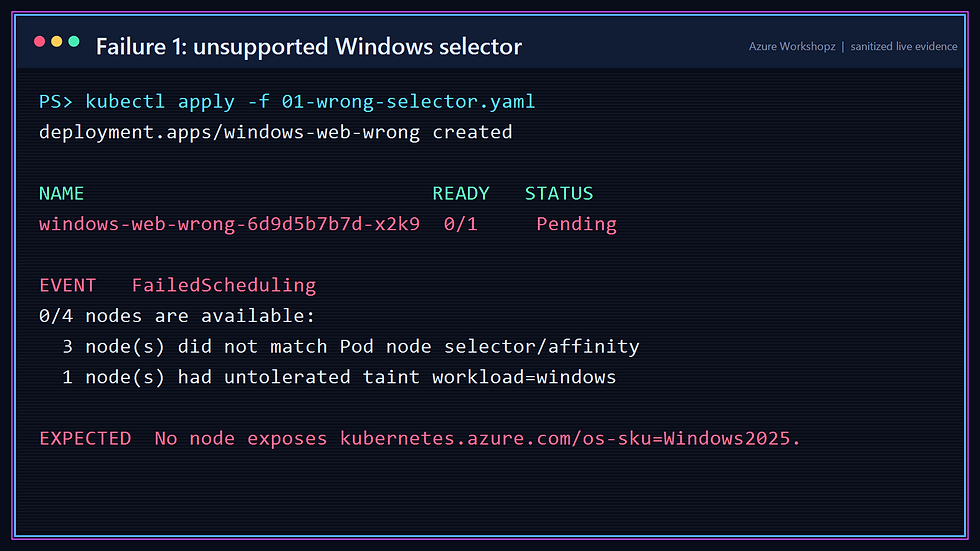
The result is Pending, not an image error. The scheduler cannot find a node with the requested label. Windows Server 2025 is a migration-path note only in this workshop; the live pool is stable Windows Server 2022.
7. Failure 2: correct selector, missing toleration
The next manifest selects Windows Server 2022 correctly but omits the toleration:
nodeSelector: kubernetes.io/os: windows kubernetes.azure.com/os-sku: Windows2022 workload: windows
This is the difference to remember:
• A label/selector says where a pod wants to run.
• A taint/toleration says whether a node permits that pod to run there.
A selector matching the node is not permission to bypass its taint.
8. Failure 3: scheduling works, registry authorization does not
The corrected manifest includes the taint toleration:
tolerations: - key: workload operator: Equal value: windows effect: NoScheduleThe pod now schedules to win22, but the Windows kubelet cannot pull the image:

This is a separate failure plane. Scheduling succeeded. Networking reached the registry. Authentication occurred through the managed kubelet identity. Authorization failed because it had no repository-read permission.
9. Repair ACR access with managed identity
The registry is ABAC-enabled, so the legacy AcrPull role is not the right model. Grant Container Registry Repository Reader to the kubelet identity at the disposable registry scope:
./Start-AksWindowsOperationsWorkshop.ps1 ` -SubscriptionId $subscriptionId ` -Stage Operate
The role grants repository content and metadata read without registry write access or catalog listing. Microsoft’s current role guidance specifically calls out the AKS kubelet managed identity as a supported assignee. Review ACR Microsoft Entra permissions and role assignments (https://learn.microsoft.com/en-us/azure/container-registry/container-registry-rbac-built-in-roles-overview).
No registry password, ACR admin credential, or Kubernetes image-pull secret is created.
10. Run the final private Windows application
The production-shaped manifest adds:
• readiness and liveness probes on /healthz;
• CPU and memory requests and limits;
• host and node names through the Downward API;
• an internal Azure Load Balancer annotation;
• an HPA targeting 40% average CPU.
apiVersion: v1kind: Servicemetadata: name: windows-web annotations: service.beta.kubernetes.io/azure-load-balancer-internal: "true"spec: type: LoadBalancer selector: app: windows-web ports: - port: 80 targetPort: 8080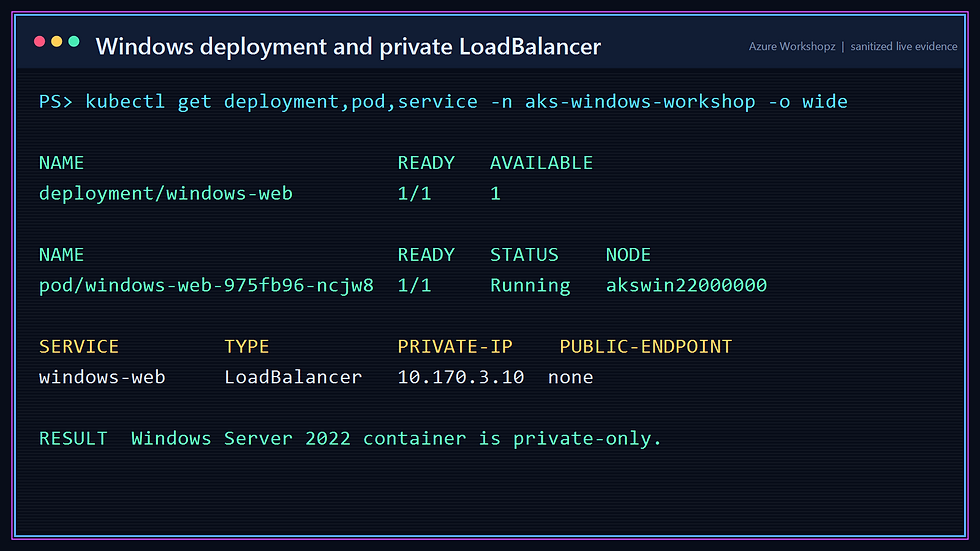
The private service received 10.170.3.10; there is no public application endpoint. The exact private IP can change on a new deployment, so consumers should use internal DNS rather than hard-code it.
11. Validate from inside the private cluster
A short-lived Linux probe pod carries an explicit CriticalAddonsOnly toleration, runs on syslinux, calls the internal service, prints the safe JSON response, and deletes itself. The opslinux pool remains the scheduling home for the transient ARM Run Command pod itself:

./scripts/Invoke-AksPrivateCommand.ps1 ` -SubscriptionId $subscriptionId ` -Command 'kubectl get deployment,pod,service -n aks-windows-workshop -o wide'The helper calls the stable AKS Run Command REST API. During the live run, Azure CLI 2.88.0 completed Run Command on the service but its client wrapper raised Operation returned an invalid status 'OK'. Calling the same ARM operation directly avoided that client-side parser bug. Tokens stay in memory and are cleared in finally.
12. Establish the autoscaling baseline
Before load, the HPA wants one replica and the Windows pool has one node:

Autoscaling has two independent control loops:
1. The HPA observes workload metrics and changes the Deployment replica count.
2. The cluster autoscaler watches unschedulable pods and changes node-pool capacity.
The HPA does not create VMs, and the cluster autoscaler does not decide how many application replicas you need.
13. Scale pods under CPU pressure
Apply the temporary Windows load generator. It repeatedly calls the bounded /cpu endpoint:
./Start-AksWindowsOperationsWorkshop.ps1 ` -SubscriptionId $subscriptionId ` -Stage Autoscale
The HPA increased the Deployment to three replicas. Because only one Windows node existed and the pod requests could not all fit there, pending replicas became the signal for cluster autoscaler.
14. Scale the Windows node pool

The live pool reached its configured maximum of three nodes, and the three replicas spread across three Windows nodes. Distribution is important: a three-replica application placed on a single node still has a node-level single point of failure.
In production, review quota, subnet capacity, image pull time, Windows image size, application startup time, and scale-down behavior together. A 2.23 GiB Windows image is materially slower to pull onto a new node than a small Linux image.
15. Make a PDB too strict—and prove the drain fails
For deterministic maintenance testing, the script temporarily sets the Windows pool minimum to three and keeps three application replicas. It then applies:
apiVersion: policy/v1kind: PodDisruptionBudgetmetadata: name: windows-webspec: minAvailable: 100% selector: matchLabels: app: windows-webDrain one Windows node:
./Start-AksWindowsOperationsWorkshop.ps1 ` -SubscriptionId $subscriptionId ` -Stage Disruption
The failure is expected. With three desired replicas and minAvailable: 100%, Kubernetes is not allowed to evict even one healthy replica voluntarily. The PDB preserved its declared objective, but that objective made planned maintenance impossible.
16. Repair the PDB and drain safely
Change the budget to minAvailable: 2, drain again, probe the internal service while the node is cordoned, and uncordon it:

The application remained available because two replicas could stay ready while Kubernetes moved the third. A PDB is not an availability guarantee on its own: readiness probes, replica placement, spare capacity, and application behavior must all cooperate.
17. Configure upgrade and maintenance controls
Each pool receives:
maxSurge = 1drain timeout = 30 minutesA weekly four-hour node OS maintenance schedule starts Sunday at 02:00 UTC. The live Kubernetes patch upgrade is then executed explicitly, so the workshop does not have to wait for the schedule.

maxSurge=1 means AKS can add one temporary node while it drains and replaces nodes in a pool. More surge can make upgrades faster, but requires quota, subnet addresses, and budget. Microsoft recommends combining maintenance windows, PDBs, surge, drain timeout, and workload readiness rather than treating any one setting as sufficient. See AKS upgrade options and recommendations (https://learn.microsoft.com/en-us/azure/aks/upgrade-options).
18. Perform the supported rolling upgrade
./Start-AksWindowsOperationsWorkshop.ps1 ` -SubscriptionId $subscriptionId ` -Stage UpgradeThe sequence is deliberate:
1. Upgrade the control plane from 1.35.5 to 1.35.6.
2. Probe the private application.
3. Upgrade syslinux; probe again.
4. Upgrade opslinux; probe again.
5. Upgrade win22; probe during and after the Windows surge.

All stages returned Succeeded. Windows nodes were replaced through the surge process and the internal proof service remained healthy. The complete upgrade phase took about 58 minutes in West Europe during this run.
Afterward, the script removes the load generator, restores HPA minimum replicas to one, and restores the Windows autoscaler range to one through three. The HPA returned the application to one replica. Node scale-down is intentionally slower and should be observed rather than forced.
19. Query operational evidence
Run the evidence collector:
./Get-AksWindowsOperationsEvidence.ps1 ` -SubscriptionId $subscriptionId ` -Scenario ValidateIt creates evidence/sanitized-evidence.json, masking GUIDs, raw ARM paths, IP addresses, registry hostnames, and private FQDNs. The final native state was:
cluster: aks-winops-wecontrol plane: 1.35.6 / Succeededsyslinux: 1.35.6 / Succeededopslinux: 1.35.6 / Succeededwin22: 1.35.6 / Succeededprivate cluster: truepublic FQDN disabled: truelocal accounts disabled: trueAzure RBAC: trueACR admin: falseACR anonymous pull: false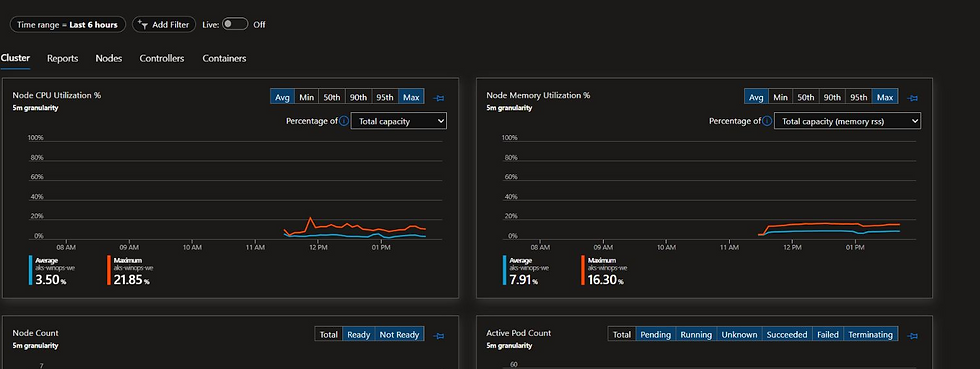
Useful KQL starting points include:
KubePodInventory| where TimeGenerated > ago(4h)| where Namespace == "aks-windows-workshop"| summarize Pods=dcount(PodUid), Restarts=sum(ContainerRestartCount) by Computer, bin(TimeGenerated, 15m)| order by TimeGenerated descKubeEvents| where TimeGenerated > ago(4h)| where Namespace == "aks-windows-workshop"| where Reason in ("FailedScheduling", "Failed", "SuccessfulRescale")| project TimeGenerated, Reason, ObjectKind, Name, Message| order by TimeGenerated ascContainer Insights supplies operational history; Kubernetes objects and events remain the authoritative source for scheduling and disruption behavior. For Windows metric visualization, review the Windows collection requirements described in Container Insights visualization guidance (https://learn.microsoft.com/en-us/azure/azure-monitor/containers/container-insights-experience-v2).
Troubleshooting map
Symptom — Check first — Meaning
Pod is Pending and events mention selector/affinity — nodeSelector, node labels, OS SKU — No eligible node matches placement requirements
Pod is Pending and events mention an untolerated taint — tolerations, node taints — Placement matches, but the node rejects the pod
Pod is ImagePullBackOff with 401 — kubelet identity and ACR data-plane role — Scheduling worked; registry authorization failed
Run Command cannot schedule — Linux pool taints and available CPU/memory — The transient command pod needs an eligible Linux node
HPA stays at one — Metrics availability, requests, target CPU, generator health — The HPA has no reason or no data to scale
HPA grows but Windows pool does not — Pod is schedulable, autoscaler range, quota, pool state — Cluster autoscaler only reacts to unschedulable pods
Drain repeatedly reports PDB violation — desired replicas, ready replicas, minAvailable/maxUnavailable — Voluntary disruption is more restricted than available capacity
Upgrade stalls — PDB, quota, subnet capacity, max surge, image pulls, readiness — One of the replacement prerequisites is blocking rotation
Production hardening
This disposable lab deliberately keeps the Basic ACR public for authenticated data-plane access. A production design should consider:
• Premium ACR with Private Link and private build agents.
• Microsoft Entra workload identity for application access to Azure services.
• Azure Policy for Kubernetes, Defender for Containers, image scanning, and signed artifact verification.
• A governed private administration path using VPN, ExpressRoute, or a peered management VNet for routine automation.
• Separate node pools by trust, lifecycle, OS, and resource profile.
• More than one system pool where availability requirements justify it.
• Upgrade channels, maintenance windows, PDB reviews, quota checks, and synthetic probes in a release gate.
• GitOps or CI/CD with OIDC instead of a human Azure CLI session.
• Repository-scoped ABAC conditions when multiple teams share a registry.
20. Preserve the bundle and clean up
Before deletion, preserve the source files, manifests, cover, ordered screenshots, sanitized transcript, publishing brief, and validation JSON. The bundle must not contain Azure CLI profiles, kubeconfig, tokens, passwords, public IPs, subscription or tenant IDs, principal IDs, raw ARM IDs, or the private runtime file.
Run exact-scope cleanup:
./Remove-AksWindowsOperationsWorkshop.ps1 ` -SubscriptionId $subscriptionId ` -ResourceGroupName rg-aks-windows-operations-we ` -ForceThe cleanup script deletes the Kubernetes workshop namespace, removes disposable role assignments, deletes AKS and waits for its managed node resource group to disappear, then deletes only the workshop resource group. It performs a final subscription query for matching clusters, managed node groups, public IPs, registries, and assignments.

Final result
You operated a private, identity-driven AKS cluster across Linux and Windows nodes without opening its API or application to the Internet. More importantly, you proved how the operational layers fail independently:
• selector mismatch;
• taint rejection;
• registry authorization;
• pod scaling;
• node scaling;
• disruption policy;
• node drain;
• control-plane and node-pool upgrade.
That separation is the core troubleshooting skill. Kubernetes is rarely “just broken”; one control loop is usually telling you exactly which contract was not satisfied.
References
• Azure CNI Overlay concepts (https://learn.microsoft.com/en-us/azure/aks/concepts-network-azure-cni-overlay)
• Manage system node pools in AKS (https://learn.microsoft.com/en-us/azure/aks/use-system-pools)
• Windows containers on AKS (https://learn.microsoft.com/en-us/azure/aks/learn/quick-windows-container-deploy-powershell)
• Access a private AKS cluster with Run Command (https://learn.microsoft.com/en-us/azure/aks/access-private-cluster)
• ACR Tasks overview (https://learn.microsoft.com/en-us/azure/container-registry/container-registry-tasks-overview)
• ACR roles for RBAC and ABAC (https://learn.microsoft.com/en-us/azure/container-registry/container-registry-rbac-built-in-roles-overview)
• AKS deployment and cluster reliability (https://learn.microsoft.com/en-us/azure/aks/best-practices-app-cluster-reliability)
• AKS upgrade options and recommendations (https://learn.microsoft.com/en-us/azure/aks/upgrade-options)
Comments