In this hands-on workshop, you will secure an Azure Storage account with a blob Private Endpoint and Private DNS. PowerShell performs the deployment and testing, while Azure Portal confirms each important setting visually. The complete lab is temporary and finishes with verified cleanup.
WORKSHOP AT A GLANCE
Time: 60–75 minutes
Level: Beginner to intermediate
Region: West Europe
Estimated cost: A few cents when cleaned up immediately
Deployment method: Azure PowerShell with Azure Portal verification
Public exposure: No VM public IP and storage public network access disabled
LEARNING OBJECTIVES
• Build a private-only test network and managed-identity VM.
• Create a secure StorageV2 account.
• Add a blob Private Endpoint with a predictable private IP.
• Configure a Private DNS zone, A record, and VNet link.
• Prove that the storage hostname resolves to a private address.
• Break and repair the DNS path without exposing the storage account.
• Delete every temporary Azure resource.
PREREQUISITES
You need an Azure subscription with permission to create networking, compute, storage, role assignments, and Private DNS resources. Install the Az PowerShell modules and use PowerShell 7. No interactive SSH, Bastion, NAT Gateway, or VM public IP is required.
ARCHITECTURE AND IP PLAN
Resource group: rg-bcwc-private-storage-workshop-weu
Virtual network: vnet-bcwc-private-storage-weu — 10.50.0.0/16
Test VM subnet: snet-test-vm — 10.50.1.0/24
Private Endpoint subnet: snet-private-endpoints — 10.50.2.0/24
Test VM address: 10.50.1.4
Blob Private Endpoint address: 10.50.2.4
Private DNS zone: privatelink [dot] blob [dot] core [dot] windows [dot] net
1. AUTHENTICATE SAFELY
Connect to Azure, select the intended subscription by name, and display only privacy-safe context. Never include tenant IDs, subscription IDs, email addresses, access tokens, or SSH key material in workshop output.
PowerShell:
Connect-AzAccount
Get-AzContext | Select-Object @{Name='Subscription';Expression={$_.Subscription.Name}}, Environment

Figure 1. Privacy-safe Azure PowerShell authentication context.
2. RUN THE PREFLIGHT
The Preflight phase checks the required Az commands, provider registration, regional vCPU quota, Ubuntu image availability, VM size availability, globally unique storage name, existing resource group, and a live cost estimate. The script stops before creation if a required check fails or the estimate exceeds EUR 2.
PowerShell:
& $WorkshopScript -Phase Preflight -SubscriptionName 'Visual Studio Enterprise Subscription'

Figure 2. Provider, quota, image, storage-name, and cost preflight checks passed.
3. CREATE THE ISOLATED RESOURCE GROUP
Keep the complete lab inside one temporary resource group. The script refuses to build over an existing group, which protects unrelated resources and makes cleanup predictable.
PowerShell:
& $WorkshopScript -Phase Build
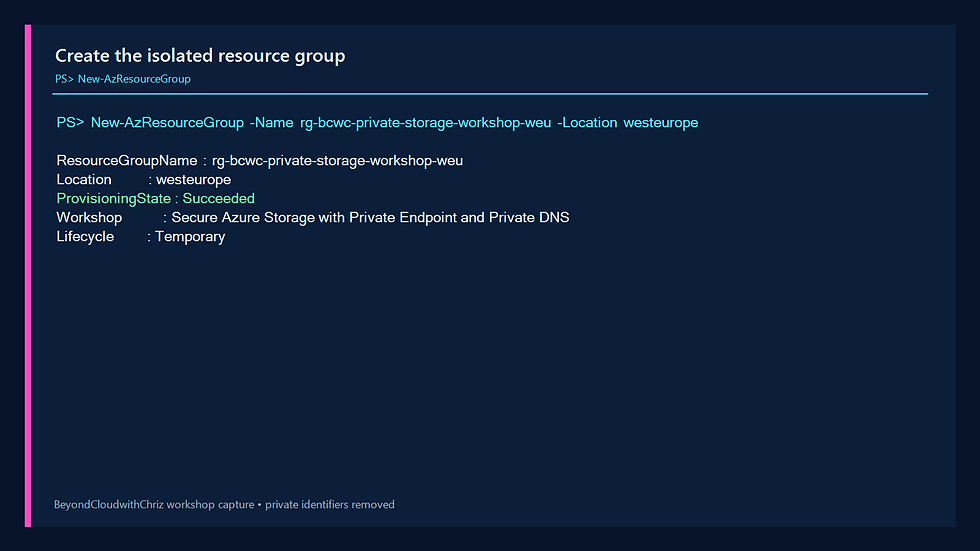
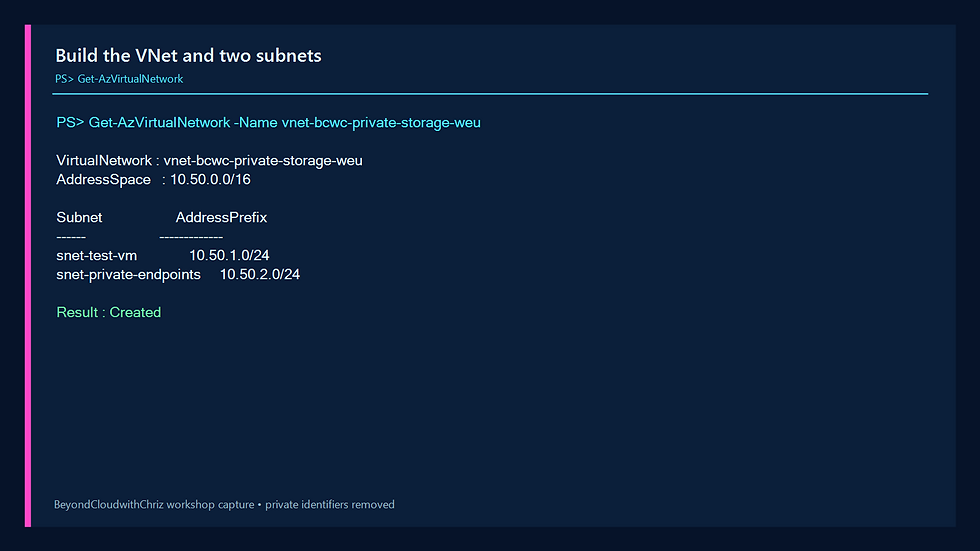

Figure 5. The private-only VM uses managed identity and has no public IP.
6. CREATE THE STORAGE ACCOUNT
Create a Standard LRS StorageV2 account with HTTPS-only traffic, TLS 1.2, and anonymous blob access disabled. Public network access stays enabled only long enough to capture the baseline. The Private Endpoint phase will disable it and set the storage firewall to default-deny.
PowerShell:
Get-AzStorageAccount -ResourceGroupName rg-bcwc-private-storage-workshop-weu


Figure 7. Before Private DNS, the storage hostname resolves to a public service address.
8. CREATE THE BLOB PRIVATE ENDPOINT
Create a Private Link service connection for the blob subresource. Use a static Private Endpoint address of 10.50.2.4 and a dedicated network interface. Azure automatically approves the connection because the storage account and endpoint are in the same authorized subscription context.
PowerShell:
& $WorkshopScript -Phase PrivateEndpoint

Figure 8. The blob Private Endpoint is approved and uses 10.50.2.4.
9. CONFIGURE PRIVATE DNS
Create the private zone for the blob service, link it to the VNet with auto-registration disabled, and attach the zone to the Private Endpoint through a DNS zone group. Azure creates the storage-account A record that points to 10.50.2.4.
PowerShell:
Get-AzPrivateDnsVirtualNetworkLink -ZoneName $PrivateDnsZone
Get-AzPrivateDnsRecordSet -ZoneName $PrivateDnsZone -RecordType A
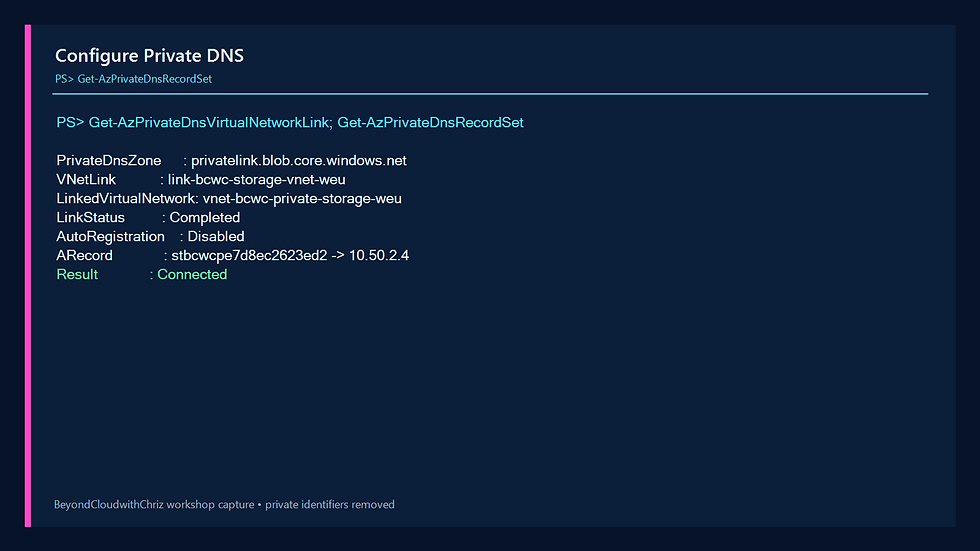
Figure 9. The private zone, VNet link, and A record are connected.
10. PROVE THE PRIVATE DATA PATH
Disable public network access, set the storage firewall to default-deny with no bypass, and run the test from the VM. The storage hostname must resolve to 10.50.2.4. The VM obtains a data-plane token from managed identity without displaying it, and the authenticated blob request returns HTTP 200.
PowerShell:
& $WorkshopScript -Phase ValidatePrivate

Figure 10. The private-only VM resolves 10.50.2.4 and receives HTTP 200 with managed identity.
11. VERIFY THE DESIGN IN AZURE PORTAL
PowerShell is the source of deployment truth, but Portal verification makes the workshop easier to audit. Open the isolated resource group and confirm that the VNet, VM, NICs, NSG, storage account, Private Endpoint, and Private DNS zone are grouped together. A temporary boot-diagnostics account created during the capture is also isolated here and is removed during cleanup.

Figure 11. Every workshop resource is isolated in one temporary resource group.
Open the storage account Networking page. Public network access must display Disabled. This proves that clients should not rely on the public storage endpoint.

Figure 12. Azure Portal confirms that public network access is disabled.
Select the Private endpoints tab. The blob connection must show Approved. A pending or rejected connection cannot carry private traffic.

Figure 13. The blob Private Endpoint connection is approved.
Open the private DNS zone Recordsets page. The storage-account A record must point to 10.50.2.4. The zone's SOA record is expected and should not be edited.

Figure 14. The storage-account record maps the blob name to 10.50.2.4.
Open Virtual Network Links. The workshop link must show Completed, point to vnet-bcwc-private-storage-weu, and keep auto-registration disabled. This link allows Azure-provided DNS inside the VNet to query the private zone.
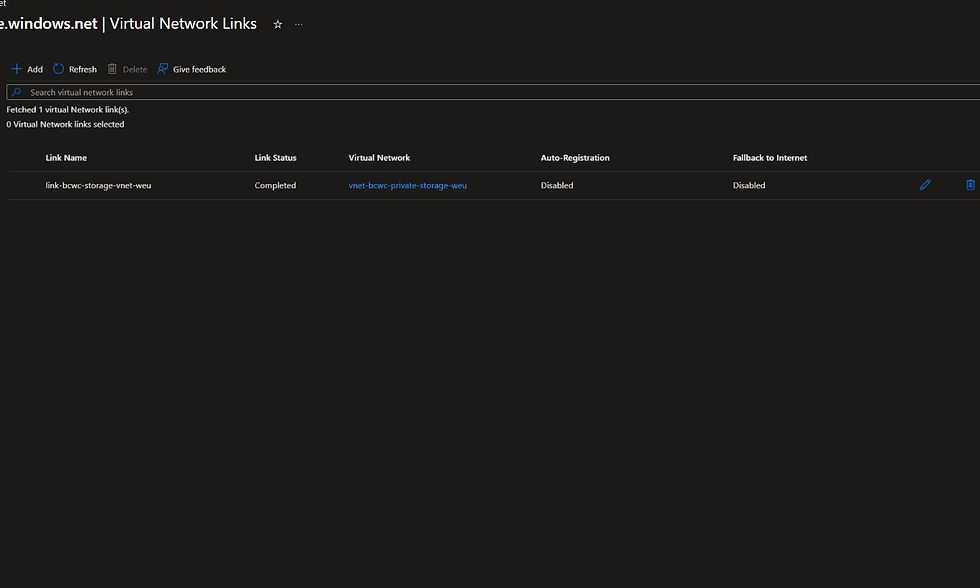
Figure 15. The VNet link is completed and auto-registration is disabled.
12. BREAK PRIVATE DNS SAFELY
Remove only the VNet link. Keep the zone, A record, Private Endpoint, and storage security controls intact. The VM now resolves the storage hostname to the public service address instead of 10.50.2.4, so the workshop's private-path acceptance test fails.
Important: an HTTP success by itself does not prove that the Private Endpoint path is being used. Private IP resolution is the decisive evidence in this lab. Public network access remains disabled and the storage firewall remains default-deny.
PowerShell:
& $WorkshopScript -Phase BreakDns

Figure 16. Removing the VNet link makes private-path validation fail even though the A record still exists.
13. DIAGNOSE THE ROOT CAUSE
Query the private zone, its storage-account A record, the VNet link, and DNS from inside the VM. The evidence separates two independent objects: the A record still says 10.50.2.4, but the VNet cannot query that zone because its link is missing.
PowerShell:
& $WorkshopScript -Phase DiagnoseDns
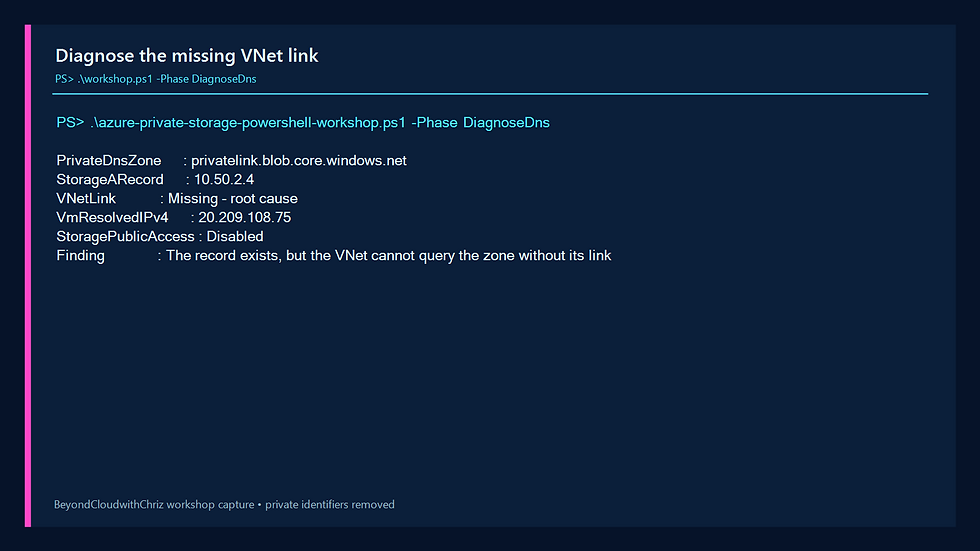
Figure 17. The A record is healthy; the missing VNet link is the root cause.
14. REPAIR PRIVATE DNS
Recreate the VNet link with auto-registration disabled. Wait for Azure DNS propagation, then rerun the VM-side probe. Resolution must return to 10.50.2.4 and the managed-identity request must return HTTP 200.
PowerShell:
& $WorkshopScript -Phase FixDns

Figure 18. Restoring the link returns private DNS and the successful storage request.
15. RUN FINAL VALIDATION
The final validation phase checks all important controls together: storage public access disabled, firewall default-deny, endpoint Approved, private address 10.50.2.4, connected VNet link, private-only VM at 10.50.1.4, and HTTP 200 through the private path.
PowerShell:
& $WorkshopScript -Phase Validate

Figure 19. Every private storage acceptance check passes together.
TROUBLESHOOTING
Storage name unavailable: choose a different globally unique suffix, then rerun Preflight.
Private Endpoint stays Pending: verify that you can approve private endpoint connections on the storage account.
DNS still returns a public address: confirm the private zone name, A record, DNS zone group, VNet link, and VM DNS configuration. Allow time for negative DNS cache entries to expire.
HTTP returns 403: DNS may be correct while authorization is wrong. Confirm that the VM identity has Storage Blob Data Reader at the storage-account scope and allow time for role assignment propagation.
VM Run Command fails: confirm the VM is running and the Azure guest agent is healthy. No inbound SSH rule is required.
16. DELETE THE LAB AND VERIFY CLEANUP
Delete only the exact workshop resource group. Poll until Azure reports it absent, then remove the temporary SSH key files. Never delete a shared resource group as part of this lab.
PowerShell:
& $WorkshopScript -Phase Cleanup

Figure 20. Azure reports the resource group absent and no chargeable lab resources remain.
KNOWLEDGE CHECK
1. Why does the storage hostname stay the same after Private Endpoint creation?
Answer: Applications keep using the normal storage hostname. Private DNS changes its resolution inside the linked VNet to the Private Endpoint address.
2. What proves that the Private Endpoint path is active?
Answer: The VM resolves the storage hostname to 10.50.2.4 and the endpoint connection is Approved. HTTP success alone is not path proof.
3. Why is the VM system-assigned identity useful?
Answer: It gives the VM short-lived Azure authentication without placing storage keys, SAS tokens, or credentials in the script.
4. What happens when the VNet link is removed?
Answer: The A record remains in the private zone, but the VNet can no longer query that zone. DNS falls back away from the private endpoint address.
5. Why use one isolated resource group?
Answer: It creates a clear ownership and cleanup boundary, making it easy to prove that every lab resource has been deleted.
NEXT STEPS
Repeat the pattern for file, queue, or table storage by using the matching Private Link subresource and private DNS zone. In production, add centralized DNS forwarding, monitoring, resource locks, policy enforcement, and infrastructure as code.
WORKSHOP RESULT
You built a private-only test network, secured Azure Storage with a blob Private Endpoint and Private DNS, authenticated with managed identity, proved the private path, diagnosed a broken DNS link, repaired it, and removed every temporary resource. The final Azure cleanup check passed.
Comments