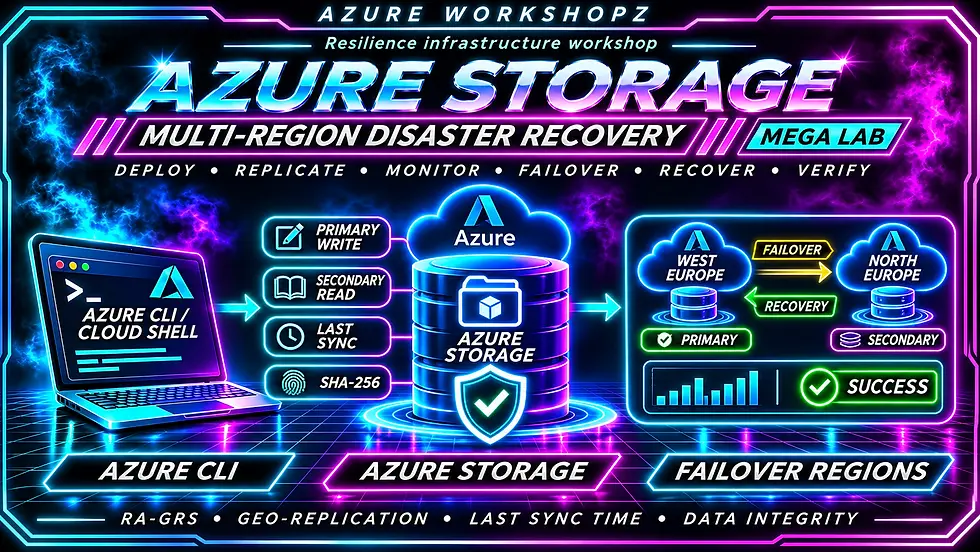
Azure Workshopz | Beyond Cloud with Chriz
DEPLOY • REPLICATE • MONITOR • BREAK • FAILOVER • RECOVER • VERIFY
Introduction
Your Azure Storage account contains business-critical application data. Geo-redundancy is enabled, your infrastructure is operational, and your disaster recovery strategy is documented. But what happens when the primary storage region changes while applications are actively uploading and downloading data?
Will applications reconnect? How long will access be interrupted? Is every successfully uploaded file still available? Can you verify data integrity and safely restore the original regional configuration?
In this enterprise mega lab, deploy a geo-redundant storage account, generate continuous application traffic, investigate replication, perform planned regional failover, verify data integrity and restore the original regional configuration. Everything uses Azure CLI and PowerShell 7 — no Bash or Python.
Workshop overview
Difficulty: Advanced
Duration: 3–5 hours or longer, depending on synchronization and failover.
Estimated cost: Low–Medium; actual charges depend on capacity, transactions, replication traffic and regional pricing.
Deployment and Azure operations: Azure CLI
Automation and reporting: PowerShell 7
Primary region: West Europe; paired secondary: North Europe (verify actual pairing).
Redundancy: RA-GRS | Authentication: Microsoft Entra ID | Monitoring: Azure Monitor
Certification relevance: AZ-104 / AZ-305
Learning objectives
Deploy geo-redundant storage with passwordless authentication; examine asynchronous replication and read-only secondary endpoints; generate continuous read/write traffic with Azure CLI and PowerShell jobs; inspect Last Sync Time and readiness; perform planned failover and failback; measure client recovery; reconcile uncertain writes and verify SHA-256 checksums; investigate Azure Monitor metrics and activity logs.
Enterprise architecture
       APPLICATION CLIENT
       PowerShell / Azure CLI
                |
         Microsoft Entra ID
                |
      Primary Blob Endpoint
                |
       WEST EUROPE (primary)
        Blob read / write
                |
       Asynchronous replication
                |
       NORTH EUROPE (secondary)
           Blob read only
                |
      Secondary Blob Endpoint

       Azure Monitor / Activity Logs

NORMAL:    West Europe PRIMARY ---> North Europe SECONDARY
FAILOVER:  West Europe SECONDARY <-- North Europe PRIMARY
FAILBACK:  West Europe PRIMARY ---> North Europe SECONDARY
The application uses the same primary hostname throughout the exercise. Azure changes the underlying DNS mapping when regional roles switch.
Storage redundancy and disaster recovery
LRS protects against local hardware failures. ZRS distributes copies across availability zones. GRS adds asynchronous replication to a paired region. RA-GRS adds read access to the secondary region. GZRS combines zone and geo-redundancy; RA-GZRS adds secondary reads.
Planned failover requires both regions to be operational, completes synchronization before switching roles, retains geo-redundancy for RA-GRS and is intended to avoid data loss. Unplanned failover may lose recent writes and initially leaves the new primary locally redundant.
Planned transitions can interrupt service; each typically takes around an hour. Initial synchronization can extend the exercise.
Prerequisites and safety
Use a disposable Azure resource group, a recent Azure CLI, PowerShell 7, permissions to deploy resources, assign data-plane RBAC and perform account failover. Prefer a local PowerShell terminal that can stay open for several hours; Cloud Shell may time out. Use synthetic blob data only. Never run this exercise against production or active Azure file shares. Review the Microsoft failover FAQ for incompatible features. Never substitute unplanned failover.
THE MEGA LAB
Step 1 — Prepare the PowerShell environment
Open PowerShell 7 or https://shell.azure.com in PowerShell mode. Authenticate locally if needed.
$PSVersionTable.PSVersion
az version
az storage account failover --help
# If not already signed in:
az login
az account show --query "{Name:name,Subscription:id,Tenant:tenantId}" -o table
$Location = "westeurope"
$Suffix = [guid]::NewGuid().ToString("N").Substring(0,10)
$RG = "rg-storage-dr-$Suffix"
$Storage = "stdr$Suffix"
$Container = "enterprise-data"
$Subscription = az account show --query id -o tsv
if ($LASTEXITCODE -ne 0 -or -not $Subscription) { throw "Select a subscription." }
$LabDir = Join-Path $HOME "storage-dr-$Suffix"
New-Item -ItemType Directory -Path $LabDir -Force | Out-Null
Set-Location $LabDir
az group create --subscription $Subscription --name $RG --location $Location --tags Environment=Workshop Project=StorageDisasterRecovery
if ($LASTEXITCODE -ne 0) { throw "Resource group deployment failed." }
az group show --subscription $Subscription --name $RG -o tableStep 2 — Deploy Azure Storage with RA-GRS
Create a GPv2 account, Hot access tier, HTTPS only, no anonymous blob or shared-key access. Public HTTPS endpoints remain available for authenticated requests.
az storage account create --subscription $Subscription --name $Storage --resource-group $RG --location $Location --kind StorageV2 --sku Standard_RAGRS --access-tier Hot --https-only true --min-tls-version TLS1_2 --allow-blob-public-access false --allow-shared-key-access false
if ($LASTEXITCODE -ne 0) { throw "Storage deployment failed." }
$StorageID = az storage account show --subscription $Subscription -g $RG -n $Storage --query id -o tsv
az storage account show --subscription $Subscription -g $RG -n $Storage --query "{Name:name,SKU:sku.name,Primary:primaryLocation,Secondary:secondaryLocation,State:provisioningState}" -o table
Expected: Standard_RAGRS, westeurope, northeurope, Succeeded. Azure chooses the paired region; verify the actual result.
Step 3 — Configure passwordless authentication
Management-plane permissions do not automatically grant blob access. Assign Storage Blob Data Contributor to the signed-in user.
$UserID = az ad signed-in-user show --query id -o tsv
az role assignment create --assignee-object-id $UserID --assignee-principal-type User --role "Storage Blob Data Contributor" --scope $StorageID
if ($LASTEXITCODE -ne 0) { throw "Role assignment failed." }
az role assignment list --assignee $UserID --scope $StorageID -o table
Allow RBAC propagation, then create the private container.
az storage container create --subscription $Subscription --account-name $Storage --name $Container --auth-mode login
if ($LASTEXITCODE -ne 0) { throw "Check data-plane RBAC and retry container creation." }
If HTTP 403 occurs, inspect the identity and role assignment. Do not enable shared-key authentication as a workaround.
Step 4 — Discover the storage endpoints
$PrimaryURL = az storage account show --subscription $Subscription -g $RG -n $Storage --query primaryEndpoints.blob -o tsv
$SecondaryURL = az storage account show --subscription $Subscription -g $RG -n $Storage --query secondaryEndpoints.blob -o tsv
$PrimaryURL
$SecondaryURL
[System.Net.Dns]::GetHostAddresses(([uri]$PrimaryURL).Host)
[System.Net.Dns]::GetHostAddresses(([uri]$SecondaryURL).Host)
Expected hostnames: storage.blob.core.windows.net and storage-secondary.blob.core.windows.net. Primary supports reads and writes; secondary is read-only. DNS IPs alone do not identify the active region; verify regional properties.
Step 5 — Upload and validate the first transaction
@{
    OrderID = "ORD-0001"
    Customer = "Enterprise Customer"
    Amount = 499.99
    Currency = "EUR"
    Status = "Completed"
} | ConvertTo-Json | Set-Content "order-0001.json" -Encoding utf8

$OriginalHash = (Get-FileHash "order-0001.json" -Algorithm SHA256).Hash
az storage blob upload --subscription $Subscription --account-name $Storage --container-name $Container --name "baseline/order-0001.json" --file "order-0001.json" --auth-mode login --overwrite false
if ($LASTEXITCODE -ne 0) { throw "Upload failed." }
az storage blob list --subscription $Subscription --account-name $Storage --container-name $Container --auth-mode login --query "[].{Name:name,Size:properties.contentLength}" -o table
az storage blob download --subscription $Subscription --account-name $Storage --container-name $Container --name "baseline/order-0001.json" --file "downloaded-order.json" --auth-mode login
if ($LASTEXITCODE -ne 0) { throw "Download failed." }
$DownloadedHash = (Get-FileHash "downloaded-order.json" -Algorithm SHA256).Hash
if ($OriginalHash -ne $DownloadedHash) { throw "Baseline checksum mismatch." }
$OriginalHash -eq $DownloadedHash
Expected: True.
Step 6 — Build the Azure CLI workload using PowerShell
The reusable workload continuously uploads unique synthetic transactions and optionally downloads the anchor object. It logs each attempt before upload, records Azure CLI outcomes, elapsed time and checksums, and supports graceful shutdown using a stop file. Azure CLI process startup and internal retries influence measurements; these are command-level observations, not individual HTTP request latencies.
@'
param(
    [string]$Storage,
    [string]$Container,
    [string]$Subscription,
    [string]$Phase,
    [string]$LabDir,
    [int]$Count = 0,
    [int]$Interval = 5,
    [bool]$ReadProbe = $false
)

$ErrorActionPreference = "Stop"
$PSNativeCommandUseErrorActionPreference = $false
Set-Location $LabDir
$Log = Join-Path $LabDir "$Phase.csv"
$StopFile = Join-Path $LabDir "stop-$Phase"
$Payload = Join-Path $LabDir "$Phase-payload.json"
$ReadFile = Join-Path $LabDir "$Phase-download.json"
if (Test-Path $Log) { throw "Existing log: $Log" }
$AnchorHash = (Get-FileHash "order-0001.json" -Algorithm SHA256).Hash

function Write-Event {
    param($Started,$Finished,$Operation,$Blob,$Hash,$Result,$ExitCode,$LatencyMs,$ErrorText)
    [PSCustomObject]@{
        Started = $Started
        Finished = $Finished
        Operation = $Operation
        Blob = $Blob
        SHA256 = $Hash
        Result = $Result
        ExitCode = $ExitCode
        LatencyMs = $LatencyMs
        Error = $ErrorText
    } | Export-Csv -Path $Log -Append -NoTypeInformation
}

$Sequence = 0
$RunID = [guid]::NewGuid().ToString("N")

while (-not (Test-Path $StopFile)) {
    if ($Count -gt 0 -and $Sequence -ge $Count) { break }
    $Sequence++
    $Blob = "workload/$Phase/$RunID-$Sequence.json"
    @{
        TransactionID = [guid]::NewGuid().ToString()
        Sequence = $Sequence
        Phase = $Phase
        Timestamp = [DateTime]::UtcNow.ToString("o")
        Data = "X" * 4096
    } | ConvertTo-Json | Set-Content $Payload -Encoding utf8

    $Hash = (Get-FileHash $Payload -Algorithm SHA256).Hash
    $Started = [DateTime]::UtcNow.ToString("o")
    Write-Event -Started $Started -Operation "UPLOAD" -Blob $Blob -Hash $Hash -Result "ATTEMPT"
    $Timer = [Diagnostics.Stopwatch]::StartNew()
    $Output = az storage blob upload --subscription $Subscription --account-name $Storage --container-name $Container --name $Blob --file $Payload --auth-mode login --overwrite false --only-show-errors -o none 2>&1
    $Code = $LASTEXITCODE
    $Timer.Stop()
    $Result = if ($Code -eq 0) { "SUCCESS" } else { "ERROR" }
    Write-Event -Started $Started -Finished ([DateTime]::UtcNow.ToString("o")) -Operation "UPLOAD" -Blob $Blob -Hash $Hash -Result $Result -ExitCode $Code -LatencyMs $Timer.ElapsedMilliseconds -ErrorText ($Output | Out-String).Trim()
    Write-Output "UPLOAD $Result $Blob"

    if ($ReadProbe) {
        Remove-Item $ReadFile -ErrorAction SilentlyContinue
        $Started = [DateTime]::UtcNow.ToString("o")
        $Timer.Restart()
        $Output = az storage blob download --subscription $Subscription --account-name $Storage --container-name $Container --name "baseline/order-0001.json" --file $ReadFile --auth-mode login --only-show-errors -o none 2>&1
        $Code = $LASTEXITCODE
        $Timer.Stop()
        $Result = "ERROR"
        if ($Code -eq 0 -and (Test-Path $ReadFile)) {
            $Hash = (Get-FileHash $ReadFile -Algorithm SHA256).Hash
            $Result = if ($Hash -eq $AnchorHash) { "SUCCESS" } else { "MISMATCH" }
        }
        Write-Event -Started $Started -Finished ([DateTime]::UtcNow.ToString("o")) -Operation "DOWNLOAD" -Blob "baseline/order-0001.json" -Hash $AnchorHash -Result $Result -ExitCode $Code -LatencyMs $Timer.ElapsedMilliseconds -ErrorText ($Output | Out-String).Trim()
        Write-Output "DOWNLOAD $Result"
    }
    Start-Sleep -Seconds $Interval
}
'@ | Set-Content "Start-StorageWorkload.ps1" -Encoding utf8
Step 7 — Generate the baseline dataset
& ./Start-StorageWorkload.ps1 -Storage $Storage -Container $Container -Subscription $Subscription -Phase "baseline" -LabDir $LabDir -Count 100 -Interval 1
Import-Csv "./baseline.csv" | Group-Object Operation,Result | Select-Object Name,Count

$BaselineSuccess = @(Import-Csv "./baseline.csv" | Where-Object { $_.Operation -eq "UPLOAD" -and $_.Result -eq "SUCCESS" })
if ($BaselineSuccess.Count -ne 100) { throw "Baseline must contain 100 acknowledged uploads." }
az storage blob list --subscription $Subscription --account-name $Storage --container-name $Container --prefix "workload/baseline/" --auth-mode login --query "length(@)" -o tsv
Expected: 100 attempts, 100 successes, 100 workload blobs. Resolve any failures before proceeding.
Step 8 — Investigate geo-replication
az storage account show --subscription $Subscription -g $RG -n $Storage --expand geoReplicationStats --query geoReplicationStats -o json
az storage account show --subscription $Subscription -g $RG -n $Storage --expand geoReplicationStats --query geoReplicationStats.lastSyncTime -o tsv
Geo-replication is asynchronous. Last Sync Time marks replication progress, not exact per-blob latency. Recent writes after that timestamp may not yet be available in the secondary region.
Step 9 — Build the SHA-256 verification function
Azure CLI manages resources and retrieves Microsoft Entra tokens. For explicit primary or secondary reads, PowerShell calls the Blob REST API with a Storage audience token. No account keys are required. Token refresh is included for longer verification runs.
function Test-StorageIntegrity {
    param([string]$Endpoint,[string[]]$Logs)

    $Writes = @{}
    foreach ($Log in $Logs) {
        foreach ($Row in (Import-Csv $Log)) {
            if ($Row.Operation -eq "UPLOAD") { $Writes[$Row.Blob] = $Row }
        }
    }

    $Summary = [ordered]@{
        Acknowledged = 0
        AcknowledgedVerified = 0
        AcknowledgedMissing = 0
        UncertainVerified = 0
        UncertainMissing = 0
        ChecksumMismatch = 0
        VerificationErrors = 0
    }

    $TempFile = Join-Path $LabDir "verify-blob.tmp"
    $RefreshAt = [DateTime]::MinValue
    $Headers = @{"x-ms-version" = "2023-11-03"}

    foreach ($Row in $Writes.Values) {
        $Acknowledged = $Row.Result -eq "SUCCESS"
        if ($Acknowledged) { $Summary.Acknowledged++ }

        if ([DateTime]::UtcNow -ge $RefreshAt) {
            $Token = az account get-access-token --subscription $Subscription --resource "https://storage.azure.com/" --query accessToken -o tsv
            if ($LASTEXITCODE -ne 0 -or -not $Token) { throw "Storage token acquisition failed." }
            $Headers.Authorization = "Bearer $Token"
            $RefreshAt = [DateTime]::UtcNow.AddMinutes(5)
        }

        $URI = "$($Endpoint.TrimEnd('/'))/$Container/$($Row.Blob)"
        Remove-Item $TempFile -ErrorAction SilentlyContinue

        try {
            $Headers["x-ms-date"] = [DateTime]::UtcNow.ToString("R")
            $Response = Invoke-WebRequest -Uri $URI -Headers $Headers -Method Get -OutFile $TempFile -PassThru -SkipHttpErrorCheck -TimeoutSec 30 -ErrorAction Stop

            if ($Response.StatusCode -eq 404 -and $Response.Headers["x-ms-error-code"] -contains "BlobNotFound") {
                if ($Acknowledged) { $Summary.AcknowledgedMissing++ }
                else { $Summary.UncertainMissing++ }
                Write-Host "Missing blob: $($Row.Blob)"
                continue
            }

            if ($Response.StatusCode -ne 200) {
                $Summary.VerificationErrors++
                Write-Warning "HTTP $($Response.StatusCode): $($Row.Blob)"
                continue
            }

            $Hash = (Get-FileHash $TempFile -Algorithm SHA256).Hash
            if ($Hash -ne $Row.SHA256) {
                $Summary.ChecksumMismatch++
                Write-Warning "Checksum mismatch: $($Row.Blob)"
            } elseif ($Acknowledged) {
                $Summary.AcknowledgedVerified++
            } else {
                $Summary.UncertainVerified++
                Write-Host "Uncertain write committed: $($Row.Blob)"
            }
        } catch {
            $Summary.VerificationErrors++
            Write-Warning $_.Exception.Message
        }
    }

    Remove-Item $TempFile -ErrorAction SilentlyContinue
    [PSCustomObject]$Summary
}

function Assert-Integrity {
    param($Result)
    if ($Result.Acknowledged -eq 0 -or
        $Result.AcknowledgedVerified -ne $Result.Acknowledged -or
        $Result.AcknowledgedMissing -gt 0 -or
        $Result.ChecksumMismatch -gt 0 -or
        $Result.VerificationErrors -gt 0) {
        throw "Data integrity checkpoint failed."
    }
}

$PrimaryCheck = Test-StorageIntegrity -Endpoint $PrimaryURL -Logs @("baseline.csv")
$PrimaryCheck | Format-List
Assert-Integrity $PrimaryCheck
Expected: Acknowledged = 100, AcknowledgedVerified = 100, no missing acknowledged blobs, uncertain writes, checksum mismatches or verification errors.
Step 10 — Verify the secondary region
$SecondaryCheck = Test-StorageIntegrity -Endpoint $SecondaryURL -Logs @("baseline.csv")
$SecondaryCheck | Format-List
Illustrative initial result: 87 verified, 13 missing, zero checksum mismatches. Replication lag is possible. HTTP 403, transport errors or a missing container must be investigated separately.
Start-Sleep -Seconds 60
$SecondaryCheck = Test-StorageIntegrity -Endpoint $SecondaryURL -Logs @("baseline.csv")
$SecondaryCheck | Format-List
Assert-Integrity $SecondaryCheck
Repeat after allowing replication to advance. Do not proceed until this check passes.
Step 11 — BREAK #1: Attempt a secondary-region write
RA-GRS is not an active-active write architecture. Test this assumption using a disposable object and a Storage Entra token.
$Token = az account get-access-token --subscription $Subscription --resource "https://storage.azure.com/" --query accessToken -o tsv
if ($LASTEXITCODE -ne 0 -or -not $Token) { throw "Token acquisition failed." }
$Headers = @{
    Authorization = "Bearer $Token"
    "x-ms-version" = "2023-11-03"
    "x-ms-date" = [DateTime]::UtcNow.ToString("R")
    "x-ms-blob-type" = "BlockBlob"
    "If-None-Match" = "*"
}
$URI = "$($SecondaryURL.TrimEnd('/'))/$Container/secondary-write-$Suffix.txt"
$Response = Invoke-WebRequest -Uri $URI -Method Put -Headers $Headers -Body "Secondary region write test" -ContentType "text/plain" -SkipHttpErrorCheck -TimeoutSec 30
$Response.StatusCode
$Response.Content
Remove-Variable Token,Headers
if ($Response.StatusCode -ge 200 -and $Response.StatusCode -lt 300) { throw "Unexpected secondary write success: inspect endpoint." }
Expected: rejection. Inspect the returned storage error, confirm secondary reads and primary writes work with the same identity, then direct application writes back to the primary hostname.
Step 12 — Configure automated failover readiness checks
Use ARM API 2025-08-01 to inspect eligibility and replication properties. Microsoft does not support planned failover when Last Sync Time is more than two hours old.
$StatusURI = "https://management.azure.com" + $StorageID + "?api-version=2025-08-01&%24expand=geoReplicationStats"
function Get-StorageDRStatus {
    $JSON = az rest --method get --uri $StatusURI --output json
    if ($LASTEXITCODE -ne 0) { throw "Storage status query failed." }
    $JSON | ConvertFrom-Json
}

function Assert-FailoverReadiness {
    $Status = Get-StorageDRStatus
    $Properties = $Status.properties
    $Geo = $Properties.geoReplicationStats
    $Sync = [DateTimeOffset]::MinValue
    $Parsed = [DateTimeOffset]::TryParse([string]$Geo.lastSyncTime,[ref]$Sync)
    $Age = if ($Parsed) { ([DateTimeOffset]::UtcNow - $Sync).TotalHours } else { [double]::PositiveInfinity }

    $Checks = [ordered]@{
        GeoRedundancy = $Status.sku.name -eq "Standard_RAGRS"
        PrimaryAvailable = $Properties.statusOfPrimary -eq "Available"
        SecondaryAvailable = $Properties.statusOfSecondary -eq "Available"
        NoActiveFailover = $Properties.failoverInProgress -ne $true
        ReplicationLive = $Geo.status -eq "Live"
        PlannedSupported = $Geo.canPlannedFailover -eq $true
        RecentLastSync = $Parsed -and $Age -ge 0 -and $Age -lt 2
    }

    $Checks.GetEnumerator() | Format-Table Name,Value | Out-Host
    if ($Checks.Values -contains $false) { throw "Not ready for planned failover." }
    Write-Host "Last Sync Time: $($Geo.lastSyncTime)"
    return $Status
}

$Status = Assert-FailoverReadiness
$OriginalPrimary = $Status.properties.primaryLocation
$OriginalSecondary = $Status.properties.secondaryLocation
$Status.properties.geoReplicationStats
Stop if any check fails. Allow synchronization to complete, investigate regional status and consult Microsoft restrictions. Never switch to an unplanned operation.
Step 13 — Start continuous application traffic
Remove-Item "./stop-failover" -ErrorAction SilentlyContinue
$WorkloadJob = Start-Job -FilePath (Join-Path $LabDir "Start-StorageWorkload.ps1") -ArgumentList @($Storage,$Container,$Subscription,"failover",$LabDir,0,5,$true)
Start-Sleep -Seconds 45
Get-Job -Id $WorkloadJob.Id
Receive-Job -Job $WorkloadJob -Keep
Import-Csv "./failover.csv" | Select-Object -Last 10 | Format-Table Operation,Result,LatencyMs
Expected: successful uploads and downloads. Keep the session and job running. Do not initiate failover until both operations succeed.
Step 14 — Perform planned regional failover
The reusable transition function checks current primary, replication eligibility, and recent successful upload/download probes before starting. Azure CLI waits for the management operation.
function Invoke-PlannedDRTransition {
    param([string]$Phase,[string]$ExpectedPrimary)

    $Status = Assert-FailoverReadiness
    if ($Status.properties.primaryLocation -ne $ExpectedPrimary) { throw "Unexpected primary region." }
    if ($WorkloadJob.State -ne "Running") { throw "Workload is not running." }

    $Events = @(Import-Csv "$Phase.csv" | Where-Object Result -ne "ATTEMPT")
    foreach ($Operation in @("UPLOAD","DOWNLOAD")) {
        $Latest = $Events | Where-Object Operation -eq $Operation | Select-Object -Last 1
        if (-not $Latest -or $Latest.Result -ne "SUCCESS") { throw "No healthy recent $Operation probe." }
    }

    $Status | ConvertTo-Json -Depth 30 | Set-Content "$Phase-readiness.json"
    $Start = [DateTime]::UtcNow
    $Start.ToString("o") | Set-Content "$Phase-start.txt"
    az storage account failover --subscription $Subscription --name $Storage --resource-group $RG --failover-type Planned --yes
    if ($LASTEXITCODE -ne 0) { throw "Failover command failed: inspect account state before retrying." }
    $End = [DateTime]::UtcNow
    $End.ToString("o") | Set-Content "$Phase-complete.txt"
    Write-Host "Management operation duration: $(($End - $Start).TotalSeconds) seconds"
}

Invoke-PlannedDRTransition -Phase "failover" -ExpectedPrimary $OriginalPrimary
During the transition, the job continues. Possible observations: successful uploads and downloads, temporary errors, followed by recovery. If the command fails or times out, check account state and activity logs; do not immediately submit another transition.
Step 15 — Verify the new primary region
$Status = Get-StorageDRStatus
$Status.properties | Select-Object primaryLocation,secondaryLocation,failoverInProgress
$Status.sku
if ($Status.properties.primaryLocation -ne $OriginalSecondary -or
    $Status.properties.secondaryLocation -ne $OriginalPrimary -or
    $Status.sku.name -ne "Standard_RAGRS" -or
    $Status.properties.failoverInProgress -eq $true) {
    throw "Unexpected post-failover configuration."
}
$Status | ConvertTo-Json -Depth 30 | Set-Content "./post-failover.json"
Start-Sleep -Seconds 60
Import-Csv "./failover.csv" | Select-Object -Last 10 | Format-Table Operation,Result,LatencyMs
New-Item -ItemType File -Path "./stop-failover" -Force | Out-Null
Wait-Job -Job $WorkloadJob
Receive-Job -Job $WorkloadJob
Remove-Job -Job $WorkloadJob
Expected: North Europe primary, West Europe secondary, RA-GRS retained. Verify successful post-transition reads and writes before moving on.
Step 16 — Analyze application recovery times
function Get-WorkloadReport {
    param([string]$Log)
    $Rows = Import-Csv $Log

    foreach ($Operation in @("UPLOAD","DOWNLOAD")) {
        $Events = @($Rows | Where-Object { $_.Operation -eq $Operation -and $_.Result -ne "ATTEMPT" })
        if ($Events.Count -eq 0) { continue }

        $Success = @($Events | Where-Object Result -eq "SUCCESS")
        $Failed = @($Events | Where-Object Result -ne "SUCCESS")
        $Latencies = @($Success | ForEach-Object { [double]$_.LatencyMs } | Sort-Object)
        $Average = $null
        $P95 = $null
        if ($Latencies.Count -gt 0) {
            $Average = ($Latencies | Measure-Object -Average).Average
            $Index = [int][Math]::Ceiling($Latencies.Count * 0.95) - 1
            $P95 = $Latencies[$Index]
        }

        $FailureStart = $null
        $Windows = @()
        foreach ($Event in $Events) {
            if ($Event.Result -ne "SUCCESS") {
                if ($null -eq $FailureStart) { $FailureStart = [DateTimeOffset]::Parse($Event.Started) }
            } elseif ($null -ne $FailureStart) {
                $Recovered = [DateTimeOffset]::Parse($Event.Finished)
                $Windows += [Math]::Round(($Recovered - $FailureStart).TotalSeconds,2)
                $FailureStart = $null
            }
        }

        [PSCustomObject]@{
            Operation = $Operation
            CompletedAttempts = $Events.Count
            Successful = $Success.Count
            Failed = $Failed.Count
            SuccessRatePercent = [Math]::Round(($Success.Count / $Events.Count) * 100,2)
            AverageLatencyMs = $Average
            P95LatencyMs = $P95
            RecoveryWindowsSec = $Windows -join ", "
            UnrecoveredAtEnd = $null -ne $FailureStart
        }
    }
}

Get-WorkloadReport -Log "./failover.csv" | Format-List
Get-WorkloadReport -Log "./failover.csv" | Export-Csv "./failover-report.csv" -NoTypeInformation
$Start = [DateTimeOffset]::Parse((Get-Content "./failover-start.txt" -Raw).Trim())
$End = [DateTimeOffset]::Parse((Get-Content "./failover-complete.txt" -Raw).Trim())
($End - $Start).TotalSeconds
Illustrative result: 300 upload commands, 275 successes, 25 failures, 91.67% success, 142.5 seconds observed failure-to-success window.
Management duration is the elapsed time of the failover command. Application recovery is measured from the first failed probe to the next successful probe. These are not equivalent; CLI overhead, retries and sampling affect results. No observed failures does not prove zero downtime.
Step 17 — Validate all acknowledged writes
$Integrity = Test-StorageIntegrity -Endpoint $PrimaryURL -Logs @("baseline.csv","failover.csv")
$Integrity | Format-List
Assert-Integrity $Integrity
$Integrity | ConvertTo-Json | Set-Content "./integrity-after-failover.json"
Illustrative example: 375 acknowledged, 375 verified, 0 missing, 2 uncertain writes verified, 23 uncertain writes missing, 0 checksum mismatches, 0 verification errors.
A request can fail at the client after Azure commits the blob but before acknowledgment arrives. Reconcile uncertain outcomes by stable object names and checksums. Production applications should use idempotent transaction processing.
Step 18 — BREAK #2: Simulate logical corruption
Geo-replication cannot protect against every erroneous change. Create a separate disposable object, overwrite it with incorrect data, detect the difference, then restore the trusted local copy.
"Original enterprise document" | Set-Content "./integrity-test.txt"
$ExpectedHash = (Get-FileHash "./integrity-test.txt" -Algorithm SHA256).Hash
az storage blob upload --subscription $Subscription --account-name $Storage --container-name $Container --name "tests/integrity-test.txt" --file "./integrity-test.txt" --auth-mode login --overwrite false
if ($LASTEXITCODE -ne 0) { throw "Test upload failed." }

"Incorrect application update" | Set-Content "./corrupted-test.txt"
az storage blob upload --subscription $Subscription --account-name $Storage --container-name $Container --name "tests/integrity-test.txt" --file "./corrupted-test.txt" --auth-mode login --overwrite true
if ($LASTEXITCODE -ne 0) { throw "Test overwrite failed." }

az storage blob download --subscription $Subscription --account-name $Storage --container-name $Container --name "tests/integrity-test.txt" --file "./recovered-test.txt" --auth-mode login
if ($LASTEXITCODE -ne 0) { throw "Test download failed." }
$RecoveredHash = (Get-FileHash "./recovered-test.txt" -Algorithm SHA256).Hash
$ExpectedHash -eq $RecoveredHash
Expected: False.
az storage blob upload --subscription $Subscription --account-name $Storage --container-name $Container --name "tests/integrity-test.txt" --file "./integrity-test.txt" --auth-mode login --overwrite true
if ($LASTEXITCODE -ne 0) { throw "Repair upload failed." }
az storage blob download --subscription $Subscription --account-name $Storage --container-name $Container --name "tests/integrity-test.txt" --file "./repaired-test.txt" --auth-mode login
if ($LASTEXITCODE -ne 0) { throw "Repair download failed." }
$RepairedHash = (Get-FileHash "./repaired-test.txt" -Algorithm SHA256).Hash
if ($ExpectedHash -ne $RepairedHash) { throw "Repair verification failed." }
$ExpectedHash -eq $RepairedHash
Expected: True. Replication can also propagate incorrect changes and deletions; independent backup and logical recovery protection remain essential.
Step 19 — Investigate Azure Monitor metrics
$BlobServiceID = "$StorageID/blobServices/default"
az monitor metrics list-definitions --resource $BlobServiceID --query "[].{Metric:name.value,Unit:unit}" -o table
az monitor metrics list --resource $BlobServiceID --metric Transactions --interval PT1M --aggregation Total -o json
az monitor metrics list --resource $BlobServiceID --metric Availability --interval PT1M --aggregation Average -o json
az monitor metrics list --resource $BlobServiceID --metric SuccessE2ELatency --interval PT1M --aggregation Average -o json
az monitor activity-log list --resource-id $StorageID --offset 24h --query "[].{Time:eventTimestamp,Operation:operationName.localizedValue,Status:status.localizedValue}" -o table
az monitor activity-log list --resource-id $StorageID --offset 24h -o json | Set-Content "./activity-log.json"Compare server-side telemetry with PowerShell workload reports. DNS and transport errors may never reach Storage. Metrics may have ingestion delay; use the CSV to establish the client perspective.
Step 20 — Perform planned regional failback
Wait until planned failback is supported and all acknowledged objects are available through the current secondary endpoint.
$Status = Assert-FailoverReadiness
$SecondaryCheck = Test-StorageIntegrity -Endpoint $SecondaryURL -Logs @("baseline.csv","failover.csv")
$SecondaryCheck | Format-List
Assert-Integrity $SecondaryCheck
Remove-Item "./stop-failback" -ErrorAction SilentlyContinue
$WorkloadJob = Start-Job -FilePath (Join-Path $LabDir "Start-StorageWorkload.ps1") -ArgumentList @($Storage,$Container,$Subscription,"failback",$LabDir,0,5,$true)
Start-Sleep -Seconds 45
Receive-Job -Job $WorkloadJob -Keep
Import-Csv "./failback.csv" | Select-Object -Last 10Confirm healthy reads and writes.
Invoke-PlannedDRTransition -Phase "failback" -ExpectedPrimary $OriginalSecondary
Start-Sleep -Seconds 60
New-Item -ItemType File -Path "./stop-failback" -Force | Out-Null
Wait-Job -Job $WorkloadJob
Receive-Job -Job $WorkloadJob
Remove-Job -Job $WorkloadJob
Get-WorkloadReport -Log "./failback.csv" | Format-List
Step 21 — Final regional and data integrity verification
$FinalStatus = Get-StorageDRStatus
$FinalStatus.properties | Select-Object primaryLocation,secondaryLocation,failoverInProgress
$FinalStatus.sku
if ($FinalStatus.properties.primaryLocation -ne $OriginalPrimary -or
    $FinalStatus.properties.secondaryLocation -ne $OriginalSecondary -or
    $FinalStatus.sku.name -ne "Standard_RAGRS" -or
    $FinalStatus.properties.failoverInProgress -eq $true) {
    throw "Original regional configuration not restored."
}

$AllLogs = @("baseline.csv","failover.csv","failback.csv")
$FinalIntegrity = Test-StorageIntegrity -Endpoint $PrimaryURL -Logs $AllLogs
$FinalIntegrity | Format-List
Assert-Integrity $FinalIntegrity
$FinalIntegrity | ConvertTo-Json | Set-Content "./final-integrity.json"
Wait for secondary replication and repeat until integrity verification passes.
$FinalSecondary = Test-StorageIntegrity -Endpoint $SecondaryURL -Logs $AllLogs
$FinalSecondary | Format-List
Assert-Integrity $FinalSecondary
$FinalSecondary | ConvertTo-Json | Set-Content "./final-secondary-integrity.json"
$FinalStatus | ConvertTo-Json -Depth 30 | Set-Content "./final-status.json"
Success: original primary restored, RA-GRS retained, reads and writes operational, all acknowledged uploads present with matching checksums on both endpoints, uncertain outcomes documented.
Step 22 — Document the disaster recovery results
RPO defines the maximum tolerable data loss. For an unplanned outage, the interval between Last Sync Time and the incident estimates potential exposure, not proven data loss. For this planned exercise report missing acknowledged blobs and checksum mismatches.
RTO defines the maximum tolerable recovery duration. Compare the observed client recovery windows with a business target. Example: a 10-minute target compared with a measured 142-second write interruption would be within target, but this is an illustrative example, not an Azure guarantee.
$Reports = foreach ($Phase in @("failover","failback")) {
    Get-WorkloadReport -Log "./$Phase.csv" | Select-Object @{Name="Phase";Expression={$Phase}},*
}
$Reports | Export-Csv "./disaster-recovery-report.csv" -NoTypeInformation
$Reports | Format-Table
$Evidence = Join-Path $HOME "storage-dr-$Suffix-evidence.zip"
Compress-Archive -Path @("*.csv","*.json","*.txt","*.ps1") -DestinationPath $Evidence -Force
Get-Item $Evidence
Record both transitions' source/destination regions, management durations, successful/failed uploads and downloads, observed recovery windows, missing acknowledged objects, mismatches and redundancy. Preserve the archive before cleanup.
Step 23 — Clean up the Azure environment
Confirm the workload jobs have stopped and there is no active failover. Inspect the resource group before deletion.
Get-Job
az resource list --subscription $Subscription --resource-group $RG -o table
$Status = Get-StorageDRStatus
$Status.properties | Select-Object failoverInProgress,provisioningState
if ($Status.properties.failoverInProgress -eq $true -or $Status.properties.provisioningState -ne "Succeeded") { throw "Storage account is not stable." }
Only after confirming no workshop jobs remain active and the resource group contains exclusively lab resources:
az group delete --subscription $Subscription --name $RG --yes
if ($LASTEXITCODE -ne 0) { throw "Resource group deletion failed." }
az group exists --subscription $Subscription --name $RG
Expected: false. Retain the evidence locally.
Enterprise troubleshooting matrix
Missing RBAC / HTTP 403: inspect role assignment, token audience and identity; restore data-plane permissions.
Missing secondary blob: inspect geoReplicationStats and Last Sync Time; wait and revalidate.
Secondary write rejected: verify endpoint and credentials; use primary endpoint for writes.
Planned operation unavailable: inspect canPlannedFailover, Last Sync Time and regional status; never substitute unplanned failover.
Regional transition errors: examine the workload CSV, activity logs and regional properties; wait for recovery.
Uncertain upload: reconcile the blob name and checksum.
Logical corruption: compare SHA-256 and restore the trusted original.
Failback unavailable: wait for secondary synchronization and run readiness checks.
Production architecture improvements
Private Endpoints and Private DNS, managed identities, independent backups, compatible blob versioning and soft delete, immutable storage for applicable workloads, Azure Monitor alerts/action groups, bounded retry policies, idempotent transactions, automated readiness checks, approved recovery runbooks and documented RPO/RTO targets. Verify feature compatibility before enabling additional capabilities.
Advanced engineering challenges
1. Automated replication latency: upload unique blobs and measure when each becomes readable at the secondary endpoint.
2. DR dashboard: report primary/secondary regions, Last Sync Time, health, eligibility, success rate, observed recovery duration and checksum results.
3. Secondary read recovery: implement read-only access during primary outages and investigate stale data.
4. Azure Monitor alerting: use Azure CLI to configure availability, transaction failure and latency alerts.
5. Enterprise runbook: convert the functions into a PowerShell runbook with prechecks, approval gates, execution, recovery and reporting.
Knowledge assessment
What is the difference between GRS and RA-GRS? Why is geo-replication asynchronous? Can the secondary accept writes? What does Last Sync Time represent? How do planned and unplanned failover differ? Why does the primary hostname remain unchanged? Why might an unsuccessful upload still exist? What are RPO and RTO? Why is replication not backup? How does SHA-256 verify integrity? Why must failback readiness be checked? How do PowerShell jobs generate continuous workload traffic?
Conclusion
Geo-redundancy is an infrastructure capability. Disaster recovery is an operational capability that must be tested, measured and continuously improved.
This mega lab combines infrastructure deployment, live traffic, regional transitions, troubleshooting, data integrity and recovery validation using Azure CLI and PowerShell.
DEPLOY → REPLICATE → MONITOR → FAILOVER → DIAGNOSE → RECOVER → VERIFY
Official Microsoft documentation
https://learn.microsoft.com/en-us/azure/storage/common/storage-redundancy
https://learn.microsoft.com/en-us/azure/storage/common/storage-disaster-recovery-guidance
https://learn.microsoft.com/en-us/azure/storage/common/storage-failover-customer-managed-planned
https://learn.microsoft.com/en-us/azure/storage/common/storage-initiate-account-failover
https://learn.microsoft.com/en-us/azure/storage/common/last-sync-time-get
https://learn.microsoft.com/en-us/azure/storage/common/storage-failover-faq
https://learn.microsoft.com/en-us/cli/azure/storage/account
https://learn.microsoft.com/en-us/cli/azure/storage/blob
https://learn.microsoft.com/en-us/azure/storage/blobs/authorize-data-operations-cli
https://learn.microsoft.com/en-us/rest/api/storageservices/get-blob
https://learn.microsoft.com/en-us/rest/api/storagerp/storage-accounts/get-properties?view=rest-storagerp-2025-08-01
https://learn.microsoft.com/en-us/powershell/module/microsoft.powershell.core/start-job
https://azure.microsoft.com/en-us/pricing/details/storage/blobs/
Azure Workshopz | Beyond Cloud with Chriz
https://www.beyondcloudwithchriz.com/azureworkshopz
Hands-on Microsoft Azure workshops for cloud engineers, architects and IT professionals.
LEARN. BUILD. BREAK. RECOVER.
Technical validation: This workshop is based on documented Azure CLI, PowerShell and Azure REST API behavior. It has not been executed end-to-end in a live Azure subscription. All example measurements are illustrative.
Comments