
Patching one server is easy. Proving that the right servers were assessed, selected, patched, restarted, and returned to compliance is the real engineering problem.
In this Azure Workshopz lab, we build a private Windows patching environment with Windows Server 2022 and Windows Server 2025. We deliberately give one VM the wrong patch-ring tag, prove that Azure Update Manager excludes it, repair the tag, and watch a Customer Managed Schedule evaluate both machines at run time. PowerShell 7 drives Azure CLI and the Azure REST APIs; the Azure Portal supplies the operational view.
Reading time: 30–35 minutes Hands-on time: 90–150 minutes, mainly Azure provisioning and Windows Update Level: Intermediate to advanced Cost: A small temporary charge for two B2s VMs, Standard SSDs, NAT Gateway, its public IP, and outbound traffic
WHAT YOU WILL BUILD
• A disposable resource group in West Europe.
• A private VNet and subnet with no inbound Internet access.
• A NAT Gateway for explicit outbound Windows Update connectivity.
• Windows Server 2022 and Windows Server 2025 VMs with no public IPs.
• Periodic update assessments and on-demand baseline scans.
• A daily three-hour InGuestPatch maintenance configuration.
• A subscription-scoped dynamic assignment filtered by resource group, location, OS, type, and tags.
• A real scheduled installation of Critical, Security, and Definition updates.
• Azure Resource Graph evidence for assessments, installations, maintenance runs, and reboot results.
The machines are tagged Environment=Workshop and PatchRing=Pilot. The Windows Server 2025 VM begins with the intentional typo PatchRing=Pliot, so the first scope evaluation returns only Windows Server 2022.
ARCHITECTURE AND SAFETY BOUNDARIES
The two VMs live in 10.110.1.0/24. Neither NIC has a public IP, and the NSG contains no custom inbound rules. NAT Gateway supports outbound access without turning either server into an Internet-facing management endpoint. Administration is performed through Azure control-plane operations, not RDP.
The VM local administrator password is generated through a masked PowerShell prompt, converted only long enough for az vm create, and cleared from memory in a finally block. It is never written to a file, terminal transcript, screenshot, or ZIP.
The Update Manager mental model
Four layers work together in this lab, and separating them makes troubleshooting much easier.
Assessment asks the guest operating system which updates are currently applicable. It is a point-in-time inventory operation. Assessment does not mean installation, and a machine can become stale again as soon as Microsoft publishes new updates or a newly installed prerequisite changes applicability.
Patch orchestration is a property of the Azure VM. Manual orchestration is useful for a clean lab baseline because Azure does not install updates on our behalf. Customer Managed Schedules is represented by AutomaticByPlatform plus the user-schedule safety-check bypass. This tells the platform that an attached maintenance configuration—not the platform's autonomous guest-patching schedule—owns the timing.
Maintenance configuration describes when the window opens, how long it remains open, which classifications are selected, and what reboot behavior is allowed. It is reusable. A configuration without an assignment is only a schedule definition; it has no machines to operate on.
Assignment connects the configuration to resources. A static assignment contains explicit machine resource IDs. A dynamic assignment contains filters. At execution time, Azure evaluates those filters and derives the current members. This is why fixing Pliot to Pilot is enough to move the 2025 VM into the run without editing the assignment itself.
The data path is equally important. Azure Resource Manager stores VM configuration, the maintenance configuration, and the assignment. Azure Compute and the VM Agent coordinate the guest operation. Windows Update Agent talks to its configured update source. Finally, Update Manager writes assessment and installation summaries into Azure Resource Graph. A green maintenance configuration does not prove Windows Update succeeded; the installation result does.
Why private VMs still need outbound access
Removing public IPs and inbound NSG rules protects the management surface, but patching is an outbound workflow. Each VM still needs DNS, HTTPS, and access to the Windows Update endpoints or the organization's approved WSUS service. NAT Gateway gives the subnet a predictable outbound architecture without creating an inbound path to either VM.
For a production environment, outbound design might use Azure Firewall, an explicit proxy, or private connectivity to an internal WSUS hierarchy. The important point is to make the dependency observable. If all egress is denied and no internal update source exists, Update Manager can be correctly configured while every assessment fails inside the guest.
Why this lab uses two Windows generations
Windows Server 2022 and 2025 let us validate that one patching policy can span multiple supported Windows generations while assessment remains machine-specific. They can report different update counts and reboot behavior even when they share the same schedule. Update Manager is not flattening the guest into one generic state; it is coordinating each OS's own update service under a common control plane.
Standard images are used instead of Hotpatch images. Hotpatch is valuable, but it would hide the reboot-control behavior this lab is meant to demonstrate. Likewise, the VMs are Standard-security B2s machines because the workshop focuses on patch orchestration rather than confidential-computing or Trusted Launch prerequisites.

PREREQUISITES
You need:
• PowerShell 7.
• Azure CLI authenticated to an Azure subscription.
• Contributor rights for the lab resources.
• Permission to create a subscription-scoped maintenance configuration assignment.
• The Microsoft.Compute, Microsoft.Network, Microsoft.Maintenance, and Microsoft.ResourceGraph providers.
Select the subscription by immutable ID. Display names are not safe selectors because multiple enabled subscriptions can share the same name.powershell
$subscriptionId = az account show --query id --output tsvaz account set --subscription $subscriptionId
az account show ` --query '{Subscription:name,State:state}' ` --output tableThe workshop script verifies the active ID internally but prints only the friendly subscription name and state.
STEP 1 — DEPLOY THE PRIVATE WINDOWS LAB
Run the deployment stage:
$subscriptionId = az account show --query id --output tsv
./scripts/Start-UpdateManagerWorkshop.ps1 `
-SubscriptionId $subscriptionId `
-Stage Deploy
The script performs these actions:
1. Registers the required providers.
2. Confirms 10.110.0.0/16 does not overlap an existing VNet.
3. Creates rg-update-manager-deep-dive-we.
4. Creates a VNet, private subnet, NSG, Standard public IP, and NAT Gateway.
5. Finds the newest Windows Server image version that is at least 90 days old.
6. Creates both VMs as Standard_B2s with Standard SSD OS disks.
7. Confirms there is no VM public IP and no custom inbound NSG rule.
Using an older Marketplace version gives Windows Update a useful baseline. Image availability changes, so the script discovers versions instead of pinning one forever. If a selected image produces no applicable patches, move to the next older candidate. Stop after two retries rather than turning the lab into an uncontrolled image search.
Read the network deployment
The workshop uses straightforward Azure CLI resources so you can see every safety decision. First create the NSG without adding a single custom inbound rule, then attach it to the subnet:
az network nsg create `
--resource-group rg-update-manager-deep-dive-we `
--name nsg-update-manager-we `
--location westeurope
az network vnet create `
--resource-group rg-update-manager-deep-dive-we `
--name vnet-update-manager-we `
--location westeurope `
--address-prefixes 10.110.0.0/16 `
--subnet-name snet-private-windows `
--subnet-prefixes 10.110.1.0/24 `
--network-security-group nsg-update-manager-we
Azure NSGs contain built-in rules, including DenyAllInbound. “No custom inbound rule” is more precise than saying the NSG is empty. The acceptance check lists custom inbound rules and requires a count of zero.
The NAT Gateway uses a Standard static public IP, but that public IP belongs to the outbound gateway—not to a VM NIC:
az network public-ip create `
--resource-group rg-update-manager-deep-dive-we `
--name pip-nat-update-manager-we `
--location westeurope `
--sku Standard `
--allocation-method Static `
--version IPv4
az network nat gateway create `
--resource-group rg-update-manager-deep-dive-we `
--name nat-update-manager-we `
--location westeurope `
--public-ip-addresses pip-nat-update-manager-we `
--idle-timeout 10
az network vnet subnet update `
--resource-group rg-update-manager-deep-dive-we `
--vnet-name vnet-update-manager-we `
--name snet-private-windows `
--nat-gateway nat-update-manager-we
Each NIC is created separately without --public-ip-address, then passed to az vm create. This prevents the CLI from creating an implicit public IP. The validation does not trust intent; it queries the effective addresses after deployment.
Discover reproducible older images
The Marketplace image list is dynamic. The script requests every version for each SKU, parses the yyMMdd release token, filters to dates older than 90 days, and sorts newest-first. That creates useful drift for the lab without locking readers to an image version that Microsoft may later remove.
The exact image date is stored in the safe ImageRelease tag. That tag is operational evidence: when two readers see different missing-update counts, they can first compare image dates instead of assuming one assessment is wrong.
This lab accepts deprecation warnings for the short-lived source image when Azure still allows deployment. Production image pipelines should do the opposite: build from a supported current image, patch during image creation, scan it, and regularly roll out a new immutable version. Here, age is a teaching tool—not a recommendation for server lifecycle management.

STEP 2 — ESTABLISH THE PATCH BASELINE
The VMs begin with manual patch orchestration so nothing installs before evidence is captured. Periodic assessment is enabled, and an on-demand assessment is triggered for each machine.
powershell
./scripts/Start-UpdateManagerWorkshop.ps1 `
-SubscriptionId $subscriptionId `
-Stage Assess
The current Compute REST operation is:
http
POST /subscriptions/{subscriptionId}/resourceGroups/{resourceGroup}/providers/
Microsoft.Compute/virtualMachines/{vmName}/assessPatches?api-version=2025-04-01
Azure CLI's az vm assess-patches command handles the long-running operation and returns only after the guest assessment completes. The script reports counts—not KB titles or any account identifiers.

Azure Update Manager is control-plane driven. You do not deploy a Log Analytics agent just to assess or install updates on Azure VMs. The guest still relies on Windows Update Agent and a reachable update source, so Group Policy, WSUS settings, TLS inspection, proxy rules, or blocked outbound access can change the result.

The validated baseline for this run found Security and non-security updates on both servers. A real lab should never assume that an old image automatically has missing updates; assessment is the acceptance gate.

STEP 3 — UNDERSTAND WINDOWS CLASSIFICATIONS
Azure Update Manager does not expose a literal Optional Windows classification. Windows Update supplies classifications such as:
• Critical Updates
• Security Updates
• Definition Updates
• Update Rollups
• Updates
• Feature Packs
• Service Packs
• Tools
Treat “optional” as a user-interface concept, not a valid API classification. In this lab, the schedule selects Critical, Security, and Definition updates. Update Rollups remain visible in the assessment but are intentionally not selected by the schedule.
Classification is supplied by the update source, not invented by Azure Update Manager. The same KB can be superseded, withdrawn, or reclassified over time. That is another reason to preserve assessment time and image version in the evidence instead of publishing one universal list of expected KB numbers.
The schedule includes Definition updates because both workshop images reliably expose Defender intelligence updates, making the patch run observable even between monthly cumulative-update releases. It excludes broad Updates and Update Rollups so we can prove that selection matters: the final installation result may contain a nonzero not-selected or excluded count while the selected Security exposure still improves.
In production, design classifications around service objectives. A security pilot ring may install Critical and Security updates first, a broader ring might add Update Rollups after validation, and Feature Packs may belong in a separate change window entirely. Do not copy a classification list without understanding its effect on your applications.
powershell
./scripts/Get-UpdateManagerEvidence.ps1 `
-SubscriptionId $subscriptionId `
-Stage Classifications

STEP 4 — CREATE A DELIBERATE DYNAMIC-SCOPE MISS
The Windows Server 2022 VM has the correct tags:
text
Environment = Workshop
PatchRing = Pilot
Windows Server 2025 begins with:
text
Environment = Workshop
PatchRing = Pliot
Tag names are case-insensitive, but values are case-sensitive. The typo is therefore a real exclusion, not cosmetic metadata.

The eligibility query mirrors the dynamic scope:
kusto
Resources
| where type =~ 'microsoft.compute/virtualmachines'
| where resourceGroup =~ 'rg-update-manager-deep-dive-we'
| where location =~ 'westeurope'
| where tostring(tags.Environment) == 'Workshop'
| where tostring(tags.PatchRing) == 'Pilot'
| project Machine=name, OS='Windows', PatchRing=tostring(tags.PatchRing), Location=location
| order by Machine asc
Only vm-patch-ws2022-we appears. This is the most important dynamic-scope lesson: the assignment stores criteria, not a permanent member list.
STEP 5 — SWITCH TO CUSTOMER MANAGED SCHEDULES
Scheduled patching requires Azure VM patch orchestration to be Customer Managed Schedules. At the resource model level that means:
json
{
"patchMode": "AutomaticByPlatform",
"assessmentMode": "AutomaticByPlatform",
"automaticByPlatformSettings": {
"bypassPlatformSafetyChecksOnUserSchedule": true
}
}
The script updates those supported orchestration properties with Compute API 2025-04-01. It deliberately does not try to change enableAutomaticUpdates, because Azure treats that VM creation property as immutable.
Compare the orchestration modes
Manual leaves installation under explicit operator or external-tool control. It is useful while gathering a baseline, but an attached recurring schedule will not reliably patch an Azure VM that remains in Manual mode.
Windows Automatic Updates / Automatic by OS delegates timing to the Windows configuration in the guest. It can be appropriate when the OS owns patch cadence, but it does not give the centralized maintenance-window control demonstrated here.
Azure-orchestrated automatic VM guest patching lets Azure install Critical and Security updates according to platform availability and safety rules. It is designed for availability-aware automatic patching, not for choosing our own exact maintenance window and classification set.
Customer Managed Schedules uses Azure's platform plumbing but places the schedule, selected classifications, and reboot policy under our maintenance configuration. This is the right mode for the lab because we want an auditable, user-defined window.
Changing the visible portal setting is only half the validation. Query the resource model after the update:
powershell
az vm show `
--resource-group rg-update-manager-deep-dive-we `
--name vm-patch-ws2025-we `
--query '{PatchMode:osProfile.windowsConfiguration.patchSettings.patchMode,
AssessmentMode:osProfile.windowsConfiguration.patchSettings.assessmentMode,
Bypass:osProfile.windowsConfiguration.patchSettings.automaticByPlatformSettings.bypassPlatformSafetyChecksOnUserSchedule}' `
--output table
The expected values are AutomaticByPlatform, AutomaticByPlatform, and True.
STEP 6 — CREATE THE MAINTENANCE WINDOW
Create the Customer Managed Schedule approximately 45 minutes in the future:
powershell
./scripts/Start-UpdateManagerWorkshop.ps1 `
-SubscriptionId $subscriptionId `
-Stage Configure
The Microsoft.Maintenance/maintenanceConfigurations resource uses stable API 2023-04-01 and the following settings:
• Scope: InGuestPatch
• In-guest patch mode: User
• Time zone: W. Europe Standard Time
• Recurrence: daily
• Duration: three hours
• Expiration: seven days
• Windows classifications: Critical, Security, Definition
• Reboot: IfRequired
The important parts of the REST payload are visible below. InGuestPatchMode=User tells Maintenance that this is a user-managed guest schedule rather than a platform-owned patch cadence.
json
{
"location": "westeurope",
"properties": {
"namespace": "Microsoft.Maintenance",
"visibility": "Custom",
"maintenanceScope": "InGuestPatch",
"maintenanceWindow": {
"startDateTime": "<approximately 45 minutes from now>",
"expirationDateTime": "<seven days later>",
"duration": "03:00",
"timeZone": "W. Europe Standard Time",
"recurEvery": "Day"
},
"installPatches": {
"rebootSetting": "IfRequired",
"windowsParameters": {
"classificationsToInclude": [
"Critical",
"Security",
"Definition"
],
"excludeKbsRequiringReboot": false,
"kbNumbersToInclude": [],
"kbNumbersToExclude": []
}
},
"extensionProperties": {
"InGuestPatchMode": "User"
}
}
}
Why start 45 minutes in the future? Azure needs time to persist the configuration, index the subscription-scoped assignment, update both VM orchestration properties, and evaluate dynamic membership. Production lead time should be longer and aligned with your change process. If you add pre-maintenance events, Microsoft recommends allowing at least 40 minutes before the scheduled start so the event can execute.
The schedule expires after seven days so an abandoned disposable lab cannot become an eternal recurring patch job. Cleanup still deletes the assignment and resource group, but expiration is a second safety control.

A maintenance window is not a promise that a machine will reboot. IfRequired allows Update Manager to restart only when Windows Update reports that installation requires it. The final evidence must inspect rebootStatus; do not infer a reboot from the installation count.

STEP 7 — DEFINE THE DYNAMIC ASSIGNMENT
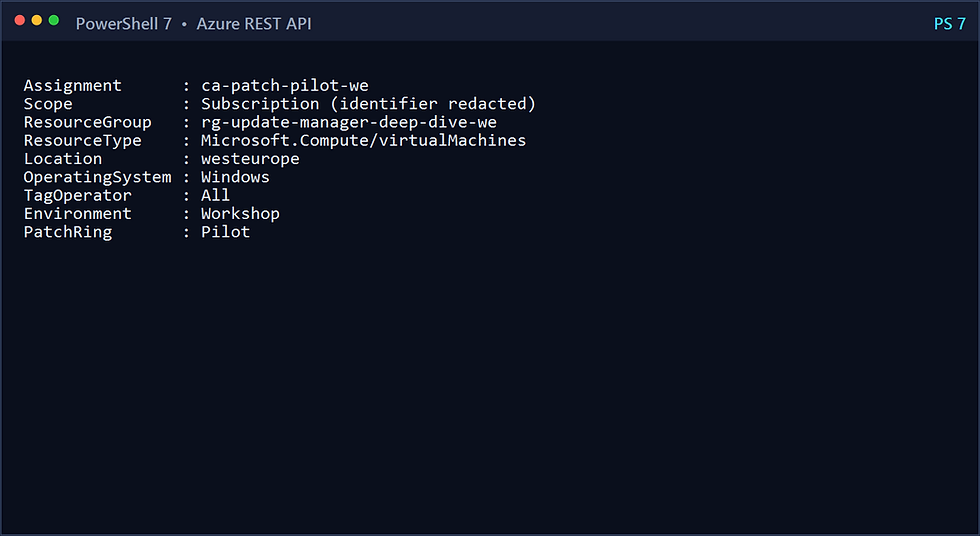
The subscription-scoped configuration assignment filters on all of these values:
• Location: westeurope
• OS: Windows
• Resource type: Microsoft.Compute/virtualMachines
• Resource group: rg-update-manager-deep-dive-we
• Environment=Workshop
• PatchRing=Pilot
• Tag operator: All

Dynamic scopes are evaluated when the scheduled run begins. The preview list shown while creating or editing a scope is useful, but it is not a frozen assignment. A VM can enter or leave the ring just by changing metadata before the run.
That behavior is powerful at scale and also dangerous if your tag governance is weak. In production, protect patch-ring tags with Azure Policy, restrict who can change them, and require a change record for production-ring promotion.
How the `All` operator changes membership
The assignment has two tag expressions. With All, a machine must satisfy both Environment=Workshop and PatchRing=Pilot. If the operator were Any, a production machine accidentally carrying only PatchRing=Pilot could enter the scope even without the Workshop boundary tag. Combining resource group, location, resource type, OS, and two tags gives this disposable lab several independent safety rails.
Location values in the REST model use normalized Azure region names such as westeurope; the portal renders West Europe. Resource types use the full provider path. OS uses Windows. Small differences in display text versus resource-model values are a common cause of hand-authored assignment failures.
Dynamic scope does not make a VM compliant merely because it matches. The VM must also use Customer Managed Schedules, remain running or otherwise available for guest patching, have a healthy agent, reach its update source, and finish within the maintenance window.
STEP 8 — REPAIR THE TAG AND PROVE TWO MATCHES
Correct the typo:
powershell
./scripts/Start-UpdateManagerWorkshop.ps1 `
-SubscriptionId $subscriptionId `
-Stage FixTag
Azure Resource Graph is eventually consistent, so the script polls for up to five minutes. A direct ARM read can show the corrected tag before the Resource Graph query does. The stage succeeds only after both machines appear.

The REST evidence script reads the subscription-scoped assignment but replaces the subscription identifier with a redacted label before rendering output:
powershell
./scripts/Get-UpdateManagerEvidence.ps1 `
-SubscriptionId $subscriptionId `
-Stage Assignment
STEP 9 — OBSERVE THE SCHEDULED RUN
Do not trigger an immediate install here. The goal is to prove the schedule and dynamic scope work together. When the start time arrives, query Azure Resource Graph:
powershell
./scripts/Get-UpdateManagerEvidence.ps1 `
-SubscriptionId $subscriptionId `
-Stage Installation
During execution, the installation record reports InProgress. A maintenance run ID correlates the patch installation with the scheduled maintenance window.

For an unattended wait:
powershell
./scripts/Get-UpdateManagerEvidence.ps1 `
-SubscriptionId $subscriptionId `
-Stage WaitForRun `
-TimeoutMinutes 120
The acceptance condition is two terminal results with no failed patches. Succeeded is ideal. CompletedWithWarnings is acceptable only after you inspect the warning and prove it is the expected reboot condition rather than a failed or timed-out update.
[IMAGE — Completed maintenance run with installation and reboot results]
STEP 10 — REASSESS AND PROVE COMPLIANCE
Run another assessment after both machines are reachable again:
powershell
./scripts/Start-UpdateManagerWorkshop.ps1 `
-SubscriptionId $subscriptionId `
-Stage Assess
./scripts/Get-UpdateManagerEvidence.ps1 `
-SubscriptionId $subscriptionId `
-Stage Final
Compare the final Critical/Security count with the baseline. This lab accepts a reduced count or zero. A nonzero result can be valid when Microsoft publishes a new update during the run, when an update is superseded, or when Windows Update marks a prerequisite update as necessary before the next one becomes applicable.
Define acceptance before reading the result
For each VM, use the same decision order:
1. The scheduled installation record exists.
2. The record is correlated to the expected maintenance run.
3. Status is Succeeded, or CompletedWithWarnings with an explained and accepted warning.
4. failedPatchCount is zero.
5. pendingPatchCount is zero for the selected classifications.
6. Reboot status is consistent with IfRequired and the guest returned healthy.
7. The subsequent assessment completed successfully.
8. Critical and Security exposure is lower than the baseline or zero.
Do not force the final count to zero by installing classifications outside the approved schedule. If an Update Rollup remains because it was not selected, the evidence is demonstrating policy correctly. If a Security update remains, investigate whether it arrived after the window, depends on another update, was rejected by Windows Update, or needs another cycle.
The two operating-system generations do not need identical results. The proof is that both were selected by one dynamic ring and each produced a valid, explainable outcome.
[IMAGE — Final compliance and cleanup evidence]
EVIDENCE QUERIES
Read the evidence as a chain, not isolated rows
An assessment row answers, “What did this machine report as applicable at this time?” An installation row answers, “What happened during this specific install operation?” A maintenance row answers, “What scheduled run did Azure create?” The correlation fields and timestamps let you join the story.
Start with the machine name and latest assessment time. Then locate the latest installation result and inspect its startedBy, maintenanceRunId, and status. Finally, compare the maintenance run time with the configured window. If two machines share a maintenance run but only one has an installation result, the missing result is the symptom—not proof that the tag filter failed. Check guest health and orchestration settings before changing the scope.
Counts also need careful interpretation:
• installedPatchCount is the number successfully installed in that operation.
• failedPatchCount must be zero for acceptance.
• pendingPatchCount means selected work remains.
• excludedPatchCount represents explicitly excluded updates.
• notSelectedPatchCount can be nonzero because the schedule intentionally chose only three classifications.
• maintenanceWindowExceeded indicates the run ran out of permitted time.
• rebootStatus records whether a restart was not needed, required, started, completed, or failed.
A final assessment is therefore mandatory. An installation row with two successful patches does not prove no Critical or Security updates remain. A newer applicable update or prerequisite chain can still appear.
Assessment summaries live in PatchAssessmentResources:
kusto
PatchAssessmentResources
| where resourceGroup =~ 'rg-update-manager-deep-dive-we'
| where type =~ 'microsoft.compute/virtualmachines/patchassessmentresults'
| extend p=parse_json(properties)
| extend Machine=tostring(split(id,'/')[8])
| project Machine,
Status=tostring(p.status),
Critical=toint(p.availablePatchCountByClassification.critical),
Security=toint(p.availablePatchCountByClassification.security),
RebootPending=tobool(p.rebootPending),
LastModified=todatetime(p.lastModifiedDateTime)
Installation summaries live in PatchInstallationResources:
kusto
PatchInstallationResources
| where resourceGroup =~ 'rg-update-manager-deep-dive-we'
| where type =~ 'microsoft.compute/virtualmachines/patchinstallationresults'
| extend p=parse_json(properties)
| project Machine=tostring(split(id,'/')[8]),
Status=tostring(p.status),
Installed=toint(p.installedPatchCount),
Failed=toint(p.failedPatchCount),
Pending=toint(p.pendingPatchCount),
Excluded=toint(p.excludedPatchCount),
Reboot=tostring(p.rebootStatus),
MaintenanceRun=tostring(p.maintenanceRunId),
LastModified=todatetime(p.lastModifiedDateTime)
Update Manager retains recent assessment history for seven days and installation history for 30 days in Azure Resource Graph. Export long-term evidence to your central reporting platform if your audit requirement is longer.
TROUBLESHOOTING
The dynamic scope matches zero or one machine
Read the live tags directly from ARM, then query Resource Graph. Check spelling, value case, region, OS, resource type, and resource-group filters. Remember that All means every tag expression must match.
The tag is correct but Resource Graph is stale
Wait and retry. Tag writes and Resource Graph indexing are separate operations. The workshop polls rather than treating immediate absence as failure.
The schedule does not patch the VM
Verify that patch orchestration is Customer Managed Schedules and that bypassPlatformSafetyChecksOnUserSchedule is true. Confirm the assignment still exists at subscription scope and that the machine matches at the run time—not only when the scope was authored.
Assessment or installation fails
Check VM Agent health, Windows Update Agent services, outbound access, proxy or TLS-inspection behavior, Group Policy, and WSUS configuration. A private VM still needs a functional update source.
The maintenance window finishes with warnings
Inspect failed, pending, not-selected, excluded, and maintenance-window-exceeded counts. A three-hour window is enough for this disposable lab, but production rings should be sized from observed installation duration.
`IfRequired` did not reboot
That can be correct. The selected Definition update may not require a restart. Conversely, Windows registry or Group Policy restart settings can influence behavior; test those policies with the exact production image.
PRODUCTION DESIGN RECOMMENDATIONS
Turn one Pilot tag into a patch-ring operating model
A scalable production design normally uses several rings with increasing blast radius.
Ring 0 — Image validation. Patch a disposable VM created from the production base image. Run synthetic health checks and capture boot, service, and application signals.
Ring 1 — Pilot. Patch a small cross-section of real but low-risk servers. Include at least one representative of every supported OS generation, network path, update source, and application pattern.
Ring 2 — Broad. Patch most workloads after an observation period. Split stateful clusters and availability sets so the same fault domain is not drained simultaneously.
Ring 3 — Critical or exception. Patch tightly controlled systems with explicit application-owner validation, pre/post events, and a rollback or recovery plan.
Tags can express this model, but tags are not a change-management system. Enforce allowed values, record promotions, and alert when a server has no approved ring. A missing tag should be treated as noncompliant—not as an indefinite exemption from patching.
Automate the control plane without hiding it
The workshop uses PowerShell and Azure CLI to keep every action visible. A production team can run the same API operations from a pipeline, but should replace the interactive Azure CLI login with workload identity federation. OIDC avoids storing a client secret and lets the pipeline receive a short-lived token for a tightly scoped identity.
Separate authoring from execution:
• A pull request changes maintenance configuration or dynamic-scope definitions.
• Validation checks the API payload, time zone, duration, allowed classifications, and tag filters.
• A plan or read-only job reports which machines currently match.
• A privileged deployment stage creates the configuration and assignment.
• An independent evidence job queries assessment and installation records after the run.
• Alerts open incidents for failed, missing, or stale results.
Avoid making the pipeline both change the ring tags and approve its own success. Ring promotion, schedule deployment, and evidence attestation are separate control points. That separation is what turns automation into governance instead of a faster manual script.
Pre/post maintenance events can stop services, drain a node, create an application-consistent checkpoint, or run health validation. Keep those events idempotent and time-bounded. A pre-event that consumes most of the window can leave too little time for cumulative updates and reboot.
• Use a pilot, broad, and critical-workload ring rather than one global schedule.
• Protect tag values with Azure Policy and least-privilege RBAC.
• Separate schedules by availability set, availability zone, or application fault domain.
• Allow enough maintenance time for slow cumulative updates and a possible reboot.
• Export Update Manager evidence before Resource Graph retention expires.
• Alert on stale assessments, failed installations, and machines outside approved orchestration modes.
• Validate WSUS and Group Policy settings explicitly; Update Manager does not override a broken update source.
• Use Azure Arc to extend the same governance model to supported non-Azure Windows servers.
• Treat NeverReboot cautiously. Preventing the restart can leave a server partially patched and still vulnerable.
CLEANUP
Delete the subscription-scoped dynamic assignment before the resource group:
powershell
./scripts/Remove-UpdateManagerWorkshop.ps1 `
-SubscriptionId $subscriptionId
The cleanup script removes only:
• ca-patch-pilot-we
• rg-update-manager-deep-dive-we
It then confirms the dynamic assignment, maintenance configuration, VMs, disks, NICs, VNet, NAT Gateway, public IP, and resource group are gone. The sanitized source ZIP remains local.
WHAT YOU PROVED
You deployed two private Windows Server versions without inbound management ports, created a real baseline, distinguished Windows classifications, converted both machines to Customer Managed Schedules, authored a stable Maintenance API schedule, deliberately excluded one VM with a typo, repaired the tag, watched the scope expand at run time, patched both servers, inspected reboot behavior, and verified compliance with Azure Resource Graph.
That is the difference between “Windows Update ran” and an auditable patch-management system.
MICROSOFT REFERENCES
• [Azure Update Manager overview](https://learn.microsoft.com/en-us/azure/update-manager/overview)
• [Schedule recurring updates](https://learn.microsoft.com/en-us/azure/update-manager/scheduled-patching)
• [Dynamic scope overview](https://learn.microsoft.com/en-us/azure/update-manager/dynamic-scope-overview)
• [Update options and patch orchestration](https://learn.microsoft.com/en-us/azure/update-manager/updates-maintenance-schedules)
• [Query Update Manager data with Azure Resource Graph](https://learn.microsoft.com/en-us/azure/update-manager/query-logs)
• [Compute REST: Assess patches, API 2025-04-01](https://learn.microsoft.com/en-us/rest/api/compute/virtual-machines/assess-patches?view=rest-compute-2025-04-01)
• [Compute REST: Install patches, API 2025-04-01](https://learn.microsoft.com/en-us/rest/api/compute/virtual-machines/install-patches?view=rest-compute-2025-04-01)
• [Azure CLI maintenance command group](https://learn.microsoft.com/en-us/cli/azure/maintenance?view=azure-cli-latest)
Comments