
Build a pooled Azure Virtual Desktop environment with Microsoft Entra-joined Windows 11 session hosts, FSLogix profiles on Azure Files, autoscale scaling plans, and Azure Monitor Insights.
Introduction
Azure Virtual Desktop is easy to demo as a single virtual machine. The interesting engineering begins when identity, user profiles, private networking, session-host health, and power management have to behave as one system.
This workshop builds that complete path. Two Windows 11 Enterprise multi-session hosts join Microsoft Entra ID, register in a pooled depth-first host pool, use an FSLogix profile location on private Azure Files, send health data to Log Analytics, and participate in a scaling plan that can deallocate unused capacity without taking the whole pool offline.
PowerShell 7 is the orchestrator. Azure CLI handles common resource operations, while az rest covers the current Azure Virtual Desktop, Azure Monitor, and Microsoft Graph surfaces. Every stage is independently rerunnable, and private credentials and identifiers stay outside the download bundle.
Timing and level
Level: intermediate to advanced.
Guided deployment: about 120–180 minutes.
Session-host registration and Azure Monitor data ingestion can each add 10–30 minutes.
The autoscale proof waits for a genuine service evaluation and can add up to 45 minutes.
Interactive FSLogix proof needs an eligible Azure Virtual Desktop user license already owned by the tenant.
Cost warning
This lab creates two Standard_D2s_v5 Windows virtual machines, Standard SSD disks, a Standard NAT Gateway and public IP for outbound connectivity, Standard Azure Files, a private endpoint, Private DNS, Log Analytics ingestion, and Azure Virtual Desktop control-plane resources. The NAT Gateway and running session hosts are the main short-session costs. Run cleanup when evidence capture and publication are complete.
The scaling plan reduces idle compute after the proof; it is not a budget or hard spending cap.
Evidence-mode warning
The tested tenant had no eligible unused Microsoft 365 or Windows license for an internal Azure Virtual Desktop user. The workshop therefore records:
ProfilePersistenceStatus = NotTested-LicenseUnavailable
FSLogix was configured identically on both session hosts, the Azure Files path was private and reachable, and the profile-container ACL design was applied. Profile persistence was not live-verified. This article includes no fabricated VHDX, user session, connection, marker, or host-switch evidence.
What you will prove
By the end of the workshop you will have evidence that:
preflight checked quota, image availability, providers, Azure permissions, tenant licensing, collisions, and the autoscale-role baseline without mutating Azure or Microsoft Entra;
two Trusted Launch Windows 11 24H2 multi-session VMs registered in a pooled host pool;
neither session host has a public IP or inbound RDP path;
Microsoft Entra Kerberos is enabled on Azure Files and the SMB share resolves through Private Link;
both hosts have the same FSLogix VHDX, dynamic-disk, local-profile deletion, and cloud Kerberos settings;
Azure Monitor Agent and the DCR are associated with both hosts;
AVD diagnostics and Log Analytics queries provide host registration, heartbeat, event, and autoscale data;
the production scaling plan retains 50% availability;
a real autoscale evaluation deallocates exactly one unused host and leaves one running;
profile persistence is either proven by a real two-host login sequence or published as unverified with the exact reason.
Architecture
temporary cloud user
        |
        v
AVD workspace + desktop application group
        |
        v
pooled host pool (depth-first, Entra SSO)
        |
        +-------------------------------+
        |                               |
Windows 11 host 1                 Windows 11 host 2
Entra joined, Trusted Launch      Entra joined, Trusted Launch
private NIC only                  private NIC only
        |                               |
        +---------------+---------------+
                        |
                 FSLogix VHDX path
                        |
      private endpoint + private DNS + Azure Files
                        |
        creator-owner ACLs and Entra Kerberos

both hosts --> AMA + DCR --> Log Analytics --> AVD Insights
host pool  --> scaling plan (50% minimum) --> one idle host deallocated
The NAT Gateway supplies explicit outbound connectivity for AVD agents, Microsoft Entra join, Windows updates, and Azure Monitor. It does not add an inbound route. Azure Files disables public network access and is reachable from the session-host subnet through its file private endpoint.
1. Run the read-only preflight
$subscriptionId = az account show --query id --output tsv

./Start-AzureAvdWorkshop.ps1 `
  -SubscriptionId $subscriptionId `
  -Location westeurope `
  -VmSize Standard_D2s_v5 `
  -HostCount 2 `
  -ProfileEvidenceMode AllowConfigurationOnly `
  -Stage Preflight
Preflight verifies regional and DSv5-family quota, the multi-session image, Gen2 support, provider state, the signed-in user's Azure role-assignment authority, the tenant's default domain, eligible license inventory, the Windows Virtual Desktop service principal, and any existing subscription-level autoscale role. It refuses to adopt an unexpected resource group or user.
The only file written is private local runtime state under work/azure-virtual-desktop-deep-dive. No Azure or Microsoft Entra resource changes occur.
2. Build the private network foundation
./Start-AzureAvdWorkshop.ps1 `
  -SubscriptionId $subscriptionId `
  -Stage Foundation
The stage creates rg-avd-deepdive-we, vnet-avd-deepdive-we, a session-host subnet, a separate private-endpoint subnet, an NSG with no workshop inbound rule, a Standard NAT Gateway, and its outbound public IP.
The two VMs later receive pre-created private NICs. No public IP configuration is attached to either NIC, and no RDP port is opened.
3. Configure private Azure Files and Entra Kerberos
./Start-AzureAvdWorkshop.ps1 `
  -SubscriptionId $subscriptionId `
  -Stage Storage
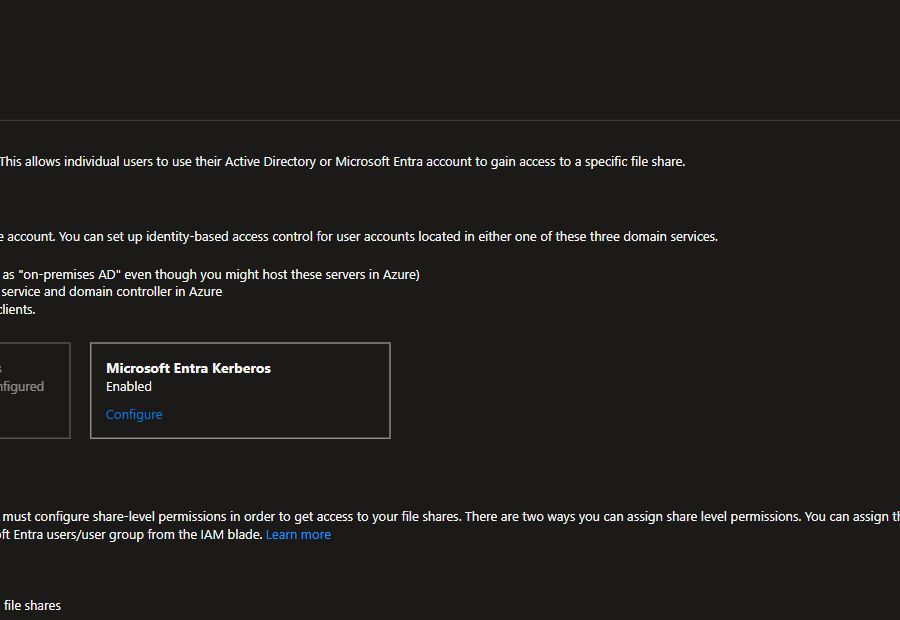
The StorageV2 account uses Standard_LRS, TLS 1.2, HTTPS-only access, disabled public network access, and a dedicated 100 GiB fslogix share. The stage enables Microsoft Entra Kerberos and the documented authenticated-identity default share permission.
West Europe does not support granular cloud-only identity RBAC for Standard Azure Files. The lab uses the documented default permission because it is the supported path in this region, then narrows exposure with a dedicated storage account, a single private share, disabled public networking, a file private endpoint, and Windows creator-owner ACL inheritance.
The autogenerated storage application receives only the documented admin consent. Its manifest gains cloud-only group SID support and the required Private Link identifier URIs. The script records whether it created the application consent so cleanup never touches an unrelated tenant object.


4. Create the pooled host pool, desktop, and workspace
./Start-AzureAvdWorkshop.ps1 `
  -SubscriptionId $subscriptionId `
  -Stage HostPool
The host pool is pooled, depth-first, limited to 10 sessions per host, configured for Start VM on Connect, and enabled for Microsoft Entra SSO. The registration token is written only to private runtime state.
The desktop application group is attached to the host pool and referenced by the workspace. The final user assignment is applied only to the temporary workshop user.


5. Deploy the Entra-joined session hosts
./Start-AzureAvdWorkshop.ps1 `
  -SubscriptionId $subscriptionId `
  -Stage SessionHosts
The stage creates two Standard_D2s_v5 VMs from MicrosoftWindowsDesktop:windows-11:win11-24h2-avd:latest. Each VM uses Trusted Launch, Secure Boot, vTPM, a Standard SSD, a system-assigned managed identity, and the Windows client license benefit.
AADLoginForWindows completes Microsoft Entra join. The official Azure Virtual Desktop DSC package installs the AVD agent and registers the host using the private token. Passing requires both session hosts to reach Available in the service.

6. Configure FSLogix identically on both hosts
./Start-AzureAvdWorkshop.ps1 `
  -SubscriptionId $subscriptionId `
  -Stage FSLogix
The session-host script verifies private DNS and TCP 445 before configuring:
reg add HKLM\SYSTEM\CurrentControlSet\Control\Lsa\Kerberos\Parameters `
  /v CloudKerberosTicketRetrievalEnabled /t REG_DWORD /d 1

reg add HKLM\Software\Policies\Microsoft\AzureADAccount `
  /v LoadCredKeyFromProfile /t REG_DWORD /d 1
It then enables FSLogix profiles with VHDX containers, dynamic disks, a 30 GiB maximum, retry behavior, and local-profile deletion when the container applies. The VHDLocations value points to the private Azure Files SMB path.
The share root removes inherited defaults and applies full control to system and administrators, creator-owner inheritance to each newly created profile, and only the root rights authenticated users need to create their own directory. Both hosts reboot so the Kerberos setting takes effect.
The user-context startup script writes a marker inside the roaming profile and a sanitized Application event. That marker is evidence only when a licensed interactive login actually runs it.
7. Add Azure Monitor and AVD Insights data
./Start-AzureAvdWorkshop.ps1 `
  -SubscriptionId $subscriptionId `
  -Stage Monitoring
The stage creates a Log Analytics workspace and a Windows DCR using the current Microsoft-Event stream. Performance counters cover CPU, available memory, disk free space, and network throughput. Event sources cover FSLogix, Terminal Services, the profile marker, and critical System events.
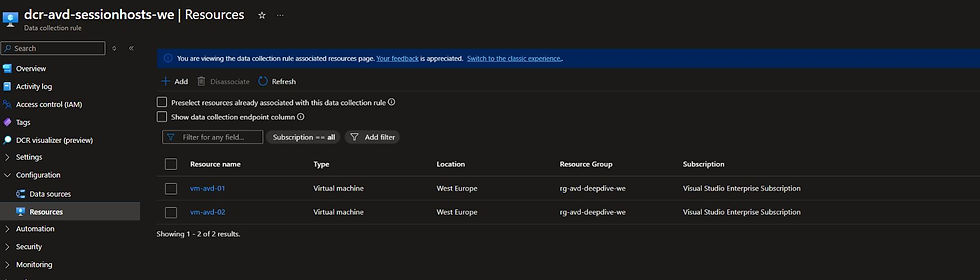
Azure Monitor Agent is installed on both hosts, both DCR associations are verified, and AVD diagnostic settings send every supported log category from the host pool, application group, and workspace to Log Analytics.
Useful queries are included in kql/avd-workshop-queries.kql:
Heartbeat
| where TimeGenerated > ago(24h)
| summarize LastHeartbeat=max(TimeGenerated) by Computer
| order by Computer asc
WVDAutoscaleEvaluationPooled
| where TimeGenerated > ago(24h)
| project TimeGenerated, ScalingPlanName, HostPoolName, ResultType, Message
| order by TimeGenerated desc
8. Create the production scaling plan
./Start-AzureAvdWorkshop.ps1 `
  -SubscriptionId $subscriptionId `
  -Stage Scaling
Azure Virtual Desktop autoscale needs the built-in Desktop Virtualization Power On Off Contributor role at subscription scope. Preflight records whether that assignment already existed. The stage creates it only when missing, records its exact assignment privately, and cleanup removes it only when this session created it.
The production schedule uses West Europe time, depth-first load balancing, and a 50% minimum during ramp-down. With two registered hosts, that means one host remains available.

9. Create the temporary identity only after confirmation
This is an action-time confirmation point. Do not create a tenant user merely because the infrastructure exists.
After explicit approval:
./Start-AzureAvdWorkshop.ps1 `
  -SubscriptionId $subscriptionId `
  -Stage Identity `
  -CreateTestUser `
  -TestUserPrefix avd-workshop `
  -ProfileEvidenceMode AllowConfigurationOnly
The stage creates one cloud-only member with usageLocation=DE, assigns Desktop Virtualization User to the desktop application group and Virtual Machine User Login at the lab scope, and assigns an existing eligible unused license when one is available.
Passwords, the UPN, object ID, role-assignment IDs, and license ID remain under work/. No license is purchased, no trial is activated, Conditional Access is not changed, and tenant-wide MFA is not disabled.
10. Deliberately test profile persistence
./Start-AzureAvdWorkshop.ps1 `
  -SubscriptionId $subscriptionId `
  -Stage TestProfile `
  -ProfileEvidenceMode AllowConfigurationOnly
When no eligible license exists, this stage performs no interactive login and writes the explicit unverified status. That is the tested path in this workshop run.
When a license does exist, the full proof is:
Allow sessions on host 1 and drain host 2.
Sign in through the AVD web client.
Confirm the marker was written inside the attached FSLogix profile.
Log off, drain host 1, and allow sessions on host 2.
Reconnect and prove the same marker survived while the current host changed.
Confirm one real VHDX profile container exists.
The FSLogix VHDX screenshot is included only after those steps succeed. In configuration-only mode there is intentionally no screenshot 6.
11. Deliberately test autoscale
./Start-AzureAvdWorkshop.ps1 `
  -SubscriptionId $subscriptionId `
  -Stage TestScaling
The script verifies there are no user sessions, starts both VMs, and temporarily moves ramp-down into the next short evaluation window. Passing requires Azure Virtual Desktop—not the workshop script—to deallocate exactly one host while leaving the second running.
The proof captures the autoscale deallocation operation and the final power-state boundary. A finally block restores the production schedule whether the test passes or fails.


12. Validate and collect sanitized evidence
./Start-AzureAvdWorkshop.ps1 `
  -SubscriptionId $subscriptionId `
  -Stage Validate

./Get-AzureAvdEvidence.ps1 `
  -SubscriptionId $subscriptionId
Validation checks ownership tags, registered-host count, no-public-IP state, Trusted Launch, Entra Kerberos, the approved private endpoint, identical FSLogix configuration, DCR/AMA coverage, the autoscale result, and restoration of the production 50% schedule.
The public evidence contains counts, booleans, and sanitized service states. It rejects UPNs, passwords, tenant or subscription identifiers, GUIDs, registration tokens, IP addresses, and identity-bearing profile filenames.
Troubleshooting map
| Symptom | Check | Expected fix | | --- | --- | --- | | Session host never becomes Available | DSC extension status and AVD agent logs | Refresh the registration token and rerun SessionHosts. | | Microsoft Entra login fails | AADLoginForWindows, system identity, SSO RDP properties, VM login role | Repair the failed extension or missing role; do not open RDP. | | Azure Files prompts for credentials | Private DNS, TCP 445, storage app Private Link identifier URI, cloud Kerberos registry | Correct DNS/app manifest and reboot the host. | | Error 1327 during SMB access | Conditional Access requires MFA for the storage application | Do not change tenant policy in this lab; publish configuration-only evidence. | | FSLogix uses a local profile | Enabled, VHDLocations, LoadCredKeyFromProfile, FSLogix operational log | Correct the registry path and confirm the SMB share is reachable in user context. | | No AMA heartbeat | AMA extension, DCR association, outbound HTTPS, ingestion delay | Repair the extension/association and wait for ingestion. | | Scaling plan does nothing | Subscription-scope autoscale role, empty host pool, schedule time zone, exclusion tag | Correct the role or schedule and wait for the next genuine evaluation. | | Both hosts remain running | Minimum percentage and current phase | Confirm ramp-down is active and minimum hosts is 50%. | | Profile proof unavailable | Tenant license inventory | Use the explicit unverified status; never simulate a session. |
Production hardening
This lab deliberately minimizes moving parts, not governance. For production:
use an identity group instead of a single user and license it through established lifecycle automation;
use a region and storage tier that supports granular cloud-only Azure Files assignments where possible;
avoid the default authenticated-identity permission when granular RBAC is supported;
build the creator-owner ACL baseline through a controlled administration host and validate effective access;
place secrets in Key Vault and use managed deployment identities;
manage FSLogix and Kerberos settings through Intune, Group Policy, or image engineering;
use image versioning, update rings, drain mode, and validation host pools;
tune session limits, scaling phases, and disconnected-session policies with real utilization data;
define Log Analytics retention, alert rules, workbooks, and diagnostic categories as code;
consider Azure Firewall or another controlled egress design when NAT-only outbound is insufficient;
use Azure Policy to deny session-host public IPs and require Trusted Launch, AMA, and diagnostic settings;
document the Conditional Access exception required by Microsoft Entra Kerberos instead of weakening MFA broadly.
Evidence included with the workshop
The download bundle contains:
staged deployment, evidence, and cleanup scripts;
the session-host FSLogix and profile-marker scripts;
KQL queries;
a live-test report;
sanitized JSON evidence and a sanitization report;
the neon cover and cropped Portal screenshots;
the Wix publishing brief and article source.
Interactive profile artifacts are included only when a real licensed two-host login test succeeds. In this run they are absent by design.
Download the workshop
The ZIP contains the deployment, evidence, cleanup, session-host configuration, KQL, documentation, cover, sanitized Portal screenshots, and manifest. SHA256: e8a337295c42814938bc6fac0bfc69f8cc574569c2e822d8c31147305f386af8.
Cleanup
./Remove-AzureAvdWorkshop.ps1 `
  -SubscriptionId $subscriptionId `
  -ConfirmCleanup
Cleanup verifies the workshop ownership tags before it removes anything. It deletes only the recorded user-role assignments, removes and baseline-checks the assigned license when applicable, soft-deletes only the exact generated user, removes only the workshop-created autoscale role assignment, removes only the workshop-created storage consent and application, deletes only rg-avd-deepdive-we, and removes private runtime secrets.
Final result
The finished environment demonstrates Azure Virtual Desktop as an integrated platform rather than a collection of Portal blades: Microsoft Entra identity and SSO, private FSLogix storage, two registered multi-session hosts, observable health, and a real scaling boundary that leaves one host online while deallocating the other.
The profile result is intentionally honest. FSLogix is fully configured, but without an eligible unused license the workshop does not claim a user session or persistence result that did not happen.
Comments