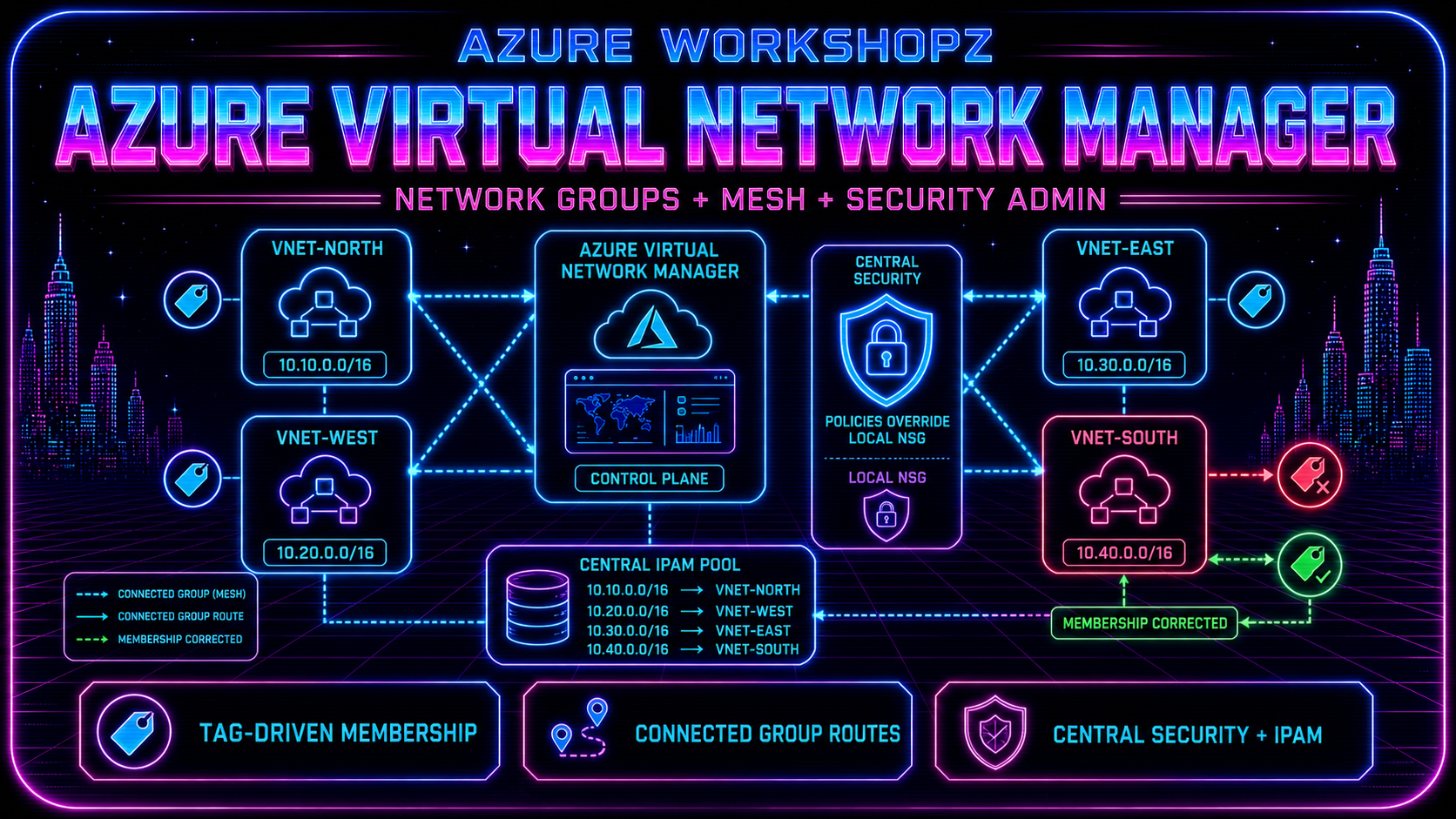
Azure Virtual Network Manager is what you reach for when one VNet becomes twenty, twenty becomes two hundred, and manual peerings, duplicate NSG rules, and spreadsheet-based address planning stop scaling. In this workshop we build a compact but realistic governance lab: four VNets allocated from centralized IPAM, tag-driven membership through Azure Policy, a regional connected-group mesh, and a Security Admin rule that overrides a local NSG.
The deliberate failures are the point. The Edge VNet starts with the tag typo NetworkGroup=Mseh, so it is excluded from the mesh. After repairing the tag, both proof ports work. We then deploy a central deny for TCP 8080 and prove that it blocks the connection even though the subnet NSG explicitly allows 8080 and 8443. Port 8443 remains open, giving us a clean control case.
Reading time: 30–35 minutes Execution time: 60–90 minutes, including Azure Policy and configuration propagation Tools: PowerShell 7.2+, Azure CLI, virtual-network-manager CLI extension Region: West Europe Cost: two short-lived Standard_B1s Ubuntu VMs, Standard public IPs for outbound access, and Azure Virtual Network Manager charges. Remove the lab when finished.
Note: This is a disposable workshop. Use a non-production subscription, bind every command to the exact active subscription ID, and remove only rg-avnm-deep-dive-we. The public IP resources provide explicit outbound connectivity; there is no inbound SSH rule.
What we will prove
By the end of the lab you will have evidence that:
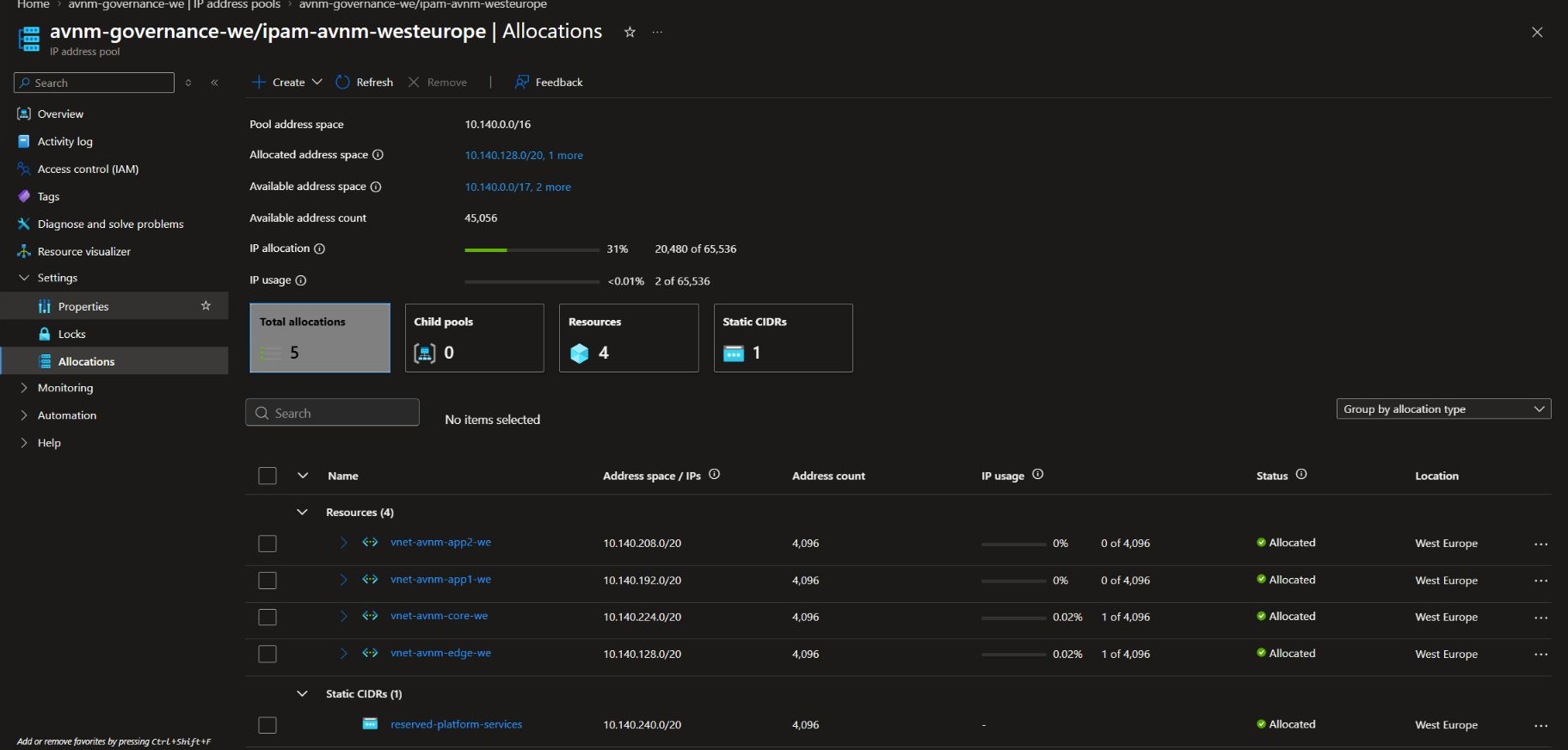
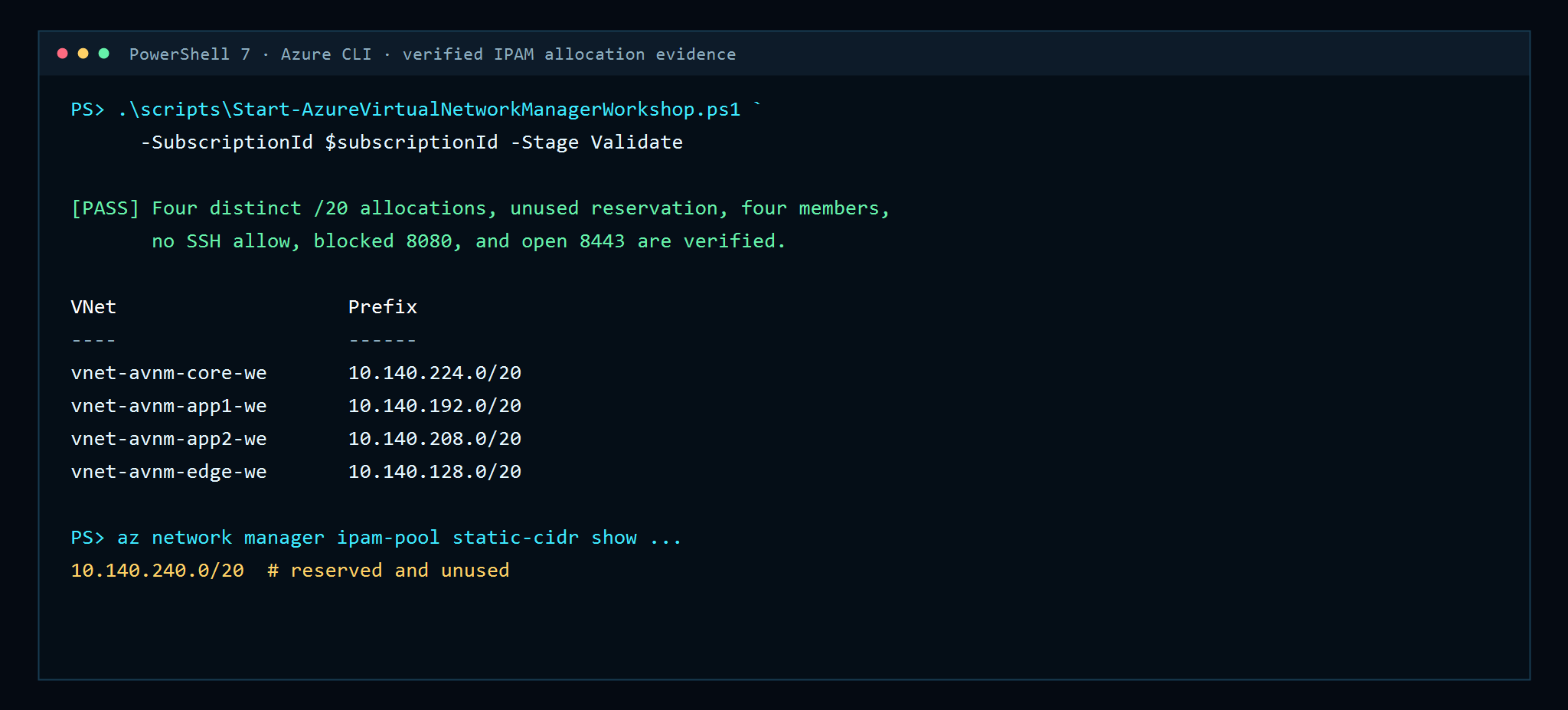
• four non-overlapping /20 VNet prefixes came from one West Europe IPAM child pool;
• the reserved 10.140.240.0/20 range stayed unused;
• a Microsoft.Network.Data policy added only correctly tagged VNets to a network group;
• the tag typo produced exactly three members and no Core-to-Edge route;
• correcting the tag added Edge without manual membership or peering;
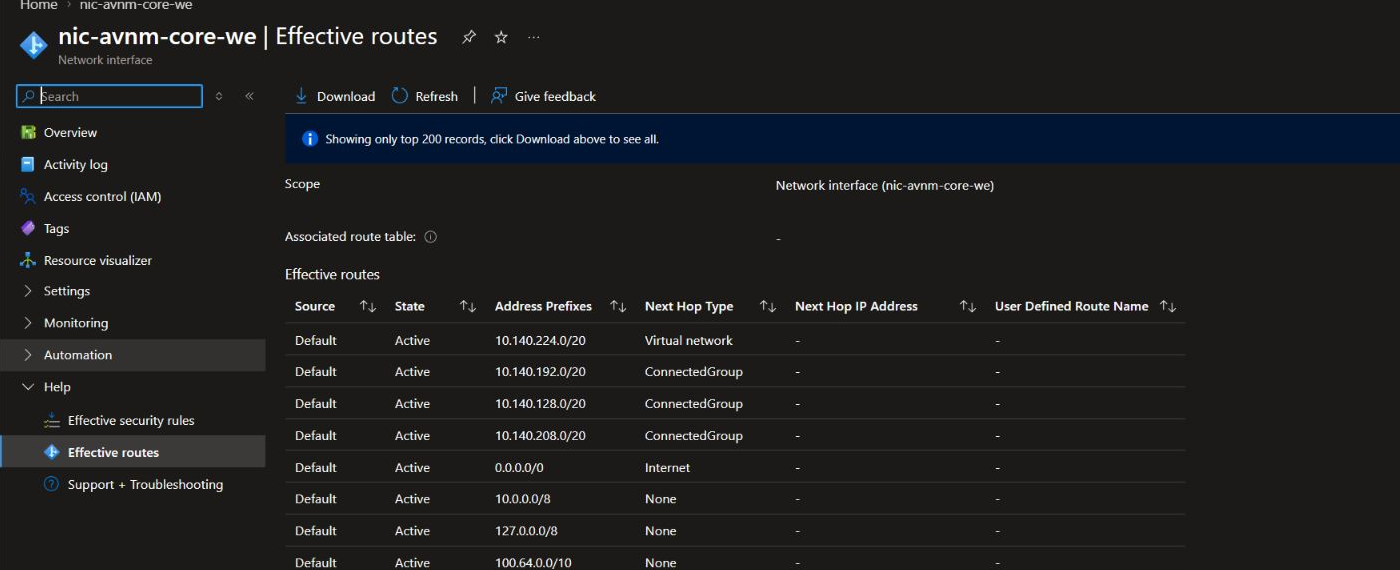
• the Core NIC received ConnectedGroup routes for the other VNets;
• both TCP 8080 and 8443 worked after the mesh repair;
• a Security Admin Deny stopped 8080 before NSG evaluation;
• TCP 8443 remained open through the local NSG; and
• cleanup removed the policy, configurations, IPAM allocations, networking, VMs, and resource group.
Microsoft describes Virtual Network Manager as a centralized service for grouping network resources and deploying connectivity, security, routing, and IP address management at scale. A configuration has no effect until it is deployed to a region. That separation between *definition* and *deployment* is central to this workshop. See the Azure Virtual Network Manager overview (https://learn.microsoft.com/en-us/azure/virtual-network-manager/overview).
Architecture
| Component | Configuration |
|---|---|
| Resource group | `rg-avnm-deep-dive-we` |
| Network manager | `avnm-governance-we` |
| Scope | Exact active subscription |
| Configuration access | Connectivity and SecurityAdmin |
| Root IPAM pool | `10.140.0.0/14` |
| West Europe child pool | `10.140.0.0/16` |
| Reserved static CIDR | `10.140.240.0/20` |
| VNets | Core, App1, App2, Edge; 4,096 addresses each (`/20`) |
| Test VMs | Ubuntu 24.04 `Standard_B1s` in Core and Edge |
| Dynamic group | `ng-avnm-mesh-we` |
| Connectivity | Regional mesh, overlap disallowed, no global mesh |
| Security Admin | Inbound TCP 8080 Deny, priority 100 |
| Control traffic | TCP 8443 allowed by NSG |
The scripts pin Network Manager and IPAM operations to the 2025-05-01 API family, Compute to 2025-04-01, effective Security Admin evidence to 2025-03-01, Policy to 2025-11-01, and role assignments to 2022-04-01 where REST evidence is required. CLI commands use the current virtual-network-manager extension.
1. Preflight the subscription and address space
Open PowerShell 7 and authenticate. Select the subscription by immutable ID, not display name. In this environment two subscriptions can share the same friendly name, which makes name-based selection unsafe.
az login
$subscriptionId = az account show --query id -o tsv
az account set --subscription $subscriptionId

$common = @{
  SubscriptionId    = $subscriptionId
  Location          = 'westeurope'
  ResourceGroupName = 'rg-avnm-deep-dive-we'
}

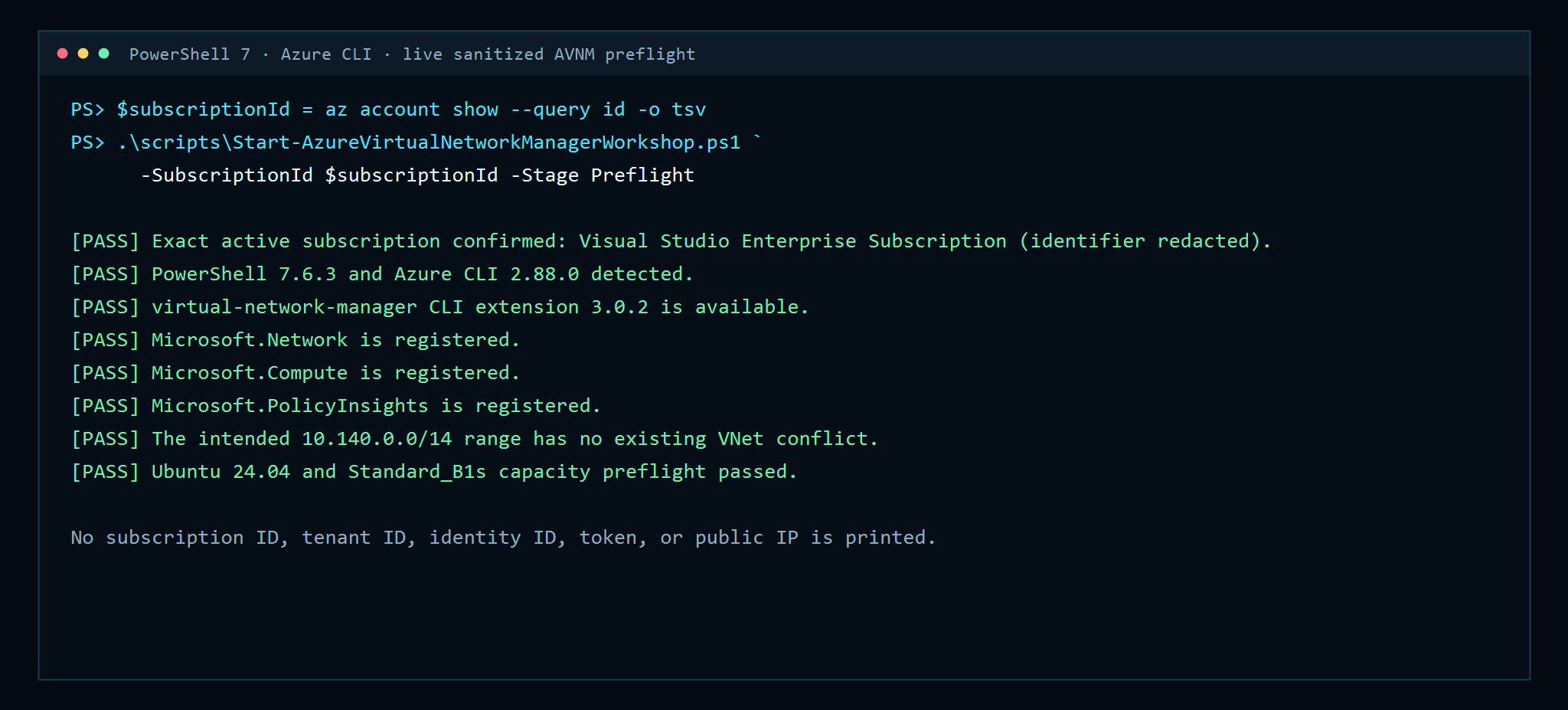
./scripts/Start-AzureVirtualNetworkManagerWorkshop.ps1 @common -Stage Preflight
The preflight checks PowerShell, Azure CLI, the Network Manager extension, provider registration, VNet overlap, the Ubuntu image, and B1s regional availability. It logs the subscription name but deliberately redacts the ID.
2. Create the Network Manager scope
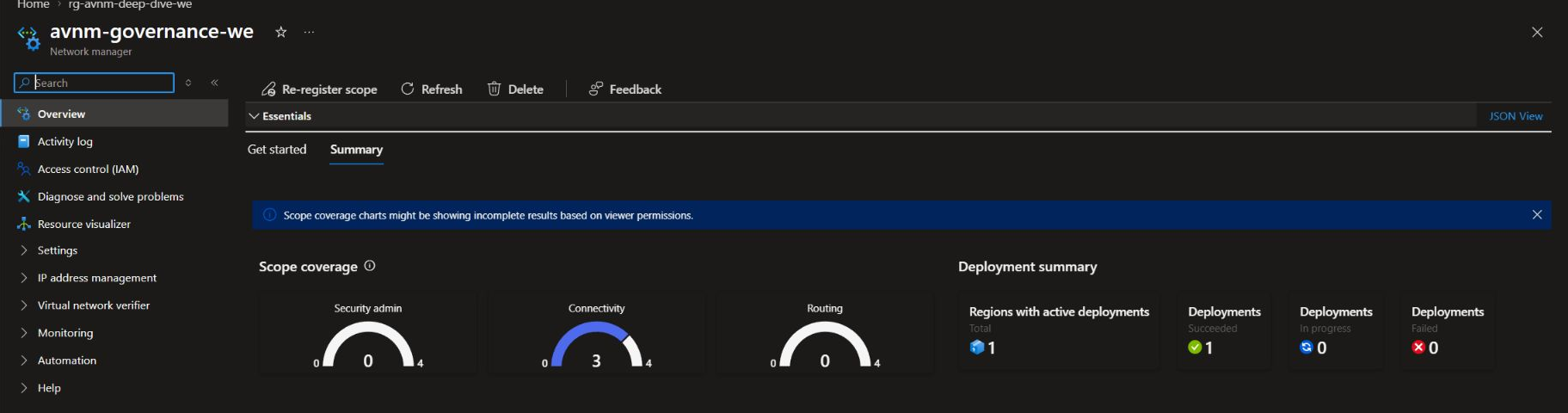
Create the exact lab resource group and a subscription-scoped Network Manager with Connectivity and SecurityAdmin access:
./scripts/Start-AzureVirtualNetworkManagerWorkshop.ps1 @common -Stage FoundationScope controls what the manager can see and configure; the network group controls which resources receive a particular configuration. Those are different boundaries. In production, use management groups when the operating model spans subscriptions, then restrict dynamic membership policies carefully.
3. Carve out IPAM pools
Run the IPAM stage:
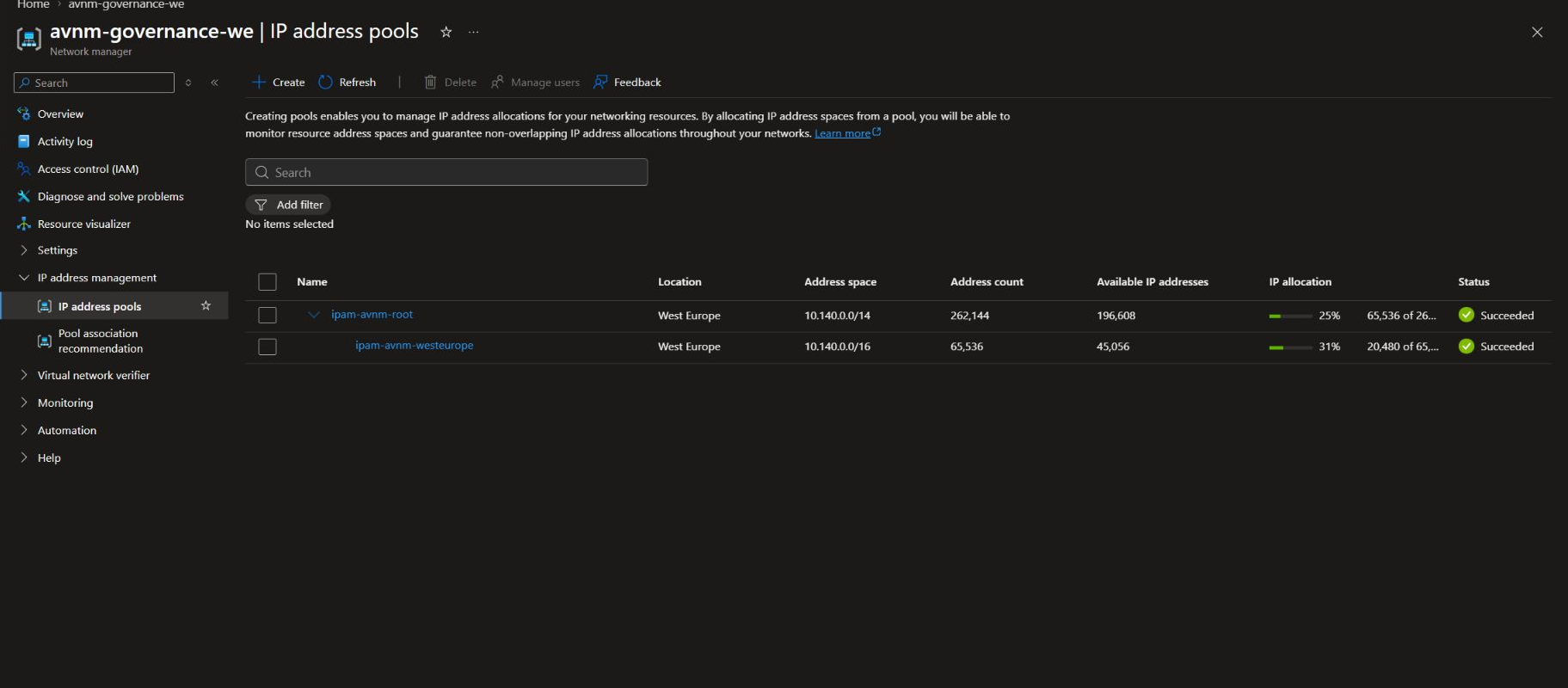
./scripts/Start-AzureVirtualNetworkManagerWorkshop.ps1 @common -Stage IpamThe root pool represents the organization-level address plan. The West Europe child pool is a regional slice. We also allocate 10.140.240.0/20 as a static CIDR named reserved-platform-services; no VNet can accidentally consume it.
Azure Virtual Network Manager IPAM can automatically allocate non-overlapping CIDRs, monitor utilization, and hold static reservations for addresses used elsewhere or reserved for future platforms. Microsoft’s IPAM model (https://learn.microsoft.com/en-us/azure/virtual-network-manager/concept-ip-address-management) distinguishes root pools, child pools, resource allocations, and static CIDRs.
4. Allocate four VNets automatically
The Networks stage requests 4,096 addresses for each VNet from the child pool. Azure chooses four non-overlapping /20 prefixes. The script then derives the first /24 in each allocation as a workload subnet.
./scripts/Start-AzureVirtualNetworkManagerWorkshop.ps1 @common -Stage NetworksThe result in this verified run was:
| VNet | Allocated prefix | Workload subnet |
|---|---:|---:|
| `vnet-avnm-core-we` | `10.140.224.0/20` | `10.140.224.0/24` |
| `vnet-avnm-app1-we` | `10.140.192.0/20` | `10.140.192.0/24` |
| `vnet-avnm-app2-we` | `10.140.208.0/20` | `10.140.208.0/24` |
| `vnet-avnm-edge-we` | `10.140.128.0/20` | `10.140.128.0/24` |
Do not hard-code these values in reusable automation: IPAM is the authority. Read the allocated prefix from the VNet response, then derive subnets from that allocation.
5. Add two private-admin test VMs
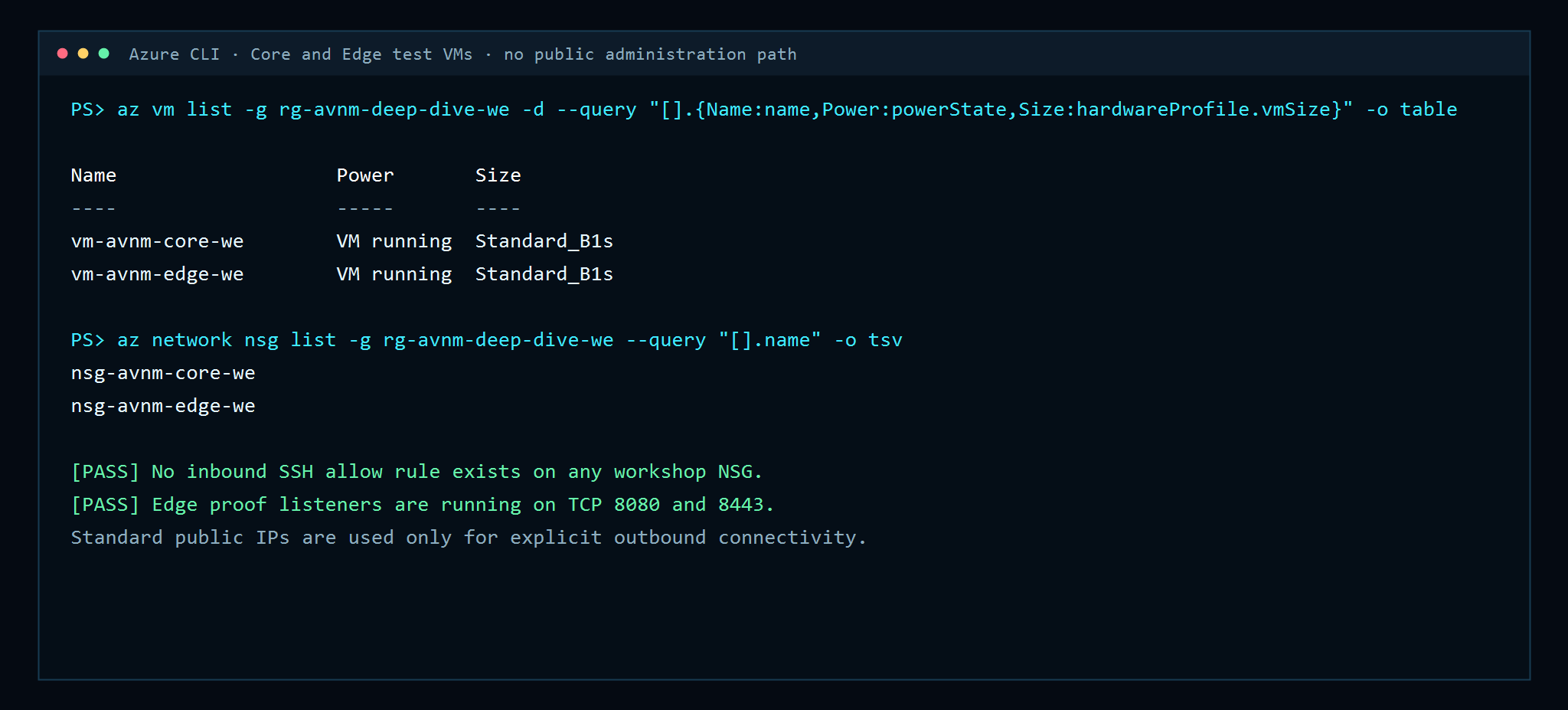
Only Core and Edge need compute. Each VM has a Standard public IP to make outbound package access explicit, but the NSGs contain no inbound SSH rule. Guest configuration uses Azure VM Run Command.
On Edge, the guest script starts simple proof listeners on TCP 8080 and 8443:
sudo systemctl enable --now avnm-proof-8080.service
sudo systemctl enable --now avnm-proof-8443.service
Both subnet NSGs deliberately allow TCP 8080 and 8443 from 10.140.0.0/14. That local allow is essential: later, when 8080 fails, we can attribute the failure to Security Admin rather than to the NSG.
6. Create a deliberate tag mistake
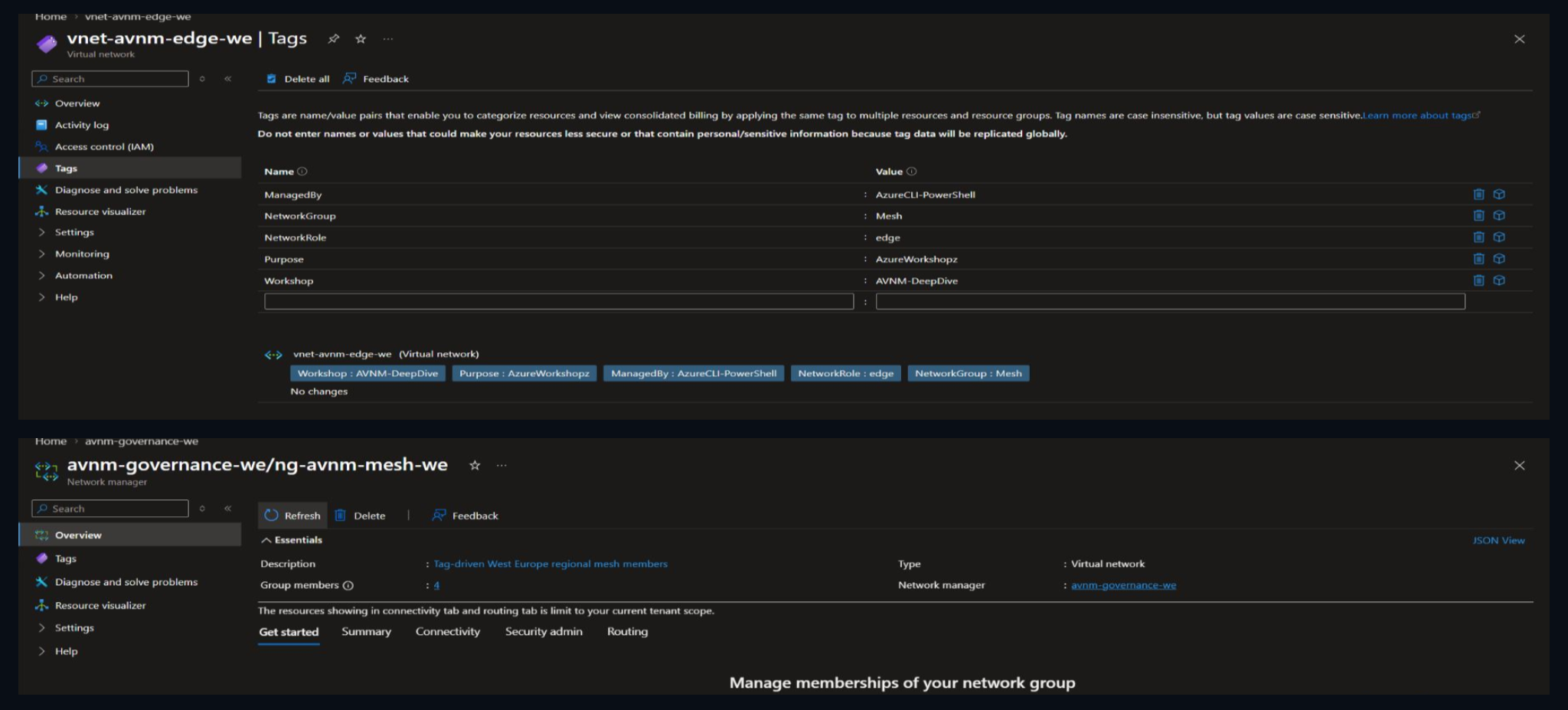
All VNets receive Workshop=AVNM-DeepDive. Core, App1, and App2 receive NetworkGroup=Mesh. Edge receives the typo NetworkGroup=Mseh.
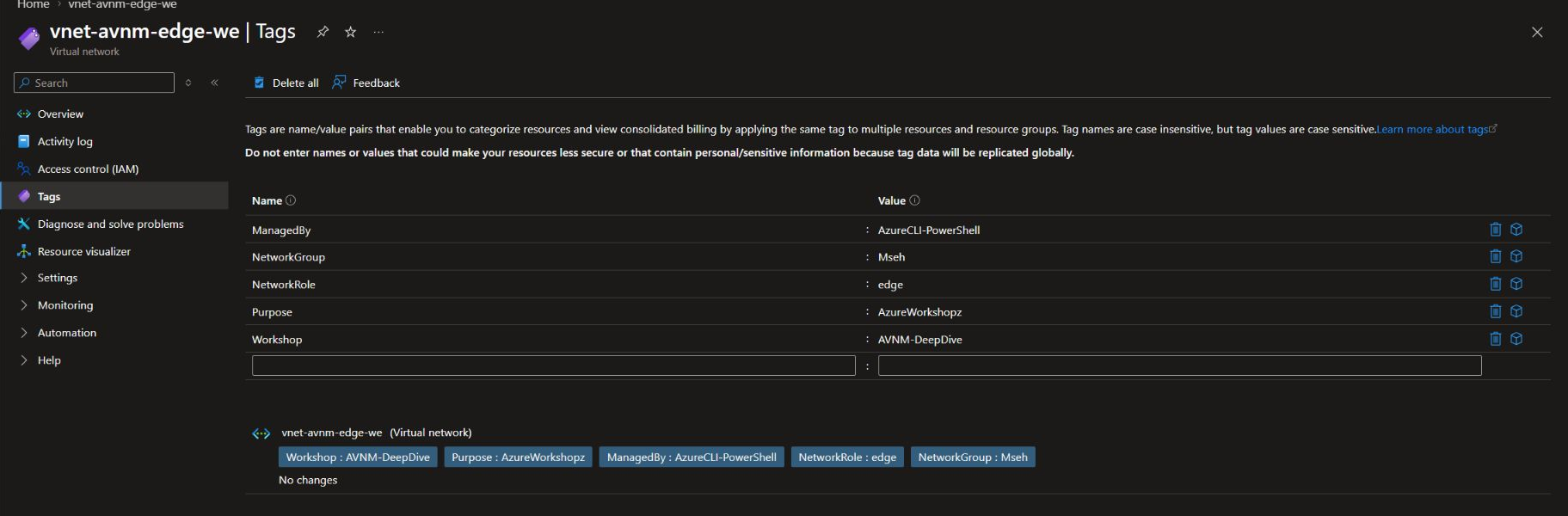
This is more realistic than manually excluding a VNet: governance at scale often fails because metadata is incomplete, misspelled, or inconsistent.
7. Build dynamic network-group membership with Azure Policy
Run the dynamic group stage:
./scripts/Start-AzureVirtualNetworkManagerWorkshop.ps1 @common -Stage DynamicGroupThe definition uses Policy mode Microsoft.Network.Data and the addToNetworkGroup effect. The conditions require all of the following:
{
  "allOf": [
    { "field": "type", "equals": "Microsoft.Network/virtualNetworks" },
    { "field": "tags[Workshop]", "equals": "AVNM-DeepDive" },
    { "field": "tags[NetworkGroup]", "equals": "Mesh" },
    { "field": "id", "like": "/subscriptions/<redacted>/resourceGroups/rg-avnm-deep-dive-we/*" }
  ]
}
The exact resource-group condition is a safety boundary: an unrelated VNet with the same tags elsewhere in the subscription cannot join this lab group. Microsoft documents that addToNetworkGroup is specific to Microsoft.Network.Data policy definitions in the dynamic network-group effect guidance (https://learn.microsoft.com/en-us/azure/governance/policy/concepts/effect-add-to-network-group).
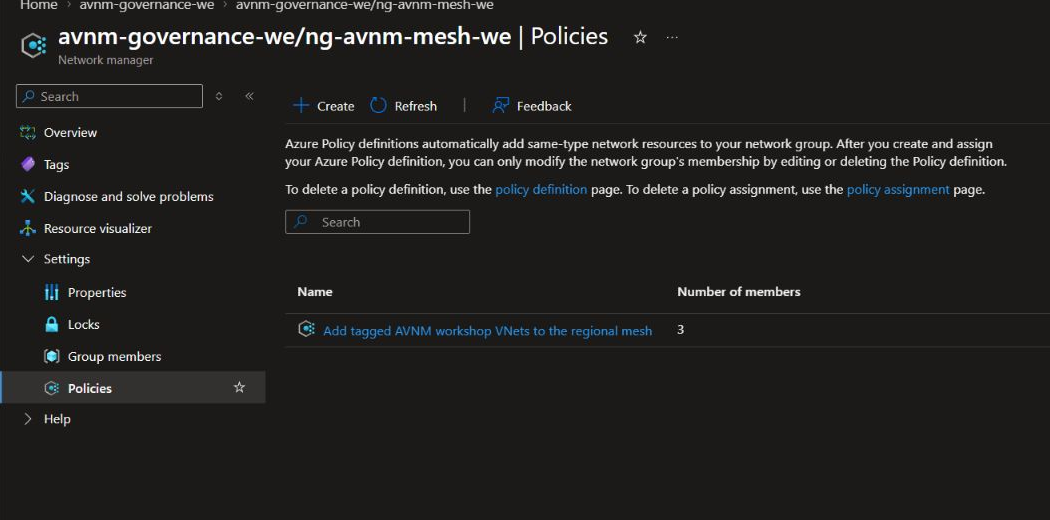
Policy evaluation is asynchronous. The automation polls Resource Graph for the generated microsoft.network/networkgroupmemberships resources instead of sleeping for a fixed period.

8. Deploy the regional mesh
Create and deploy a regional mesh connectivity configuration:
./scripts/Start-AzureVirtualNetworkManagerWorkshop.ps1 @common -Stage MeshThe configuration uses one group, disables global mesh, disallows connected-group overlap, leaves high-scale private endpoints disabled, and does not delete unrelated peerings.
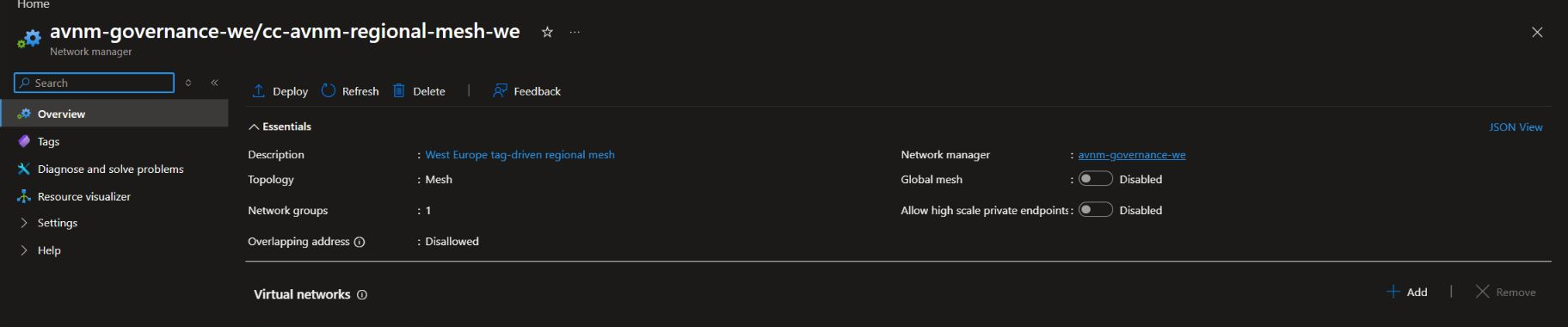
In a mesh, Virtual Network Manager creates a *connected group*. It does not add ordinary VNet peering objects. Microsoft’s connectivity configuration documentation (https://learn.microsoft.com/en-us/azure/virtual-network-manager/concept-connectivity-configuration) says the effective route next-hop type appears as ConnectedGroup.
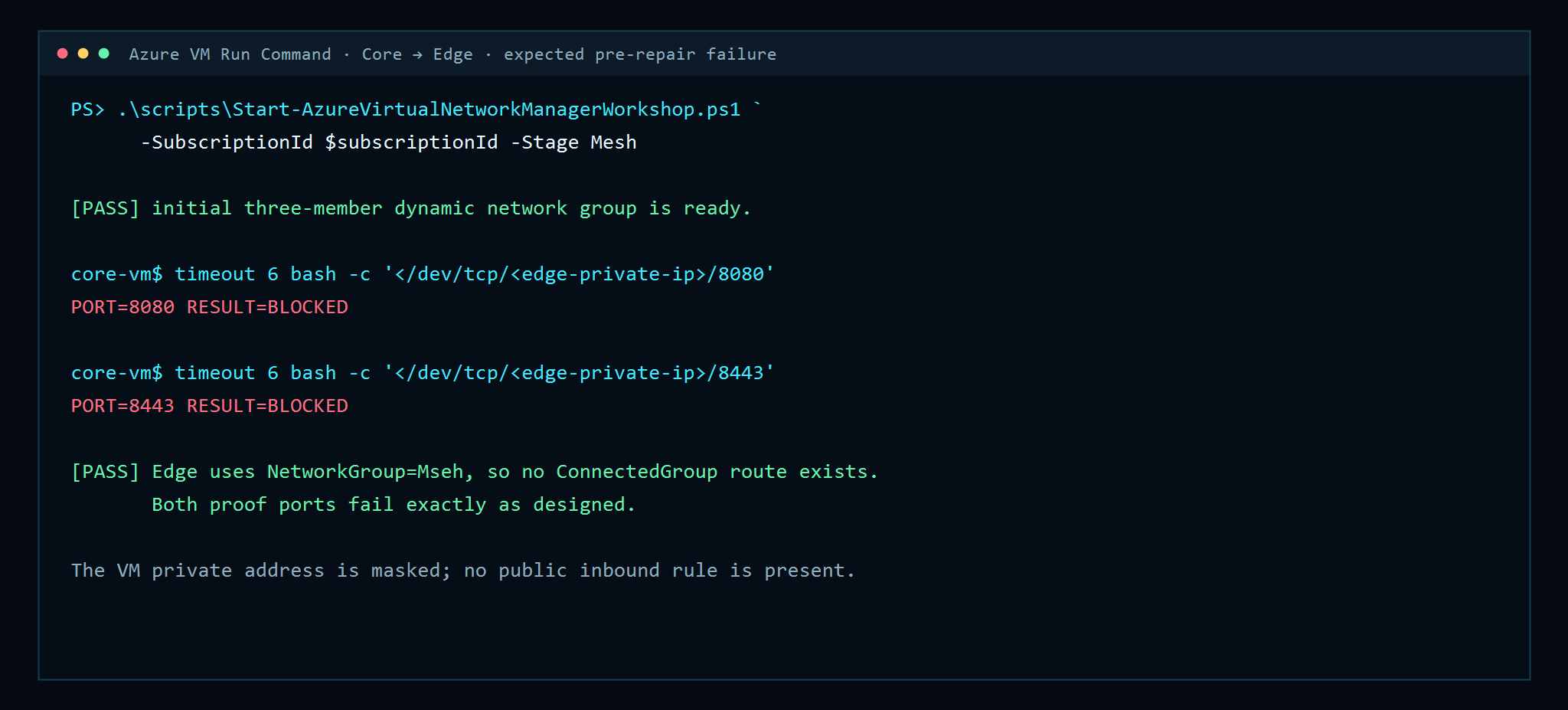
At this moment Core has ConnectedGroup routes for App1 and App2 only. It has no route for Edge, so both probes fail despite the NSG allow.
9. Inspect effective ConnectedGroup routes
Use the evidence script rather than reading guest OS routes, because Azure platform routes are authoritative:
./scripts/Get-AzureVirtualNetworkManagerEvidence.ps1 @common -Evidence RoutingAfter the repair, the Core NIC shows three active routes—one for each other VNet.
10. Prove the expected failure
Before repairing Edge, the automation invokes a shell probe from Core through VM Run Command. The Edge private address is never printed.
Troubleshooting order matters:
1. Check the resource tags.
2. Query dynamic membership with Resource Graph.
3. Confirm that the regional connectivity configuration is deployed.
4. Inspect the NIC effective routes for ConnectedGroup.
5. Only then inspect NSGs and guest listeners.
That sequence prevents wasting time on NSGs when the route does not exist.
11. Repair membership without a peering
Correct the tag and poll for membership plus data-plane convergence:
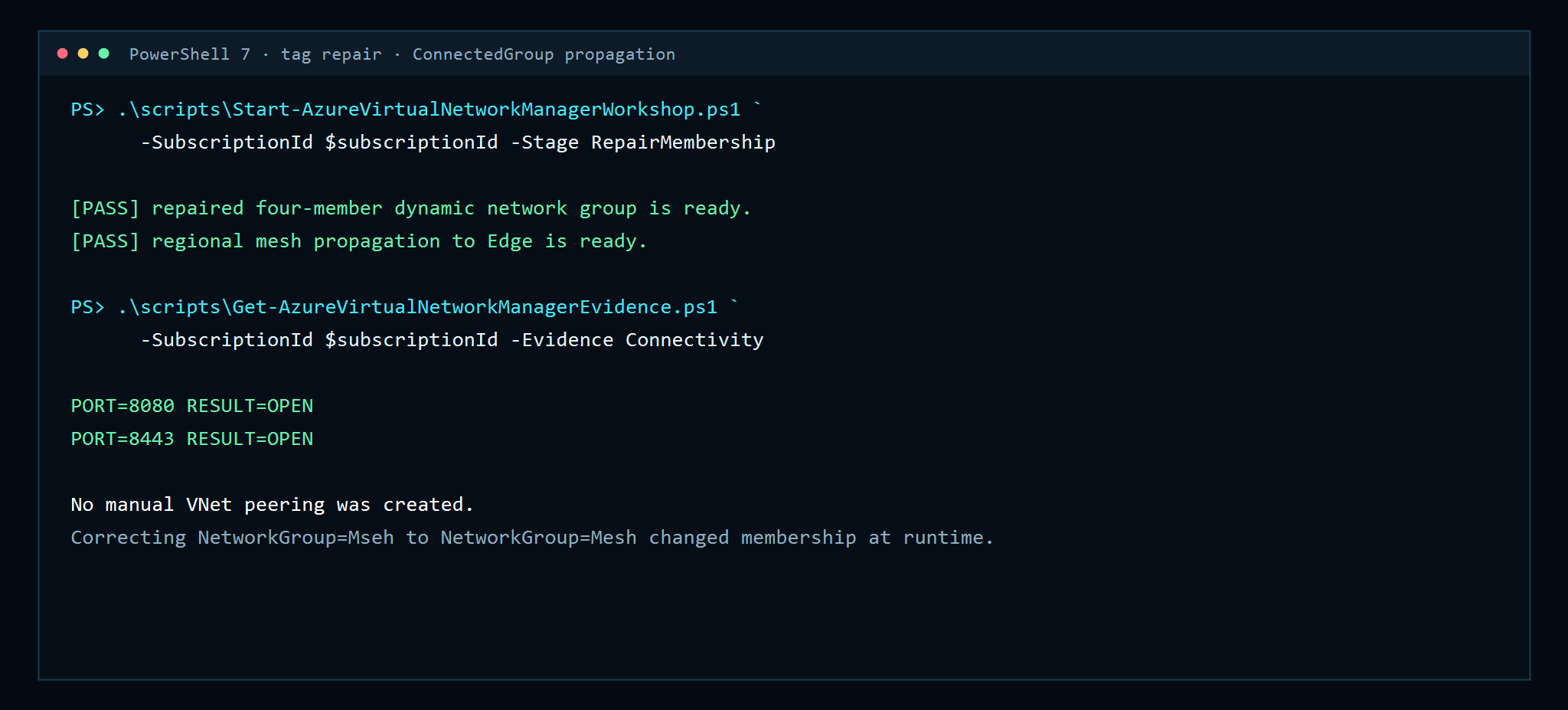
./scripts/Start-AzureVirtualNetworkManagerWorkshop.ps1 @common -Stage RepairMembershipThe group grows from three to four members. Azure redeploys the same desired mesh configuration, and Core receives the Edge route. No manual membership and no peering object are added.
Both ports now succeed:
12. Deploy Security Admin above the NSGs
Now create the central security configuration:
./scripts/Start-AzureVirtualNetworkManagerWorkshop.ps1 @common -Stage SecurityAdminThe rule collection targets the mesh network group. The custom rule is:
| Field | Value |
|---|---|
| Name | `Deny-Unmanaged-App-Port` |
| Priority | `100` |
| Direction | Inbound |
| Protocol | TCP |
| Source | `10.140.0.0/14` |
| Destination | `10.140.0.0/14` |
| Destination port | `8080` |
| Action | Deny |
Security Admin rules are evaluated before NSG rules. A Security Admin Deny or Always Allow terminates evaluation; an ordinary Security Admin Allow continues to NSG evaluation. This distinction is documented in Microsoft’s Security Admin rule evaluation guidance (https://learn.microsoft.com/en-us/azure/virtual-network-manager/concept-security-admins).
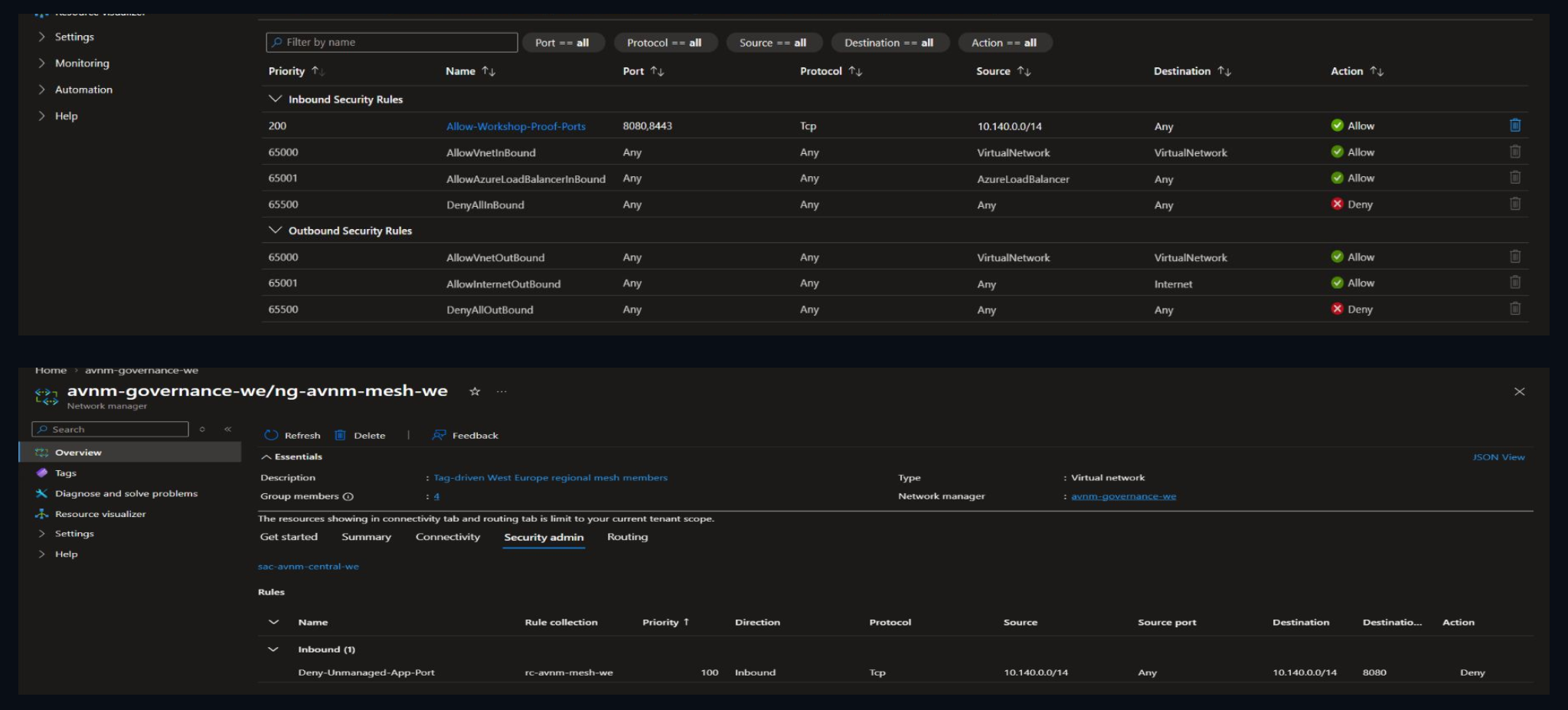
13. Prove central precedence with REST and live traffic
The evidence script calls the effective Security Admin rules API at the VNet and combines it with the defined rule metadata, returning only safe fields. It then runs the same two probes.
./scripts/Get-AzureVirtualNetworkManagerEvidence.ps1 @common -Evidence Security
./scripts/Get-AzureVirtualNetworkManagerEvidence.ps1 @common -Evidence Connectivity
Expected final result:
Rule                       DefinedPriority EffectiveAccess Direction Port Protocol
Deny-Unmanaged-App-Port    100             Deny            Inbound   8080 Tcp

PORT=8080 RESULT=BLOCKED
PORT=8443 RESULT=OPEN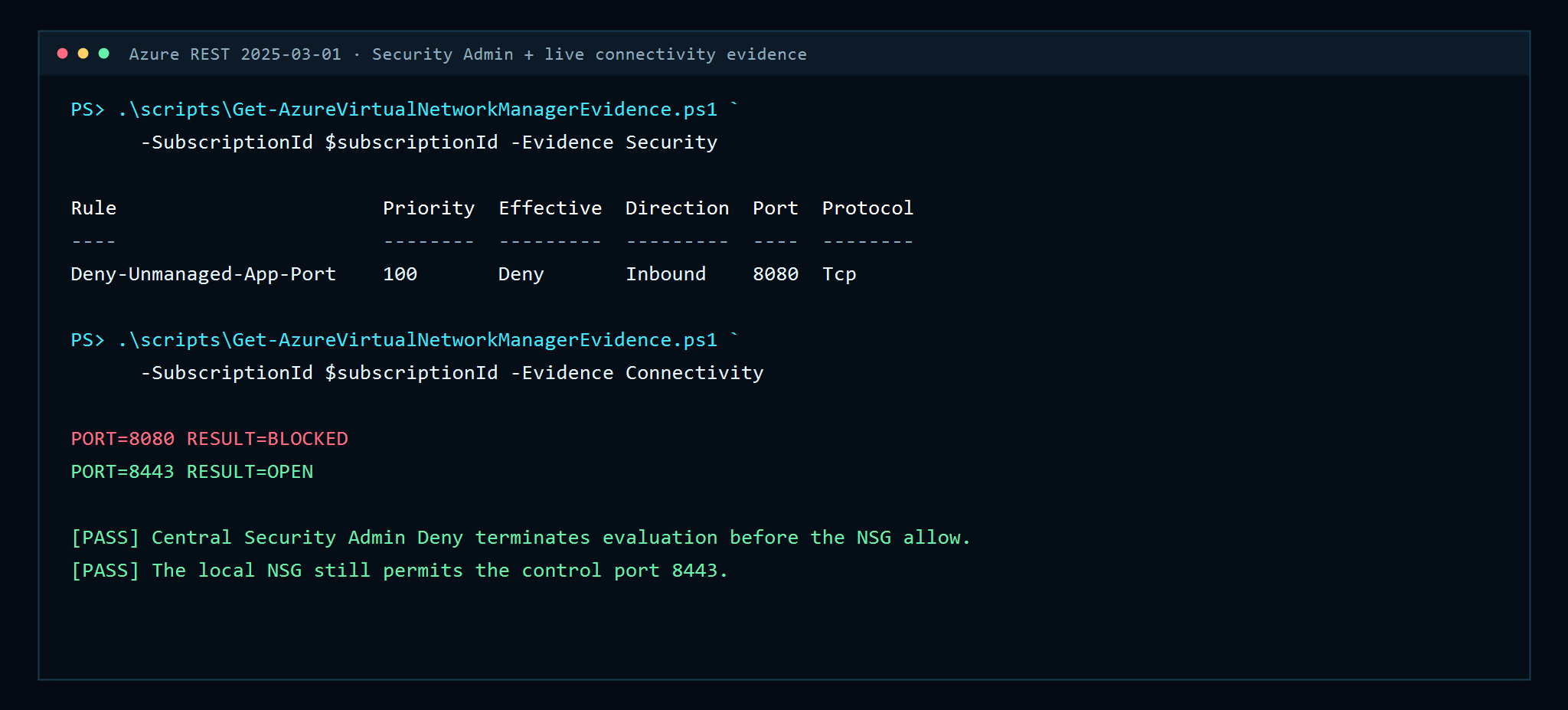
If both ports fail, check the mesh and guest listener. If both ports work, check the Security Admin regional deployment rather than the NSG. If 8080 fails and 8443 works, the lab has produced the intended proof.
14. Production design guidance
For a production rollout:
• scope network managers with management groups and separate platform ownership from application ownership;
• use tag standards enforced by policy, not informal naming conventions;
• deploy connectivity and Security Admin configurations progressively by region;
• reserve address ranges for future platforms and on-premises networks before allocations begin;
• delegate IPAM Pool User at the narrowest practical pool;
• treat Deny and Always Allow as centrally governed controls with change review;
• monitor dynamic group membership drift in Resource Graph;
• validate effective routes and rules after every configuration deployment;
• avoid enabling “delete existing peerings” until the current peering estate is inventoried; and
• use workload-private egress such as Azure Firewall or NAT Gateway rather than public IPs on production VMs.
Connected groups solve connectivity orchestration, not application authorization. NSGs, Security Admin, guest firewalls, identity, and application controls still form separate layers.
15. Cleanup in the required dependency order
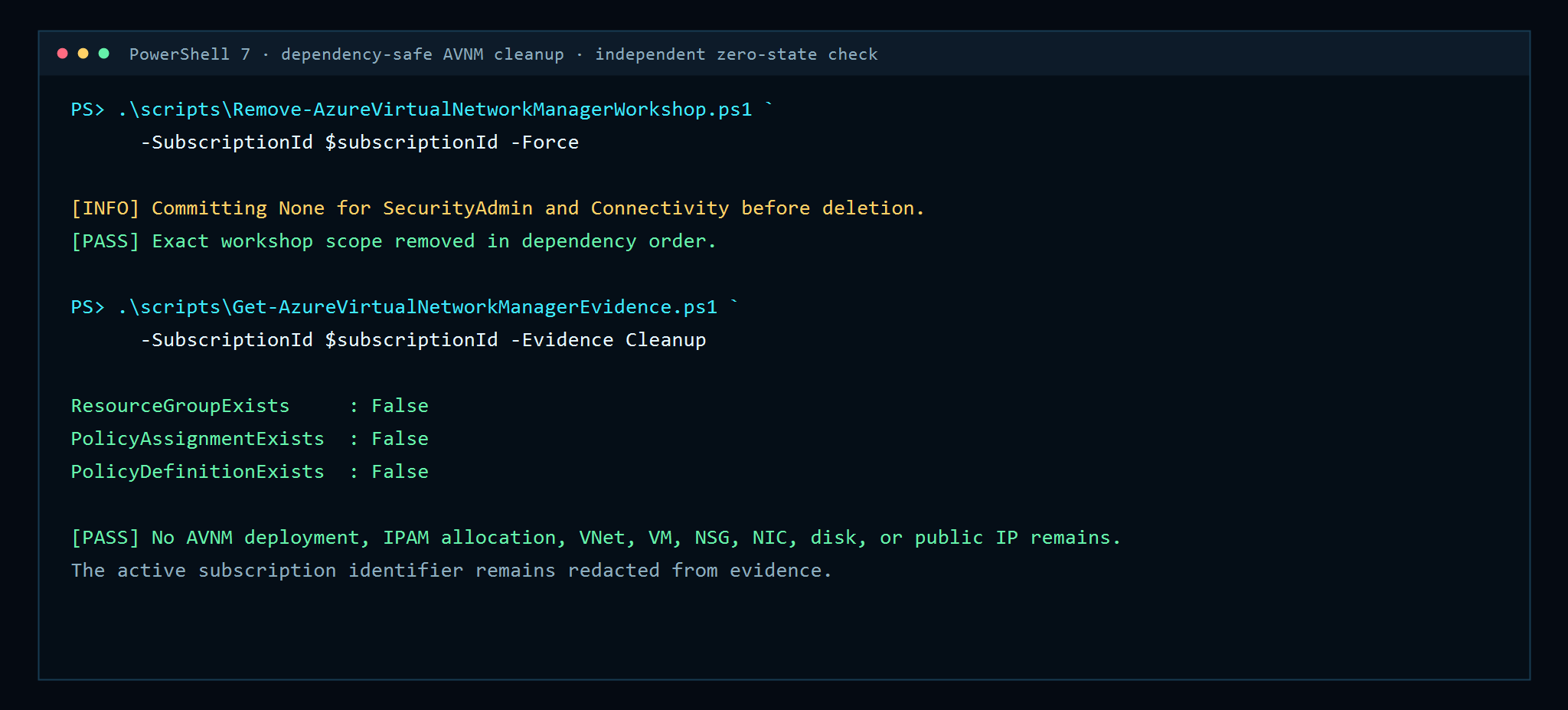
Network Manager configurations must be undeployed before their definitions are deleted. The cleanup script first commits None for SecurityAdmin and Connectivity in West Europe, polls deployment state, then removes the policy, rules, configurations, group, VMs, VNets, IPAM reservation, pools, Network Manager, and exact resource group.
./scripts/Remove-AzureVirtualNetworkManagerWorkshop.ps1 @common -Force
./scripts/Get-AzureVirtualNetworkManagerEvidence.ps1 @common -Evidence Cleanup
Microsoft’s Network Manager component-removal checklist (https://learn.microsoft.com/en-us/azure/virtual-network-manager/concept-remove-components-checklist) explains why configuration deployments must be removed before deleting the configuration resources.
Final result
This lab demonstrated all four control points that make Virtual Network Manager valuable at scale:
1. IPAM allocated non-overlapping address spaces from a governed pool.
2. Dynamic network groups turned tags into policy-driven membership.
3. Connectivity configurations created a regional mesh and ConnectedGroup routes without manual peerings.
4. Security Admin enforced a central deny before the workload NSG.
The strongest operational lesson is that the effective configuration is the truth. Tags express intent, Policy translates intent into membership, regional deployment applies connectivity or security, and effective routes/rules prove what the data plane actually received.
Download the lab bundle
The downloadable ZIP contains the workshop Markdown, public PowerShell scripts, guest setup script, cover, sanitized screenshots, publishing brief, and validation transcript. It excludes Azure CLI profiles, tokens, subscription or tenant IDs, principal IDs, public IP values, raw ARM IDs, raw Portal captures, temporary REST responses, and generated SSH keys.
Comments