Lab 09 — Virtual Machine Lifecycle and Managed Disks
azure administrator series

Lab 09 — Virtual Machine Lifecycle and Managed Disks. Neon cover illustration, not validation evidence.
Azure CLI + PowerShell 7 + Portal • 150–210 minutes
ZIP SHA-256: c53d41a54653111953e2afb9faebcf63b6903ccda47c201d9bec726629befc22
A VM can remain Running while its workload cannot write. In this workshop, a disposable data filesystem runs out of usable space. You will distinguish Azure disk capacity from guest partition and filesystem capacity, recover by expanding the correct disk, and verify the original files.
This 150–210 minute workshop combines Azure CLI, PowerShell 7, Bicep, and Portal. It follows the VM creation, sizes, disks, encryption-at-host and resource movement topics in the AZ-104 study guide. It is an independent environment; no earlier lab resources are needed.
Understand the lifecycle
The environment contains one Ubuntu 24.04 LTS VM, a 32 GiB OS disk, a separate 4 GiB data disk, NIC, NSG, VNet, and Standard static public IPv4. Its public IP is used for outbound connectivity only. A priority-100 NSG rule denies all inbound traffic, overriding the default inbound allows. Run Command uses the Azure guest agent; it is not an agent-independent recovery mechanism.
The synthetic files live only on the ext4 data filesystem at /srv/az104-lab09. Mounting uses a filesystem UUID rather than a volatile device letter. Control-plane disk IDs and LUN 0 are checked before guest operations. The fault affects an unprivileged writer and preserves root-reserved ext4 space; it is not an OS-disk fill, sign-in incident, or network outage.
The lifecycle exercises include a move between two lab-owned resource groups and planned VM size changes. A resource-group move changes ARM resource IDs but not the physical region or the filesystem UUID. A VM resize can require deallocation and causes an interruption; preserving the OS/data disks is different from preserving temporary-disk contents.
Preflight and private state
Use the selected Visual Studio Enterprise subscription in both Azure CLI and PowerShell. Preflight checks their tenant, subscription and operator match; permissions; provider registration; policies and locks; quota; image and SKU availability; overlapping VNet prefixes; required tools; current costs; and refreshed EUR retail prices. Do not register providers, enable features, grant roles or relax policy to force a passing result.
The prescribed VNet is 10.109.0.0/24, with workload subnet 10.109.0.0/26. The baseline size is Standard_B2s; the temporary resize target is Standard_B2ms. Regional SKU metadata does not guarantee allocation capacity. Stop rather than silently choosing another paid SKU.
Run the following from the extracted package in PowerShell 7, replacing the private path with a new directory outside the package:
$state = 'C:\LabPrivate\Lab09\state.json'
.\Initialize-Lab09StateDirectory.ps1 -Path (Split-Path $state) -Execute
.\Start-Az104Lab09.ps1 -StatePath $state -Stage Preflight
.\Test-Lab09Safety.ps1 -PrivateTestDirectory (Split-Path $state)
Read the private preflight report. Confirm the EUR15 active allowance and EUR5 cleanup reserve. The conservative estimate uses six hours at the higher selected VM rate plus disks, IPv4 and contingency. Retail prices are estimates, not the subscription offer or a hard billing cap.
Deploy and inspect the foundation
Prepare the two owned groups, validate the template and save the what-if without deploying the chargeable foundation:
.\Start-Az104Lab09.ps1 -StatePath $state -Stage Foundation -Execute -PrepareOnlyReview foundation-whatif-private.json locally. Expect only the seven isolated resources, the pinned image, blocked inbound traffic and no extra associations. The compiled ARM JSON explains the same Bicep resources and dependencies. Never upload the private parameter file, which contains your SSH public key and actual run context.
.\Start-Az104Lab09.ps1 -StatePath $state -Stage Foundation -Execute -ReviewedWhatIfPortal checkpoint: resource-group inventory, VM overview and size, OS/data disks, VNet subnet settings, and the NSG deny rule. Public IP does not imply public inbound permission. Inspect actual encryption settings without enabling anything.

Successful corrected Bicep foundation deployment in Azure.

Seven isolated baseline resources in West Europe; names masked.

Running Ubuntu 24.04 VM with Standard B2s and 4 GiB memory.

Encryption at host disabled; Azure Disk Encryption not enabled. Managed-disk SSE is shown separately.
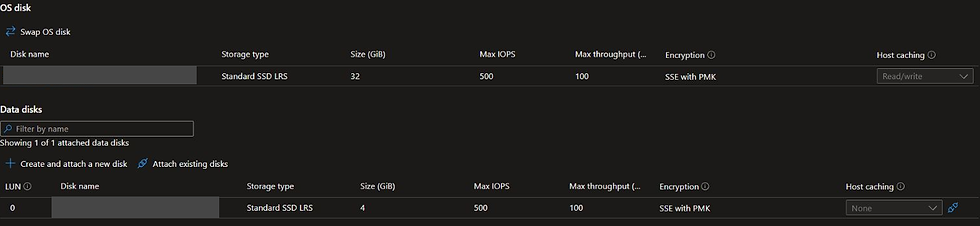
32 GiB OS disk and separate 4 GiB data disk at LUN 0, both Standard SSD LRS with platform-managed SSE.

Priority-100 Deny-All-Inbound overrides the default inbound allows.
Establish the data baseline
.\Start-Az104Lab09.ps1 -StatePath $state -Stage DataDisk -Execute
.\Test-Az104Lab09.ps1 -StatePath $state -Phase Baseline -Execute
The initializer requires a blank, exactly 4 GiB disk at the recorded LUN. It rejects OS/root and temporary disks, unexpected partitions, signatures and mount contents. It installs only missing required guest tools, creates GPT/ext4, preserves 5% root-reserved blocks, adds a scoped UUID fstab entry and creates a dedicated non-login writer. Three synthetic files total at most 3 MiB.
Record SHA-256 hashes, filesystem UUID, free space, VM identity and disk unique IDs privately. The script reboots the VM and verifies that the same mount and files return. An effective-NSG check plus an external TCP 22 probe demonstrates blocked public SSH; the probe alone would not establish the responsible control.
Portal checkpoint: Run Command results and disk attachment at LUN 0. The guest output records write success and hashes. Do not treat an attached-disk list as proof that Linux has mounted the correct filesystem.
For a readable genuine Portal checkpoint, paste guest/portal-checkpoint.sh into Run command → RunShellScript after initialization and explicitly select Run. It performs a bounded write probe and displays capacity, the actual write response, agent status and original hashes without exposing the manifest identities.

Genuine Run Command baseline: healthy root volume, 4 GiB data disk, successful unprivileged write and original SHA-256 hashes.
Move the exact resources
Begin this stage within one hour of the foundation's chargeable deployment:
.\Start-Az104Lab09.ps1 -StatePath $state -Stage Move -ExecuteThe runner validates the exact move set, then uses Move-AzResource for the seven top-level resources. The manifest records pending intent before submission. On confirmed completion, it rebinds the recorded ARM IDs and checks VM/disk identity, NIC MAC, static public IP, region, filesystem UUID and file hashes.
Azure can lock source and destination resource groups for management operations for up to four hours. The VM can continue running, but do not issue further management mutations until the move completes. Do not infer deletion from an old ID becoming absent: the moved resource has a new ID. Microsoft move guidance
Portal checkpoint: destination inventory, VM resource group and Activity Log. Repeating this stage verifies the completed move rather than moving resources again.

All seven resources in the destination resource group after the live move; region remains West Europe.
Resize without replacing the VM
.\Start-Az104Lab09.ps1 -StatePath $state -Stage Resize -ResizeStep Up -Execute
# Capture the B2ms Portal and guest-memory checkpoint before returning.
.\Start-Az104Lab09.ps1 -StatePath $state -Stage Resize -ResizeStep Down -Execute
.\Test-Az104Lab09.ps1 -StatePath $state -Phase Baseline -Execute
The script deallocates, resizes to Standard_B2ms, restarts and checks guest memory and files. It then returns to Standard_B2s using the same controlled sequence. Both sizes have two vCPUs; memory is the useful guest-side discriminator here. The Azure model's requested size alone does not prove the running guest changed. Microsoft resize guidance
Portal checkpoint: both size states and retained disk attachments. Explain the planned downtime; do not claim an uninterrupted resize or rely on temporary-disk persistence.

Running Standard B2ms with 8 GiB memory. Guest memory and identity were verified separately by the runner.

Same VM returned to Standard B2s with 4 GiB memory; guest memory, identities and hashes preserved.
Introduce the full-volume incident
.\Set-Az104Lab09Fault.ps1 -StatePath $state -Execute
.\Test-Az104Lab09.ps1 -StatePath $state -Phase Fault -Execute
Only the data filesystem is filled, using one bounded filler file. The unprivileged write probe must produce an actual insufficient-space error. The filler does not overwrite the original files. Verify the guest agent, root filesystem space, disk attachment, NSG and original hashes remain healthy.
Diagnose using the mount source, LUN mapping, df, lsblk, filesystem UUID and Azure disk capacity. A Running VM or an attached disk is not proof that an application can write. Do not change permissions, delete the baseline files, expand the OS disk or substitute another device letter to make the symptom disappear.
Portal checkpoint: genuine Run Command output showing the observed failure and healthy baseline hashes.

Actual unprivileged errno 28: No space left on device. The 4 GiB data volume is full, the root volume has 29 GiB free, the agent is active, and original hashes are unchanged.
Expand and prove recovery
.\Restore-Az104Lab09.ps1 -StatePath $state -Execute
.\Test-Az104Lab09.ps1 -StatePath $state -Phase Recovery -Execute
.\Restore-Az104Lab09.ps1 -StatePath $state -Execute
The PowerShell recovery deallocates the VM and expands the recorded Standard SSD data disk from 4 to 8 GiB. After restart it uses the verified LUN mapping, grows partition 1 and expands ext4. Disk shrinking is not part of the exercise and is not supported. Microsoft expansion guidance
Recovery must succeed while the filler still exists. This proves that new capacity—not deleting the filler—restored writes. Then the exact filler is removed and the original file hashes are verified again. Repeated recovery is a no-op verification: it must not expand to another size, reformat, or replace the disk.
Portal checkpoint: 8 GiB disk configuration, successful guest write, expanded filesystem and original hashes.

The original data disk is now 8 GiB at LUN 0. The 32 GiB OS disk and platform-managed encryption remain unchanged.

Genuine recovery: write succeeded, the ext4 volume is 7.8 GiB with free space, the root volume and agent remain healthy, and original SHA-256 hashes match. Expansion-based success with the filler retained is recorded separately in sanitized evidence.
Encryption and wider moves: guided
The live VM uses platform-managed encryption at rest on managed disks. Encryption at host remains disabled: its subscription feature was unregistered during preflight. Do not equate SKU support with feature registration or an enabled VM setting. The guided path explains registration approval, supported sizes, deallocation requirements and verification; none of these enablement steps are claimed as live-tested. Azure Disk Encryption is a separate guest-volume technology and is not enabled in this lab. Encryption-at-host prerequisites
The download includes guided-topics.md with the prerequisite, approval, deallocation, enablement and verification sequence for a separate approved environment. The release runner never registers EncryptionAtHost or enables it.
For a cross-subscription move, review same-tenant requirements, destination permissions and provider registration, dependent resources, quota, scope-dependent assignments and changed IDs. For a regional relocation, plan a supported migration method, target network and capacity, validation, cutover and additional costs. Neither is the same as moving between resource groups, and neither is executed here. VM move limitations
Interrupted operations
Every operation saves pending intent and exact targets under an exclusive manifest lock. A pending state blocks normal stage execution.
.\Reconcile-Lab09Operation.ps1 -StatePath $state
.\Reconcile-Lab09Operation.ps1 -StatePath $state -Execute
Reconciliation accepts only a verified outcome. A completed move requires all seven exact destination objects and no source objects, with preserved identities. An 8 GiB recovery can finish guest growth without another disk resize. A terminal failed initial foundation may be corrected only after the exact deployment and targets are inspected, both VM and OS disk are absent, and all partial resources are verified as owned; the original cost clock is retained and a new what-if review is required. Incomplete initialization or an ambiguous operation is never guessed, reformatted or deleted. There is no universal force-resume flag.
Cleanup and verify absence
Capture your genuine checkpoints before cleanup, then:
.\Export-Lab09Evidence.ps1 -StatePath $state -OutputPath '.\evidence-before-cleanup.json'
.\Remove-Az104Lab09.ps1 -StatePath $state -Execute
.\Remove-Az104Lab09.ps1 -StatePath $state -Execute
.\Export-Lab09Evidence.ps1 -StatePath $state -OutputPath '.\evidence-after-cleanup.json'
Cleanup validates ownership and associations before each deletion. It removes the exact recorded resources and deployment history, then only empty owned groups. Unexpected resources, locks or assignments block deletion. Temporary SSH key material is removed; private diagnostics remain local. Verify absence using the current moved IDs and both group IDs, not name-prefix searches.
Portal checkpoint: the deleted lab group/resource is absent. A screenshot alone is not the cleanup audit; exact-ID absence checks and repeated cleanup provide that evidence.
Stop new exercises at five hours and target cleanup before six. If Azure has an uncertain in-progress operation, stop exercises and reconcile rather than forcing a retry or weakening controls.

The recorded destination resource group returns Resource not found (404). Exact-ID checks separately confirmed both groups, all seven resources and the recorded deployment absent; repeated cleanup passed.
Challenge — Running VM, failed writes
Your disposable Linux VM remains Running and its management agent responds. A synthetic workload that previously wrote successfully now cannot write to its data directory. The original files are still required.
Identify the failing layer using evidence, restore write capacity without replacing the VM or changing network access, and prove the original data is unchanged. Show that the recovery is safe to repeat. Do not inspect the solution before collecting your first diagnostic checkpoint.
Knowledge checks
Why can a Running VM still fail to write application data?
What must be verified before formatting the data disk?
Why use a filesystem UUID rather than /dev/sdc1 in fstab?
Does expanding a managed disk automatically expand an ext4 data filesystem?
What evidence distinguishes a requested VM size from the running guest's effective size?
What changes during a resource-group move, and what does not?
How does platform-managed disk encryption differ from encryption at host?
Why prove recovery before removing the filler, and then repeat recovery and cleanup?
The download includes progressive hints, a separate solution, eight answers, all 14 genuine Portal captures, sanitized evidence, the validation report and individual checksums. Try the challenge before opening the solution.
Live validation — 7 October 2026
The release run passed the core VM lifecycle, full-volume recovery and cleanup exercises in West Europe. The evidence JSON retains measurements and hashes, not private resource identifiers. Fourteen genuine Azure Portal captures are cropped and masked for privacy; the neon cover is a separate AI-created illustration.
Live exercises passed
Bicep build, compiled ARM parsing, Azure template validation and reviewed what-if passed. The isolated foundation deployed successfully with seven resources and no inbound SSH permission.
A blank, exact LUN 0 data disk was initialized as ext4. Three synthetic files were hashed, an unprivileged write succeeded, and the same UUID mount and hashes survived reboot.
Effective NSG rules showed the priority-100 inbound deny. A separate external TCP 22 connection probe did not connect.
All seven exact resources moved together to the second owned group. The live move completed; ARM IDs changed, while region, VM/disk identities, NIC MAC, static public IP, mount UUID and file hashes remained unchanged.
Both controlled resize transitions passed: B2s → B2ms → B2s. Guest memory changed from approximately 4,006,260 KiB to 8,128,876 KiB and back. VM/disk identities and original hashes were preserved.
The data-volume fault produced actual unprivileged errno 28, “No space left on device.” The 4 GiB data disk had 4,096 usable bytes available; the OS filesystem retained approximately 30.4 billion free bytes and the guest agent stayed active.
PowerShell expanded the original data disk to 8 GiB. Guest partition/ext4 growth produced 8,368,103,424 filesystem bytes and restored writes while the 3,906,981,888-byte filler still existed. Approximately 4.05 billion bytes were available before filler removal; all three original SHA-256 hashes matched.
Only after expansion-based success was proven was the exact filler removed. Recovery validation and repeated recovery passed, with no second capacity increase or reformat.
Cleanup and repeated cleanup verified both owned groups, all seven resources and the recorded deployment absent. Temporary SSH material was removed. No active lab resources remain.
Safety and implementation findings
Thirteen PowerShell safety cases and six guest safety cases passed as offline simulations. They cover wrong context, mismatched IDs/UUID/mount, OS/root targets, unsafe files, exclusive locking, pending operations, time limits and address overlap. These simulations are not claimed as live Azure faults. A real competing operation was also rejected by the manifest lock.
An initial template explicitly setting encryption-at-host to false was rejected because the subscription feature was unregistered. The unnecessary property was removed, the exact failed initial deployment was reconciled, and a corrected what-if was reviewed before deployment; the original cost clock was retained. No feature or provider was registered.
The first PowerShell disk-size update cleared the disposable disk's ownership tags. The guard stopped completion. The exact disk ID, unique identity, attachment, size, encryption and prior expansion/hash proof were checked before restoring only its recorded tags. Pending recovery was then reconciled without another disk expansion. The released update explicitly preserves the existing tag map, and reconciliation requires proof of successful writes with the filler retained before claiming recovery.
PowerShell checks passed for all 13 scripts with zero syntax errors and zero error-severity findings. Eleven warnings were reviewed as documented in static-analysis.json; they were not silently treated as absent.
Scope and release checks
Encryption at host remained disabled and unregistered. Its enablement, cross-subscription movement and regional relocation are guided, not live-tested. Platform-managed managed-disk encryption was inspected. There was no Bastion deployment, additional role assignment, inbound SSH opening, application deployment, subscription move or region move.
The refreshed conservative six-hour estimate was EUR3.61, including the higher resize SKU, disks, public IPv4 and contingency. This is an estimate, not an actual settled bill or an Azure spending cap. The move began within one hour and cloud cleanup completed well before the six-hour target.
The release gate additionally requires reviewed sanitized captures, ZIP extraction and individual SHA-256 checks. Publication requires a fresh public download to match the release ZIP hash. Public-link, desktop-layout and Wix mobile-preview results are recorded separately in the publication report; no actual-phone testing is claimed.
Comments