Lab 10 — VM Availability, Scale Sets, and Load Balancing
azure administrator series
Lab 10 — VM Availability, Scale Sets, and Load Balancing. Cover illustration, not validation evidence.
ZIP SHA-256: 532d809acedadba64a9a6f21e80d0b07971ad0a162f9e13517ed6542431d5211
Build a small Azure environment, compare availability sets with zones and Flexible scale sets, then investigate why healthy applications stop receiving new load-balanced connections. Recover the captured probe configuration without rebuilding the instances.
Duration: 180–240 minutes. Tools: PowerShell 7.5+, Azure CLI, Bicep, Az.Accounts, Az.Compute, Az.Network, Az.Resources, and Azure Portal.
Authoring validation: the Azure deployments, placement, local application hashes, probe fault/recovery metrics, manual scaling, and repeated cleanup were observed successfully. Public frontend traffic, effective NSG/outbound traffic, and external SSH checks were not completed because the workstation source IP was unstable. The download retains the complete validation report and its development-package status; do not treat the observed configuration checks as end-to-end public-access acceptance.
Environment
Use only a disposable resource group in the selected Visual Studio Enterprise subscription, West Europe. At peak the environment has five Standard_B1s VMs with 32 GiB Standard SSD OS disks: two availability-set VMs, one standalone zonal VM, and two Flexible scale-set instances.
The VNet uses 10.110.0.0/24, with placement 10.110.0.0/26 and scale 10.110.0.64/26. The only public IP belongs to the Standard Load Balancer. No instance has a public IP. All SSH and other inbound traffic is denied. Azure Run Command administers the guests.
Application access is limited to one recorded workstation IPv4 /32. A changing outbound IP can make public tests fail independently of the health probe. Do not widen the rule, add a wildcard, or interpret such a failure as proof of the probe fault.
Start safely
Open PowerShell 7 in this package directory. Authenticate Azure CLI and Az PowerShell to the same tenant, subscription, and account. Keep all identifiers and authentication output private.
Choose a new private directory outside this package. These example paths contain no real credentials or subscription identifiers.
./Initialize-Lab10StateDirectory.ps1 -Path 'C:/LabPrivate/az104-10-run' -Execute
$lab10State = 'C:/LabPrivate/az104-10-run/state.json'
./Start-Az104Lab10.ps1 -StatePath $lab10State -Stage Preflight -Execute
Without -Execute, entry scripts print a preview and make no Azure calls, guest requests, deployments, transfers, or HTTP test traffic. State initialization and evidence export also require -Execute.
Preflight makes read-only Azure queries and six fresh, proxy-disabled IPv4 checks across two independent endpoints. It does not register providers, grant permissions, raise quotas, bypass policies, change tools, or deploy resources. It stops if the network cannot support the single-address access design. Creation of an isolated private manifest is a local change.
If existing policies require review, inspect governance-review-private.json and the referenced definitions and effective parameters. Confirm the existing session satisfies any MFA requirements for both creation and cleanup, then rerun Preflight with -ReviewedGovernance. This flag records a review; it does not bypass policy enforcement or create an exemption.
Require six available regional and B-series vCPUs, including one vCPU of headroom. Review applicable policies, locks, deny assignments, names, image, zones, availability-set configuration, and costs before allocation. Refresh the six-hour retail estimate for five VMs, disks, Standard Load Balancer, public IPv4, and bounded traffic. EUR15 is an estimate allowance, not an enforced billing cap; retain EUR5 for cleanup. Stop new exercises after five hours and target cleanup before six.
Build the foundation
First prepare deployment validation and the incremental what-if. This creates the empty, owned group and a private disposable SSH key, but does not deploy compute.
./Start-Az104Lab10.ps1 -StatePath $lab10State -Stage Foundation -PrepareOnly -ExecuteReview Foundation-whatif-private.json inside the private directory. Expect only this lab's creations. Never publish this raw file. Then submit the reviewed deployment:
./Start-Az104Lab10.ps1 -StatePath $lab10State -Stage Foundation -ReviewedWhatIf -Execute
./Start-Az104Lab10.ps1 -StatePath $lab10State -Stage ScaleSet -PrepareOnly -Execute
# Review ScaleSet-whatif-private.json before the next command.
./Start-Az104Lab10.ps1 -StatePath $lab10State -Stage ScaleSet -ReviewedWhatIf -Execute
The scale-set template references the existing network and load balancer; it does not redeploy them. Foundation replay is blocked after success. Every deployment is Incremental.
The authoring run observed two availability-set VMs in fault domains 0/1 and update domains 0/1, with configured counts 2/5:

Genuine Portal availability-set placement, with identifiers redacted
The separate VM ran in West Europe zone 1. The Flexible scale set selected zones 1/2 and contained two successful B1s instances:

Genuine Portal Flexible scale-set configuration, with identifiers and addresses redacted
The Portal's associated-public-IP summary can include the load balancer's public IP. It does not by itself mean that an instance NIC has a public IP. The NIC model must be inspected independently.
Establish a healthy baseline
./Start-Az104Lab10.ps1 -StatePath $lab10State -Stage Baseline -Execute
./Test-Az104Lab10.ps1 -StatePath $lab10State -Phase Baseline -Execute
The baseline stage manually scales from one to two instances. It records actual VM, NIC, and disk dependencies, validates guest service readiness, and opens bounded fresh HTTP connections. Both instance labels must appear, with the same synthetic content hash. Load balancing uses hash distribution; equal or round-robin request counts are not promised.
Record actual fault and update domains for the two availability-set VMs and actual zone placement for all zonal VMs. These observations demonstrate configuration and placement, not a datacenter-outage test. Complete the effective NSG, outbound connectivity, and blocked SSH checks in release-checklist.md; model inspection alone does not prove them.

Genuine Portal list of the two running Flexible instances
Wait for fresh per-backend health metrics before validating. Metrics may lag provisioning or a probe change. An inconclusive metric response stops validation and is not a pass.
Introduce the controlled fault
Read challenge.md first. The separate solution reveals the changed control.
./Set-Az104Lab10Fault.ps1 -StatePath $lab10State -Execute
./Test-Az104Lab10.ps1 -StatePath $lab10State -Phase Fault -Execute
Capture the actual failed new connections, per-backend health metrics, and successful local application checkpoints. Do not assume an HTTP status code: a load-balancer probe failure can prevent the connection from reaching an HTTP server at all. Established connections are not a reliable fault test.
The configuration-only authoring run changed only the captured probe port. Both local applications, content/code hashes, instance identities, NSGs, and membership remained unchanged. Fresh backend metric averages were 0,0; no causal claim about public frontend connections is made for that run.

Genuine Portal view of the deliberately incorrect probe port
Restore through PowerShell
./Restore-Az104Lab10.ps1 -StatePath $lab10State -Execute
./Test-Az104Lab10.ps1 -StatePath $lab10State -Phase Recovery -Execute
./Restore-Az104Lab10.ps1 -StatePath $lab10State -Execute
Recovery changes only the captured probe on the current owned load-balancer model. It stops on other configuration drift. A second restoration performs no write when the probe already matches. Public traffic validation remains a separate test. Probe restoration and cleanup remain available if the workstation IP changes.

Genuine Portal view of the probe restored through PowerShell
Exercise manual scaling
./Start-Az104Lab10.ps1 -StatePath $lab10State -Stage ScaleCycle -ExecuteThe sequence is 2 → 1 → 2. Scale-in can delete an instance and its configured dependencies; scale-out can create new identities. Reconciliation tracks exact parent relationships and the pending operation rather than adopting names by prefix. Compare counts, guest readiness, pools, configuration, and hashes after each operation.
The configuration-only authoring run completed that count sequence and verified the original application/code hashes after the new instance was created. These Portal views show the one-instance and restored two-instance states:

Genuine Portal one-instance scale-in state

Genuine Portal two-instance scale-out state
Recover an interrupted operation
./Reconcile-Lab10Operation.ps1 -StatePath $lab10State -ExecuteA pending manifest blocks normal stages. Reconciliation reads the exact deployment or scale-set operation and accepts only an unambiguous completed state. An unsuccessful or ambiguous deployment requires investigation; do not delete the pending record or blindly replay the command. A configuration reconciliation is not a traffic-validation pass.
Clean up and export
./Remove-Az104Lab10.ps1 -StatePath $lab10State -Execute
./Remove-Az104Lab10.ps1 -StatePath $lab10State -Execute
./Export-Lab10Evidence.ps1 -StatePath $lab10State -OutputPath './sanitized-live-evidence.json' -Execute
Cleanup refuses unexpected resources, deployment records, locks, or lab-scope assignments. It removes recorded resources in dependency order, deployment records, and the empty owned group, then verifies absence. Temporary SSH material is removed; the ACL-protected private manifest and raw evidence are retained for audit. Export creates a separate allow-listed summary, not a release approval.
The authoring run completed cleanup twice, confirming the owned group and all 24 recorded historical dependency IDs absent. The disposable private key was removed. The fresh filtered Portal view also shows no Lab 10 group:

Genuine Portal cleanup confirmation; exact IDs were checked separately
Evidence and package integrity
Follow portal-capture-guide.md for genuine Portal screenshots. Do not use generated images or reconstructed screens as evidence. Keep raw identifiers, addresses, and credentials private; approved redactions must preserve the relevant state and be documented.
The included captures use only solid privacy masks and an account/navigation crop. Original captures remain private; source and sanitized hashes are recorded in screenshots/capture-manifest.json. The cover is artwork, not evidence. See cli-powershell-reference.md for the underlying commands and the distinction between structured command evidence and screenshots.
After extracting the ZIP, verify its file manifest locally:
./Test-Lab10Package.ps1 -VerifyHashesThis walkthrough is published with the completed and unperformed checks distinguished. The downloaded package preserves its original authoring report. A fresh download was extracted and all 46 file hashes were verified before publication.
Certification and references
The workshop maps to availability sets and zones, scale sets, and load-balancer configuration/troubleshooting in the AZ-104 study guide.
Flexible orchestration exposes standard Azure VM resources. Compare that management model with Uniform orchestration; the mode is selected at creation. Microsoft orchestration guidance.
An explicit outbound rule supplies outbound SNAT; this design disables implicit rule SNAT and subnet default outbound access. Microsoft outbound-rule guidance.
Standard Load Balancer can preserve established TCP flows when probes fail; test new flows when diagnosing loss of backend eligibility. Microsoft probe behavior.
Additional genuine Portal checkpoints
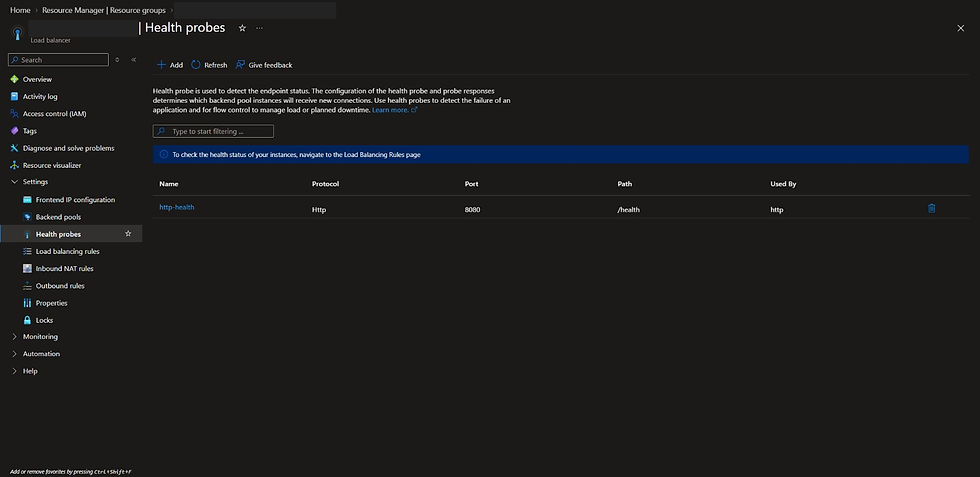
Baseline HTTP probe: port 8080, /health.

Explicit outbound rule and foundation membership before the scale-set instances were added.
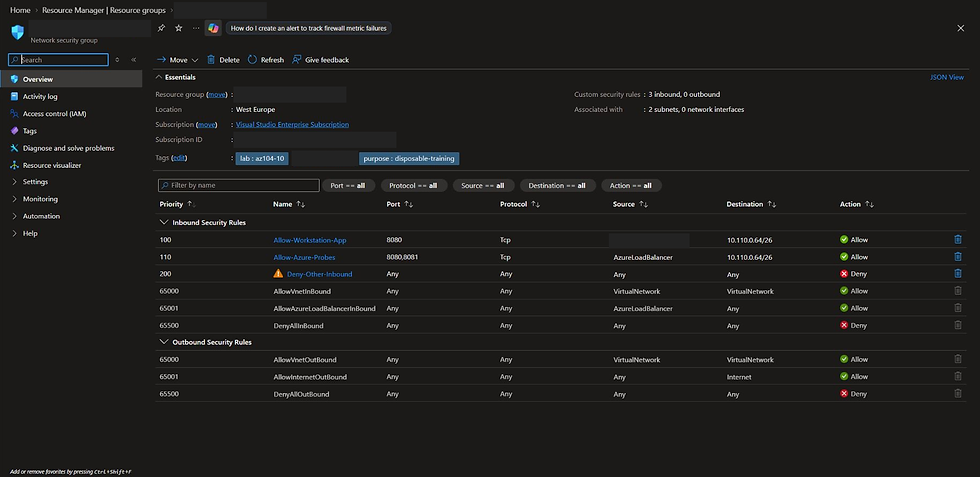
Restricted inbound NSG configuration; identifiers and source address redacted.
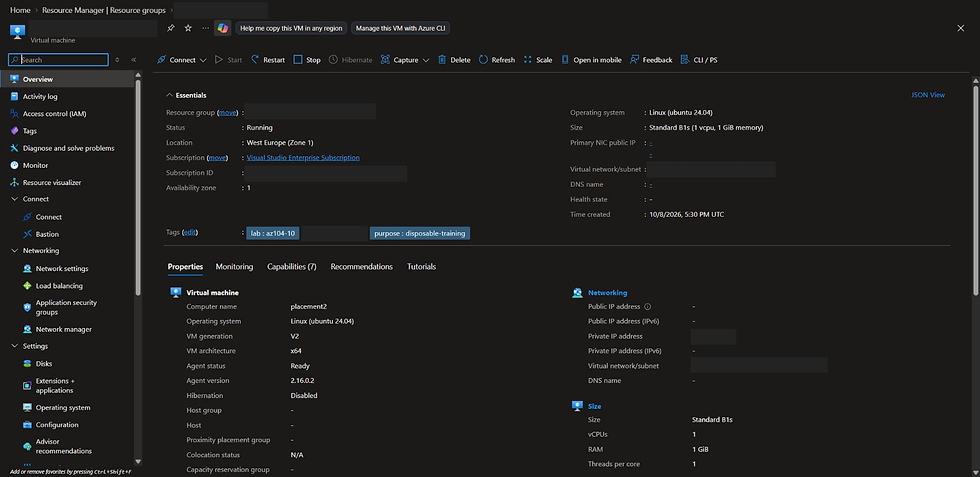
Separate VM placement in West Europe zone 1.
Lab 10 — Azure CLI and PowerShell reference
azure administrator series
The stage scripts execute these operations with the private manifest, ownership checks, pending-operation journal, and exclusive lock. The snippets explain the tooling; do not run them in a second terminal or bypass the guarded stages. Variables below are placeholders for values taken from an operator's own private manifest, not real Azure identifiers.
Azure CLI: deploy and inspect
# These commands are wrapped by the Foundation and ScaleSet stages.
az deployment group validate --resource-group $recordedLabGroup `
  --template-file ./templates/foundation.bicep --parameters "@$privateParameters" `
  --mode Incremental
az deployment group what-if --resource-group $recordedLabGroup `
  --template-file ./templates/foundation.bicep --parameters "@$privateParameters" `
  --mode Incremental --no-pretty-print
az deployment group create --resource-group $recordedLabGroup `
  --template-file ./templates/foundation.bicep --parameters "@$privateParameters" `
  --mode Incremental

# The scale-set stage deploys scaleset.bicep separately, referencing the foundation.
az vmss show --resource-group $recordedLabGroup --name $recordedScaleSet `
  --query '{mode:orchestrationMode,capacity:sku.capacity,state:provisioningState}'
az vmss scale --resource-group $recordedLabGroup --name $recordedScaleSet --new-capacity 2

# Flexible members are standard VM resources; target an exact recorded member ID.
az vm run-command invoke --ids $recordedMemberId --command-id RunShellScript `
  --scripts "@$privateGuestCheckpoint"
Run Command uses the guest agent and performs the local HTTP/service/hash checkpoint. A VM reporting Running does not establish guest readiness or frontend reachability.
Azure CLI: inspect and change the captured probe
az network lb probe show --resource-group $recordedLabGroup `
  --lb-name $recordedLoadBalancer --name http-health

# Only the fault stage may execute this change after its required baseline.
az network lb probe update --resource-group $recordedLabGroup `
  --lb-name $recordedLoadBalancer --name http-health --port 8081

az monitor metrics list --resource $recordedLoadBalancerId --metric DipAvailability `
  --interval PT1M --aggregation Average --filter "BackendIPAddress eq '*'"
Inspect each recorded backend and measurement timestamp. Missing averages are missing data, not zero health. In the configuration-only authoring run, the observed healthy averages were 100,100 and the deliberately incorrect probe produced 0,0; the validation report records these observations separately from untested public frontend connections.
PowerShell: restore without rebuilding
The recovery script reads the current owned load balancer and restores the captured probe values, preserving its other settings:
$current = Get-AzLoadBalancer -ResourceGroupName $recordedLabGroup -Name $recordedLoadBalancer
$current = Set-AzLoadBalancerProbeConfig -LoadBalancer $current -Name 'http-health' `
  -Protocol Http -Port 8080 -RequestPath '/health' `
  -IntervalInSeconds 5 -ProbeCount 2 -ProbeThreshold 2
$current | Set-AzLoadBalancer
Use Restore-Az104Lab10.ps1 -StatePath $lab10State -Execute for the actual exercise. It verifies the exact identity, expected fault state, ownership, and other configuration before writing. A repeat performs no write when the captured probe already matches. Recovery is not achieved by adding an NSG rule, replacing the VMs, or opening another public path.
PowerShell: exact-resource cleanup
Remove-Az104Lab10.ps1 uses Remove-AzResource for recorded dependencies in order, removes the exact deployment records, and deletes the empty owned group with Remove-AzResourceGroup. It refuses unknown contents. Repeat the cleanup stage to verify absence; do not delete a resource group merely because its name starts with a lab prefix.
Evidence types
The screenshots/ directory contains genuine Azure Portal captures with deterministic privacy redactions. Structured command evidence is exported separately; no terminal image or Portal screen is reconstructed from text output. The neon cover is illustration, not validation evidence.
Lab 10 challenge
azure administrator series
Both scale-set instances are running. Their synthetic applications respond locally and return the original content hash, but fresh connections to the load-balancer frontend fail.
Determine which control prevents new connections from reaching the applications. Collect evidence that distinguishes guest readiness, inbound network authorization, backend membership, and load-balancer health.
Restore the captured configuration without rebuilding either VM, changing the NSG, adding public IPs, widening the workstation rule, changing application data, or enabling automatic replacement. Prove that both instance labels return through fresh frontend connections and that repeating recovery performs no additional write.
Keep the scenario isolated. If the workstation's source IP has changed, stop and separate that problem from the challenge.
Progressive hints and separate solution
The ZIP includes hints.md with five progressively stronger hints and solution.md as a separate solution. Try the symptom-only challenge before opening either file. It also contains the Bicep templates, guest service, safety tests, private-state initialization, stage scripts and sanitized evidence.
Eight knowledge checks and answers
1. What do fault domains and update domains represent in an availability set?
Fault domains separate shared physical infrastructure risks; update domains group VMs for planned platform updates. Their configuration and observed assignments do not prove the outcome of an actual datacenter outage.
2. Does an availability set place its VMs in separate availability zones?
No. Availability sets and availability zones are different placement mechanisms. This lab uses two availability-set VMs and a separate zonal VM.
3. How are Flexible scale-set instances administered differently from Uniform instances?
Flexible instances are standard Azure VM resources and use normal VM APIs. Uniform instances are managed through scale-set VM APIs. Select orchestration mode at creation.
4. Why can the applications respond locally while new frontend connections fail?
The health probe can declare them ineligible for new flows even though the processes are healthy. Its protocol, destination, and path must reflect the real application health endpoint.
5. Why are fresh TCP connections important when testing this fault?
Existing Standard Load Balancer TCP flows can continue after probe failure. Reusing one connection can hide the loss of eligibility for new flows.
6. Does default load distribution promise an equal alternating sequence of responses?
No. Hash-based distribution is not round robin. Use a bounded set of fresh connections to observe both instances without promising equal counts.
7. Why use a separate explicit outbound pool and disable implicit SNAT?
The outbound pool includes placement and scale-set VMs independently of application membership. An explicit rule supplies allocated SNAT ports, while disabling implicit SNAT avoids competing behavior on the shared frontend.
8. What must be reconciled after manual scale-in and scale-out?
Actual count and VM identities, parent associations, NICs, OS disks, application/outbound pool membership, guest readiness, content hashes, and operation completion. Scaling can legitimately replace deleted member identities; probe recovery should not.
Validation report — observed results
Both incremental Bicep deployments succeeded after template validation and reviewed what-if.
Availability-set configured counts 2 fault domains / 5 update domains; observed VM assignments 0/0 and 1/1. Zonal VM zone 1; Flexible members observed in zones 1 and 2.
Two local guest applications retained the original content and code hashes. Fresh per-backend health averages changed 100,100 → 0,0 after the CLI port fault → 100,100 after PowerShell restoration.
Restoration preserved unrelated controls and instance identities; repeating it was a no-op. Manual scaling completed 2 → 1 → 2 with exact dependency reconciliation and final original hashes.
Cleanup and a second cleanup confirmed the owned group and all 24 recorded historical dependency IDs absent. Disposable SSH material was removed.
Static syntax/build checks and ten simulated/local safety guards passed; simulations are not separate Azure operator exercises.
Twelve genuine Portal screenshots are included. Privacy redactions are solid masks and cropping only. The neon cover is illustration, not evidence.
A fresh public ZIP download matched its original SHA-256, extracted successfully, and passed all 46 individual file checks.
Validation scope
Public frontend baseline/failure/recovery requests, approved frontend client-address observation, effective NSG traffic/outbound checks from all five guests, and the external blocked-SSH probe were not completed. No datacenter-outage or actual-phone test is claimed. Complete these checks in your own stable-IP disposable environment; do not widen the firewall or substitute configuration observations for traffic validation.
Comments